
Atlas vs Evernote (2026): An In-Depth Research Comparison
Atlas is a visual research workspace, Evernote is a long-running note-taking and web-clipping tool. Compare on paper deconstruction, citation grounding.
- Byline

Summary
Use Atlas for citation-grounded answers and research synthesis. Use Evernote for web clipping, archive search, and casual note capture.
The updated comparison covers Knowledge Maps, ENEX migration, web clips, search, and reusable research context.
Atlas traces claims to source passages, while Evernote stores clipped pages, PDFs, tags, and notes.
Evernote can remain the capture archive while Atlas handles research projects that need verifiable answers.
Note: We make Atlas. This comparison comes from the team that built it, so read it knowing that. Where Evernote has the better answer for a given research job, the article says so plainly. See the table rows where Evernote wins and the "When to choose Evernote" section below. The goal is to give you the data you need to choose the right tool for the kind of work in front of you. Atlas is not the answer to every research job.
Atlas is a visual research workspace for source-heavy work. Think thesis, treatment decision, major purchase, or literature review.
Evernote is a long-running note-taking and web-clipping tool. Its core surfaces are rich-text notes and Web Clipper. It also includes OCR, scanned documents, and cross-device sync.
Both tools touch a researcher's daily routine. The split appears after the first answer. Atlas turns each paper into a Knowledge Map, or a visual map of the argument. The mind map and knowledge graph comparison explains why those structures serve different jobs.
Atlas also builds a Semantic Map for the current project's source set. Each answer shows the claim, the source, and why the source supports it. Sources, notes, maps, and chats remain scoped to that project.
Evernote's Web Clipper and OCR are battle-tested. Browser clipping is fast, and search across handwritten notes and attachments is useful. If you need to trust the answer, Atlas's maps and cited reasoning are where it earns the comparison.

Atlas

Ask cited questions across Evernote research
Upload research PDFs from Evernote and trace answers to supporting passages.
Quick verdict: Atlas or Evernote?
Choose Evernote when capture is the main job. Its Web Clipper, OCR search, cross-platform apps, and long-running note archive are the stronger fit.
Choose Atlas when one source set must produce cited answers, argument maps, and a bounded research context. The best note-taking apps guide covers the broader capture category.
Criteria and comparison table
I applied 5 tests:
- Can the tool break down a paper?
- Can it help you move through a project?
- Can it cite sources well?
- Can it show how papers cite each other?
- Can it keep one project's evidence and conversation together?
The 7 table rows give Evernote full credit for web clipping, mobile capture, OCR, and long-running personal archives. The Evernote alternatives guide covers other archive-focused options.
| Atlas | Evernote |
|---|---|
| Citation grounding: shows the claim, source passage, and why the passage supports it. Atlas wins for defended synthesis. | Source links and notes are possible, but the reason trace is manual. |
| Knowledge Maps: breaks a paper into claims, evidence, terms, and links. Atlas wins for deep reading. | Stores and searches PDFs and notes. |
| ✗ Browser Web Clipper extension. URLs and documents can be uploaded into a project instead. | ✓ Web clipping: Web Clipper captures pages, articles, screenshots, and bookmarks. Evernote wins for clipping. |
| ENEX migration: Atlas can use exported PDFs, note text, and source files as inputs. | ENEX migration: ENEX is Evernote's native export format. This is a tie, with cleanup on the Atlas side. |
| Projects and maps replace tags for research work. | Tags and notebooks: tags, notebooks, stacks, and saved searches are mature. Evernote wins for archive organization. |
| Search is strongest once sources are mapped and cited. | Search capability: OCR and archive search are fast for stored notes. Evernote wins for archive search. |
| Research synthesis depth: maps and cited answers support defensible synthesis inside one project. Atlas wins for research output. | Synthesis is mainly a manual writing step. |
Table 1: Atlas vs Evernote feature comparison across cited answers, Knowledge Maps, web clipping, ENEX export, tags, search, and research writing.
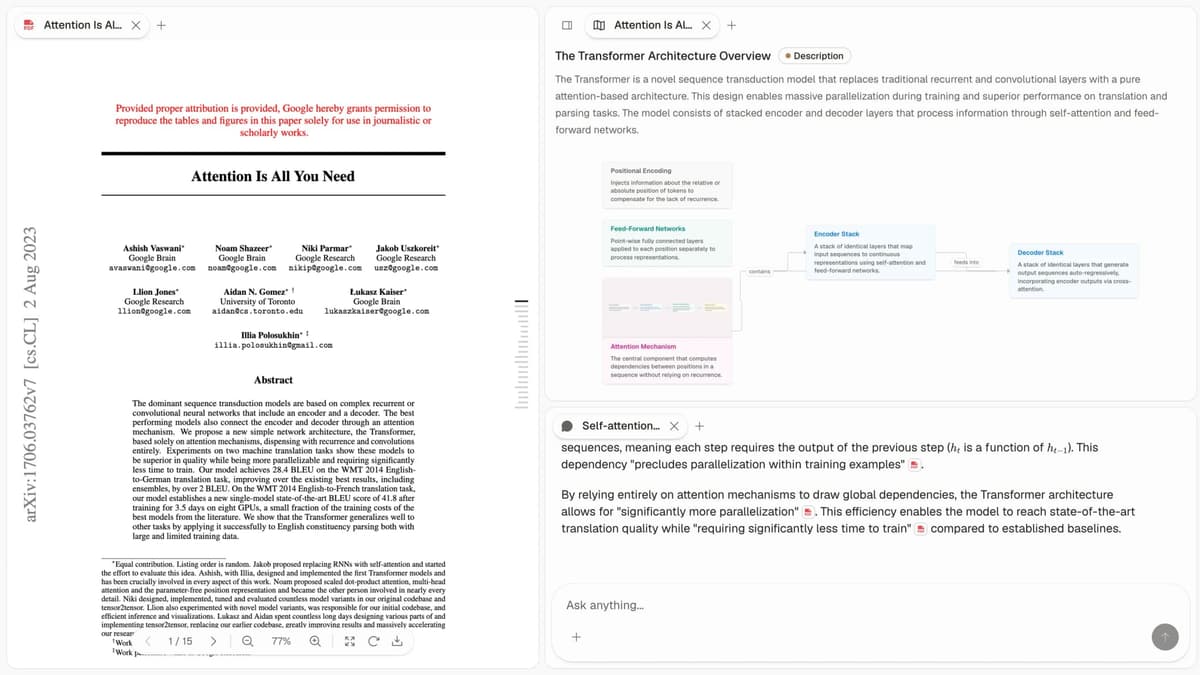
Atlas product screenshot from the checked-in Atlas product asset library. It shows the research workspace that this comparison discusses.
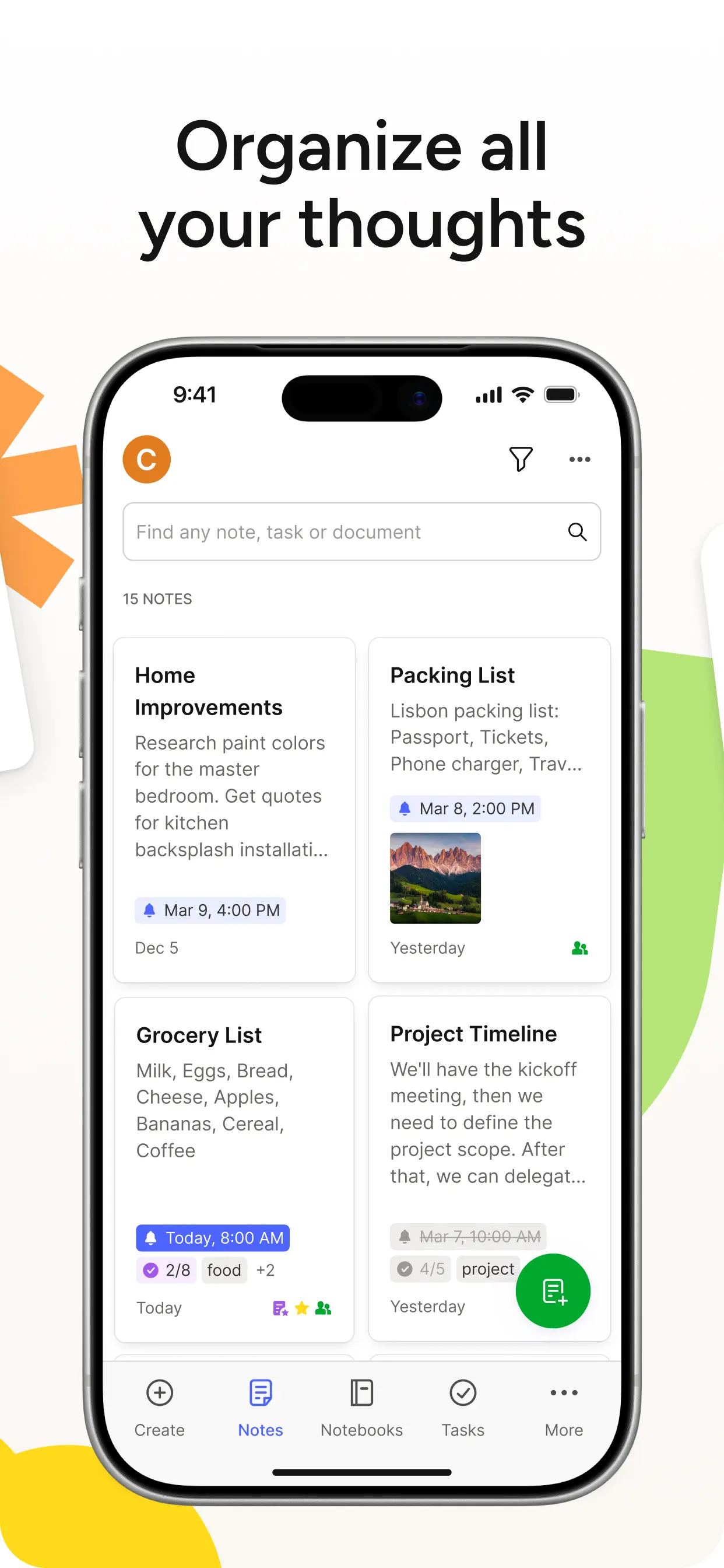
Evernote official app screenshot from the App Store listing. The mobile interface supports quick note capture and archive search.
The mobile screen presents recent notes as a searchable list with a prominent create control. That layout supports quick capture and later retrieval from a phone, which is the Evernote workflow evaluated in the comparison table.
How is Atlas different?
Evernote and Atlas both help with reading and reasoning over sources. They diverge when the output has to become shareable work. Three differences matter most.
Visual maps for papers and projects
Atlas builds 2 maps as you read. A Knowledge Map shows the paper's claims, evidence, terms, and links between ideas. You see the paper's spine first, then click into the passages that support it.
A Semantic Map shows a whole project on 1 canvas. Sources, notes, chats, and citations cluster by topic, so 200 papers stop feeling like a folder.
"It's like an ultimate GPT. I can finally see what I've read." Kyle Lao, CEO & Co-founder of MenSC Labs
Evernote does not break a paper into claim and evidence nodes. It also does not re-map a whole project by topic angle. If you have spent an afternoon trying to recover a paper you read weeks ago, the Knowledge Map pays off first. Visual maps make a body of papers legible at a glance.
Claims tied to source passages
The hallucination problem in AI research tools isn't only whether a model invents text. A citation can also sit beside a claim that its passage does not justify. Atlas renders every answer in 3 parts. You see the claim, the passage, and a short reason.
The reason explains why the passage supports the claim. You can click into the source paragraph and read the highlighted sentences in context.
Atlas tracks this with the H/V ratio. It checks how often a generated sentence fails a passage-level citation review. Atlas targets H/V < 0.1 on that benchmark, and we publish the method in the Atlas verifiability benchmark.
Evernote answers may include citations or source links. They are not built around a claim-by-claim reason why the passage supports the answer. That difference may not matter for casual Q&A. It matters for a thesis sentence, legal brief, or treatment note. Every Atlas claim traces to its source, and Atlas explains why the source justifies it.
Project-scoped research context
Atlas keeps sources, notes, chats, Knowledge Maps, and the Semantic Map inside the project where they were created. Those surfaces share one evidence base for the research question.
A separate Atlas project has separate sources and context. That isolation prevents unrelated evidence from entering a cited answer. Evernote takes a different approach through notebooks, tags, and archive-wide search.
Choose Atlas when maps, notes, and cited chat should share one bounded source set. Choose Evernote when the job needs broader archive organization and retrieval.
Evaluation note: Atlas offers a trial sample of 10 sources and 5 lifetime AI chats. That is enough to map one paper and test whether cited answers fit your work.
Comparing Atlas and Evernote: feature comparison
Both Atlas and Evernote touch a researcher's daily work, but they live in different categories. Atlas helps you read papers, map a project, cite sources, and reuse prior work. Evernote helps you write notes, clip the web, search scans, and sync across devices. Evernote is broader for capture. Atlas is deeper for cited research.
Paper deconstruction (Knowledge Map)
The Knowledge Map is Atlas's per-paper surface. It breaks one paper into claims, evidence, and links between ideas. Node text is drawn directly from the paper's source passages. You can move from the main claim down to a specific paragraph.
| Atlas | Evernote |
|---|---|
| Multi-level argument structure ✓ | Rich-text notes with PDF attachments and OCR |
| Labeled relations (motivates, causes, enables) ✓ | ✗ |
| Faithful-to-source node text ✓ | ✗ |
| Hierarchical breadcrumbs ✓ | ✗ |
| ✗ | Web Clipper across browsers ✓. Captures pages, articles, and screenshots quickly. Argument deconstruction is a different surface. |
Table 2: Atlas vs Evernote on paper deconstruction and Knowledge Map capabilities.
Good to know: The bottom row belongs to Evernote. Atlas does not ship that surface. Topic chips can orient you quickly. The Knowledge Map adds the paper's argument when you need to recover it weeks later.
Project view (Semantic Map)
The Semantic Map is Atlas's per-project surface. It places sources, notes, chats, and citations on 1 map. Related items cluster by topic. You can view the same canvas under a new topic angle without uploading the files again.
| Atlas | Evernote |
|---|---|
| Spatial embedding of sources + notes + chats ✓ | Projects + tags + saved searches |
| Auto-labeled topic clusters ✓ | ✗ |
| Topic-angle re-projection ✓ | ✗ |
| One project-scoped evidence view ✓ | ✗ |
| ✗ | OCR on images and handwritten notes ✓. Strong for scanned documents and handwritten text. Citation grounding is a different surface. |
Table 3: Atlas vs Evernote on project corpus view and Semantic Map capabilities.
Good to know: Evernote's strength on that row is genuine. If your work depends on it, that's the boundary. The Semantic Map pays off when 200 papers stop being a folder and become a source set you can view by topic.
Citation-grounded answers
Atlas shows each answer in 3 parts. You see the claim, the source passage, and a short reason the passage supports it. You can jump to the source paragraph and check the highlighted text.
| Atlas | Evernote |
|---|---|
| Claim-source-justification triples ✓ | ✗ |
| Reasoning traces (why this passage supports this claim) ✓ | ✗ |
| Jump-to-source with passage highlight ✓ | ✗ |
| H/V ratio < 0.1 benchmark published ✓ | ✗ |
| ✗ | Cross-platform sync (Mac, Windows, iOS, Android, Web) ✓. Syncs across all major platforms. Deep research synthesis is a different surface. |
Table 4: Atlas vs Evernote on source quality and citation grounding.
Good to know: Both tools can carry links to sources. Atlas also explains why a passage justifies a claim. That extra check may be unnecessary for everyday questions, but it matters for a thesis sentence or evidence-heavy paragraph.
Source-linked notes
Atlas marks up each paper on ingest. Citations inside the paper become objects you can inspect. When the cited source is open access, Atlas pulls the relevant passage. You can see how one paper builds its argument from other sources without leaving the document.
| Atlas | Evernote |
|---|---|
| Auto-annotate on ingest ✓ | Manual highlights via PDF markup |
| Multi-citation synthesis (how citations build the argument) ✓ | ✗ |
| Resolve cited sources (open-access) ✓ | ✗ |
| Exact passage / page / paragraph anchors ✓ | ✗ |
| ✗ | Saved searches and tag organisation ✓. Mature archive organisation across notebooks, stacks, and tags. Source reasoning is a different surface. |
Table 5: Atlas vs Evernote on source-linked notes and citation chain visibility.
Good to know: Atlas can resolve citations inside the paper you're reading. When a paper cites an open-access source, Atlas pulls in the cited passage. The source chain becomes visible as part of the paper.
Project-scoped context
Atlas keeps citations, notes, maps, and chats inside one project. A separate project has a separate evidence base.
| Atlas | Evernote |
|---|---|
| Project-scoped research context ✓ | Notebook and tag organization ✓ |
| Sources, notes, maps, and chats share one evidence base ✓ | Archive-wide search across notes ✓ |
| Separate projects isolate unrelated context ✓ | Notes can move between notebooks ✓ |
| Sources must be added to each relevant Atlas project | Saved searches can span the Evernote archive ✓ |
| ✗ | Long-running brand with established workflows ✓. Wide adoption and mature tooling across capture, sync, and archive. Knowledge Map and citation grounding are a different surface. |
Table 6: Atlas vs Evernote on project-scoped context and archive organization.
Good to know: Atlas's project boundary is deliberate. Put sources that answer the same question together, and start a separate project when the evidence should remain isolated.
Price comparison
Atlas is a paid product. There is no perpetual no-cost plan. You get a short evaluation sample with 10 sources and 5 lifetime AI chats. After that, Atlas Pro costs $20/mo or $204/yr.
At the paid tier, Atlas includes unlimited sources, unlimited AI chats, Knowledge Maps, Semantic Maps, and claim-source-justification. The price covers research surfaces Evernote does not provide.
| Atlas | Evernote |
|---|---|
| Free: ✗ (evaluation sample only: 10 sources · 5 lifetime AI chats) | Free: 50 notes and 1 notebook ✓ |
| Pro: $20/mo or $204/yr (unlimited sources · unlimited AI chats · all features) | Paid: Starter about $14.99/mo · Advanced about $17.99/mo |
| Pro unlocks Knowledge Map, Semantic Map, and claim-source-justification ✓ | ✗ |
Table 7: Atlas vs Evernote pricing comparison across free and paid tiers.
When to choose Atlas vs Evernote
- Want paper structure deconstructed multi-level? Go with Atlas. (Knowledge Map)
- Want answers that explain how each citation justifies the claim? Go with Atlas. (claim-source-justification)
- Want one project-scoped evidence base for maps, notes, and cited chat? Go with Atlas.
- Want a battle-tested Web Clipper with OCR and cross-device note sync? Go with Evernote.
- Tied: clipping an article you want to read later. Both work fine. Evernote is faster for the clip-and-read workflow. The wedge only opens up once you build a corpus you will return to.
Choose by the output you need. A searchable personal archive points to Evernote. A cited synthesis that must survive review points to Atlas.
If neither description is exact, compare nearby workflows in Apple Notes and Bear vs Evernote. Those guides focus more heavily on daily capture and writing.
Recommendations by user type
- PhD researchers: Atlas. In years 1-2, the Knowledge Map saves rereading time. In years 3-4, cited reasoning helps anchor thesis claims to passages. Evernote works for one-off tasks. Atlas is stronger when the research spans years.
- Students writing literature reviews: Atlas, scoped to thesis and review work. The Knowledge Map helps most during deep reading. Sources, maps, and cited chats stay findable inside that project across terms.
- Knowledge workers: Atlas when papers and citations are the core work. Evernote when web clipping and OCR note search are the daily need.
- Personal researchers with high stakes: Atlas for medical, legal, or major-purchase research where the answer must hold up. Evernote is a fine starting tool. Atlas is the step up when you need to defend the answer.
Evernote remains a capture-and-archive tool for web clips, receipts, notes, PDFs, and personal search. Atlas does not replace that archive. It earns its place when saved material becomes a research corpus that needs maps and cited synthesis.
Keep Evernote for broad collection, then move recurring, source-heavy research into Atlas when search alone stops being enough. The research-notes organization guide covers the setup decisions behind that split.
Migration and worked example
Bringing Evernote sources into Atlas
Most Evernote-to-Atlas migrations work best as staged moves. Bring research-grade content into Atlas, including PDFs, scanned papers, and long notes that anchor a thesis or brief.
Keep web clips and casual notes in Evernote when they still fit there. Split the archive by job, move specific project types, and keep the rest where they are. The Obsidian and Evernote migration comparison shows why a small export test matters.
The first step is an audit of your projects. Find the ones that hold sources you reason over, such as dissertation reading, case-prep PDFs, or deep-research files.
Separate them from receipts, recipes, bookmarks, and one-off captures. Only the source-heavy group needs to migrate. The personal archive can stay in Evernote.
After the audit, export the research projects. Evernote's ENEX export flow preserves note text, attached PDFs, and most embedded images. Export each project separately.
Pull the PDFs out of the ENEX bundle. Those are the first-class objects Atlas ingests and turns into Knowledge Maps. Plain-text notes and long-form prose can be saved as text or Markdown files and uploaded alongside.
Third, upload to Atlas in batches by project. Each batch becomes a project. Atlas turns each PDF into a Knowledge Map on ingest and can pull open web sources for cited papers when access allows.
Atlas builds a Semantic Map from the sources inside that project. Each separate project needs its own relevant sources, so create project boundaries around distinct research questions.
PDF attachments, note text, scans, and project groups migrate cleanly. Tags, saved searches, Tasks, Reminders, stacks, styled clips, and shared permissions do not become native Atlas objects.
Re-create project hierarchy as separate Atlas projects. Export styled clips as text or re-clip the URL. Plan for a half-day on 50 to 150 PDFs. Larger archives should move in stages over a week.
Expect migration friction while attachments and notes are separated from the broader Evernote archive. The payoff comes when one Atlas project contains enough related sources for its Semantic Map and cited answers to expose useful patterns.
Eight-paper literature-review example
Imagine you have 8 papers on a subtopic, such as retrieval-augmented generation for scientific QA. You need a 600-word literature-review section that defends 1 claim. A reviewer must be able to check the citations. Here is how the 2 workflows differ.
In Evernote, the standard pattern is web-clip-and-project. You clip each paper's landing page or save the PDF into a project. You add tags, read each PDF, and write rich-text notes back into Evernote. Search across the project is solid. OCR can surface text inside scanned figures. When you write, you switch to Google Docs or Word. Evernote stays open in a side panel while you copy quotes and page numbers. Evernote's Web Clipper makes capture fast. The synthesis is still on you, sentence by sentence. For many self-contained subtopics, this is efficient.
In Atlas, the same 8 papers go in as a project. Each PDF becomes a Knowledge Map with claims, evidence, and links between ideas. Atlas can also pull cited passages from open web sources when access allows.
You can see how a paper's argument leans on its sources. Once the eighth paper is in, the Semantic Map clusters the set by topic and method. You can view the set by test method, then by grounding plan, without rereading all 8 PDFs.
When you draft the section, you ask Atlas a thesis-level question, such as: "which papers argue that document-level retrieval is insufficient for scientific QA, and on what grounds?" The answer comes back with one trace per cited paper. You get the claim, the exact passage, and the short reason that passage supports the claim. Click any citation to land in the highlighted paragraph. Then move the sentence into your draft with a passage a reviewer can audit.
Evernote's Web Clipper is the better tool for capture, especially across the open web. Atlas's wedge is synthesis. Cited answers and the Semantic Map help turn 8 papers into defensible prose without manual passage tracking. If you will write 5 sections from overlapping sources, keep all relevant papers in the same Atlas project so its maps, notes, and cited chats share that evidence base.
Evernote fit and objections
When Evernote is the right call
There are research jobs Evernote does better, and pretending otherwise is the kind of move that makes a comparison article useless. The genuine scenarios:
For a long-running personal archive, Evernote fits well. That means a decade of notes, recipes, gift ideas, trip plans, receipts, and articles you wanted to remember. Evernote Home keeps several capture surfaces visible together.
Atlas is built around project-scoped source sets you reason over. A single mixed personal vault is a different use case.
For web-clip-heavy workflows, Evernote wins. Its Web Clipper works across Chrome, Firefox, Safari, and Edge. It supports full-page, clean article, screenshot, and bookmark modes. Atlas does not have a matching browser extension. If your daily input is dozens of clipped pages, Evernote is the right capture surface. Many Atlas users keep Evernote for exactly this job.
For mobile-first capture and quick notes, Evernote is stronger. Its iOS and Android apps support offline sync, voice notes, photo capture, and document scanning. Atlas is a desktop research workspace. If you capture from a phone in the field, in clinic, in court, or on the road, Evernote is better for that step.
For searchable scans, Evernote is also stronger. Its OCR on images, receipts, and handwritten notes is a long-standing strength. Atlas runs text extraction on uploaded PDFs. The broader "scan anything from anywhere and find it later" workflow belongs in Evernote.
Common objections and edge cases
"I've used Evernote for 10 years. Won't switching tools break my muscle memory?" The split-by-job approach keeps the cost low. Keep Evernote for web clipping, phone capture, and your personal archive. Add Atlas for the source set that needs maps and cited reasoning. You are not abandoning a decade of notes. You are moving the subset that needs deeper research work. Many long-time Evernote users run both side by side.
"What if my advisor or co-author still uses Evernote?" Atlas exports notes and citations to standard formats. Handoff to an Evernote user is usually a copy-paste step. The key question is what you are sharing. A finished draft lives in Word, Docs, or LaTeX. A live working corpus can be shared through Atlas project membership. Most collaboration happens at the draft layer, where the upstream tool is invisible.
"My research mostly comes from clipped blog posts and Substacks. Is Atlas still useful?" Atlas has less advantage for that job. Its strength is paper mapping and source-cited answers across long-form sources. If you mostly skim short web posts and forget them, Evernote's Web Clipper is the better fit. The line moves when the same sources feed a longer piece you must write and defend. Below that line, Evernote wins on speed.
Atlas
Ask cited questions across Evernote research
Upload research PDFs from Evernote and trace answers to supporting passages.
Frequently Asked Questions
Atlas explains the link between each claim and its evidence. Every answer is rendered as a claim-source-justification triple: the claim, the passage it draws from, and a one-sentence explanation of why the passage supports the claim. You can click into the source paragraph and read the highlighted sentences in context. Evernote may cite at the sentence level or link to sources, but it does not render the reasoning trace that connects the claim to the passage. That trace is the move when you need to defend a thesis sentence, a brief paragraph, or a treatment-plan summary. Read more about how Atlas grounds claims in the Atlas verifiability benchmark.