
Atlas vs OneNote (2026) | In-Depth Research Comparison
Atlas is a visual research workspace. OneNote is a Microsoft note-taking app with a free-form canvas. Compare on paper deconstruction, citation grounding.
- Byline

Summary
Use Atlas for citation-grounded research synthesis: it compares papers and links each answer to its source. Use OneNote for free-form notes and ink.
Atlas gives citation-grounded answers and Knowledge Maps; OneNote supports handwriting, free-form canvases, notebook sections, and familiar Office exports.
Atlas traces claims to source passages, while OneNote stores notes on flexible notebook pages.
OneNote can remain useful for canvas notes while Atlas handles research corpora that need verifiable answers.
Note: We make Atlas. This comparison comes from the team that built it. Where OneNote has the better answer for a given research job, the article says so plainly. See the table rows where OneNote wins and the "When to choose OneNote" section below. The goal is to help you choose the right tool for your current research task. Atlas does not suit every research job.
I am Jet New from the Atlas team. On July 1, 2026, I wrote the same synthesis paragraph from a OneNote page stack and an Atlas source set.
Our 3-risk test covers capture, proof, and reuse. The 8-paper literature-review example below was the deciding case in the manual review. OneNote won capture. Atlas won once the student had to turn those pages into a cited paragraph.
Atlas is a visual research workspace for people who need to understand a set of papers. That might be a thesis, treatment choice, purchase teardown, or literature review.
OneNote is Microsoft's note-taking app. It gives you a free-form page where you can place text, ink, images, clips, and files anywhere. Its notebook, section, and page model is familiar, and its Surface Pen support is strong.
The wedge is what happens after capture. Atlas turns each paper into a Knowledge Map, which is a visual map of the paper's claims and evidence. It turns a whole project source set into a Semantic Map, so related papers and notes cluster together. Its answers show the claim, the source passage, and why that passage supports the claim. Sources, notes, chats, maps, summaries, and citations remain available inside that project, while separate projects isolate unrelated context. OneNote is better when you need Microsoft 365 sync, a no-cost notebook, and digital ink. Atlas is better when the answer has to be checked against sources.

Atlas

Map research papers with cited answers
Upload papers, ask cited questions, and build a Knowledge Map from the evidence.
Quick verdict: Atlas or OneNote?
Choose OneNote when the notebook page is the deliverable. Its free-form canvas, handwriting, offline access, and Microsoft 365 connections make it the stronger capture tool.
Choose Atlas when papers must become a cited synthesis. Knowledge Maps, claim-level source traces, and reusable project context fit research that someone may challenge later.
Criteria and comparison table
We compared the tools across seven research jobs, covering capture, paper reading, source-backed answers, project maps, project context, migration, and price. OneNote wins when the job is a flexible notebook page. Atlas wins when the job is a source set you need to check.
The table below shows the main trade-offs. It compares how Atlas and Microsoft OneNote link claims to sources, map papers, support handwriting, work offline, connect to Microsoft 365, and charge for access.
| Atlas | Microsoft OneNote |
|---|---|
| Best core job: research corpus that must be checked against sources ✓ | Best core job: flexible notebook page for capture and recall ✓ |
| Paper structure: Knowledge Map shows claims, evidence, and links ✓ | Insert a PDF and mark it up by hand |
| Project view: Semantic Map clusters sources, notes, and chats by topic ✓ | Project / section / page hierarchy |
| Answer grounding: claim, passage, and reason the passage supports the claim ✓ | Notes, links, and optional Copilot-style help, without the same passage trace |
| ✗ | Free-form canvas: place text, images, ink, and clips anywhere ✓ |
| ✗ | Handwriting and ink: strong Surface Pen and iPad handwriting support ✓ |
| ✗ | Microsoft 365: deep fit with Outlook, Teams, SharePoint, and OneDrive ✓ |
| Cloud research workspace | Offline notebook use: strong notebook access across Microsoft apps ✓ |
| Evaluation sample, then Atlas Pro | Price: free with a Microsoft account, with more storage through Microsoft 365 ✓ |
Table 1: Atlas vs Microsoft OneNote comparison across citation grounding, Knowledge Maps, canvas, handwriting, Microsoft 365 integration, offline access, and pricing.
How is Atlas different?
OneNote and Atlas overlap at the surface. Both support reading and reasoning over sources. They diverge on 3 capabilities that decide whether the output is shareable and defensible.
Visual maps of every paper and project
Atlas builds two visual maps as you read. A Knowledge Map breaks one paper into claims, evidence, definitions, and links between them. You see the paper's spine first, then click into the source passages. A Semantic Map shows the whole project. Sources, notes, chats, and citations cluster by topic, and you can view the same set from a new angle without reading it again.
"It's like an ultimate GPT. I can finally see what I've read." Kyle Lao, CEO & Co-founder of MenSC Labs
OneNote does not break each paper into claim and evidence nodes. It also cannot re-map a whole project by topic. If you have spent an afternoon trying to recover an old paper, the Knowledge Map is the surface that pays for itself first.
Every claim traces to a source
AI research tools can place a citation beside a claim that the cited passage does not justify. Atlas renders every answer as a claim, source passage, and short explanation of why the passage supports it.
You can click into the paragraph and read the highlighted lines in context.
Atlas also tracks the H/V ratio: sentences whose citation fails a passage check, divided by sentences that pass. Atlas targets H/V < 0.1, and the Verifiable AI Research benchmark publishes the method.
OneNote may include citations or links. Atlas adds a passage-level reasoning trace. Casual Q&A may not require that trace, but a thesis sentence, legal brief, or treatment summary often does.
Context stays inside each research project
OneNote treats each notebook as its own container. Atlas likewise treats a project as the boundary for research context.
Sources, notes, chats, Knowledge Maps, Semantic Maps, summaries, and citations stay together inside the Atlas project where they were created. Return to that project and its source trail remains available.
Separate projects isolate unrelated context. Atlas does not automatically bring a source, note, or chat from one project into another. Add the source explicitly when it belongs in both.
OneNote's separate notebooks suit free-form personal notes. Atlas better serves a bounded research corpus that needs maps, cited answers, and an explicit evidence trail.
Comparing Atlas and OneNote: feature comparison
Both tools sit in a researcher's daily routine, but they solve different jobs. Atlas is for paper maps, source-backed answers, project browsing, and durable context inside one research project. OneNote is for free-form notes, handwriting, screenshots, and Microsoft 365 sync.
The Atlas image below shows the source library, visual map, and cited-answer panel together. This workspace supports a step from a generated claim to its source passage and research context.
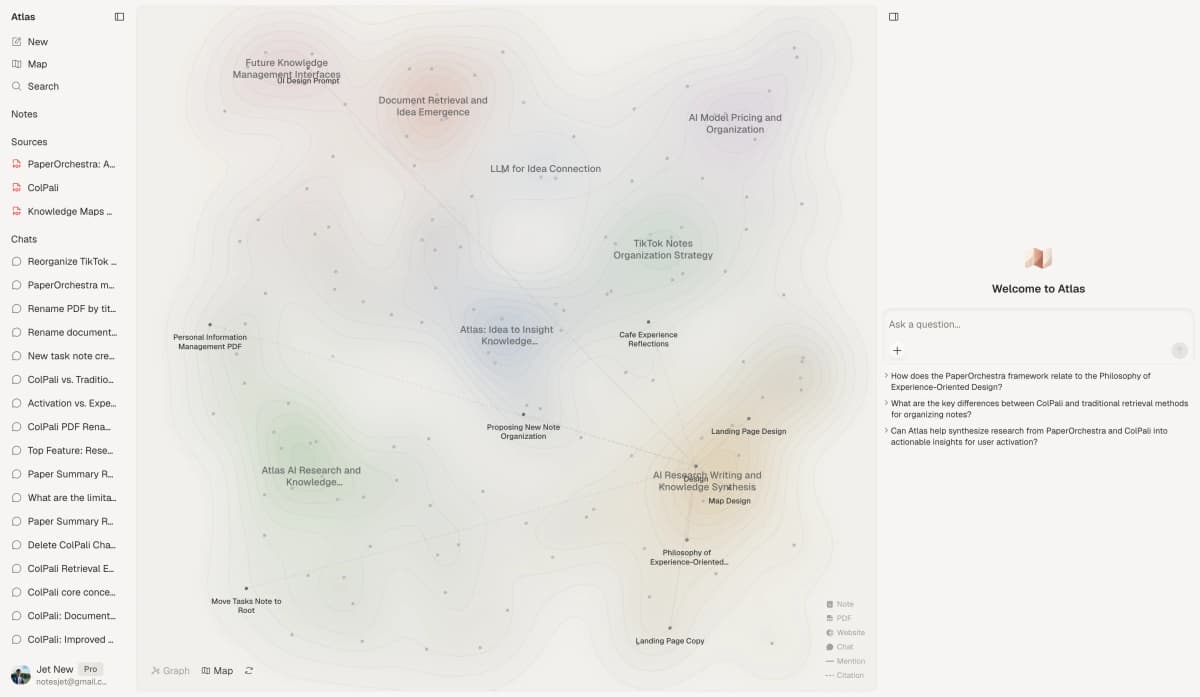
Atlas keeps sources, maps, and cited answers in one research workspace.
The next sections go deeper on five splits. They cover paper structure, project view, source-backed answers, paper notes, and the context boundary.
Evernote, Notion, Obsidian, and Apple Notes
People comparing Microsoft OneNote often also check Evernote, Notion, Obsidian, and Apple Notes. Those tools answer a different question from this page.
Evernote alternatives focus on capture and retrieval. Notion comparisons cover team docs and databases. Obsidian comparisons examine local Markdown and plugins. The Apple Notes alternatives guide covers fast notes inside Apple apps.
Atlas does not try to replace all of those note jobs. It is the research layer you add when source PDFs need maps, cited answers, and durable project context. The research paper analyzer guide covers that workflow.
For quick notes, use the note-taking guide. The citation tool guide explains why a source trace matters for defended claims.
Paper deconstruction (Knowledge Map)
The Knowledge Map is Atlas's per-paper surface. It breaks a paper into claims, evidence, and links between them. Node text is drawn directly from the paper. Breadcrumbs let you move from the main thesis to a source paragraph.
| Atlas | OneNote |
|---|---|
| Multi-level argument structure ✓ | Free-form canvas with PDF inserts and ink markup |
| Labeled relations (motivates, causes, enables) ✓ | ✗ |
| Faithful-to-source node text ✓ | ✗ |
| Hierarchical breadcrumbs ✓ | ✗ |
| ✗ | Free-form canvas (place anything anywhere) ✓. place text, images, or ink freely. Citation grounding is outside its scope |
Table 2: Knowledge Map capabilities in Atlas vs OneNote, covering argument structure, labeled relations, source-faithful node text, and breadcrumbs.
Good to know: The bottom row belongs to OneNote. Atlas does not ship that surface. The Knowledge Map helps when topic chips are no longer enough and you need the paper's argument back.
Project view (Semantic Map)
The Semantic Map is Atlas's project view. It places sources, notes, chats, and citations on a topic map. Related items cluster together. You can view the same set from a new angle without uploading it again.
| Atlas | OneNote |
|---|---|
| Spatial embedding of sources + notes + chats ✓ | Projects → sections → pages hierarchy |
| Auto-labeled topic clusters ✓ | ✗ |
| Topic-angle re-projection ✓ | ✗ |
| Mixed-item project canvas ✓ | ✗ |
| ✗ | Surface Pen handwriting and ink-to-text ✓. strong stylus input and ink-to-text. Structured reasoning over sources is outside its scope |
Table 3: Semantic Map capabilities in Atlas vs OneNote, covering spatial source embedding, topic clustering, re-projection, and a mixed-item project canvas.
Good to know: OneNote's strength on that row is genuine. If your work depends on ink, that's the boundary. The Semantic Map pays off when 200 papers need to become a source set you can view from many angles.
Citation-grounded answers
Atlas shows the claim, passage, and a short note on why the passage supports it. You can jump to the paragraph, read the highlighted lines, and check the reasoning.
| Atlas | OneNote |
|---|---|
| Claim-source-justification triples ✓ | ✗ |
| Reasoning traces (why this passage supports this claim) ✓ | ✗ |
| Jump-to-source with passage highlight ✓ | ✗ |
| H/V ratio < 0.1 benchmark published ✓ | ✗ |
| ✗ | Integration with Microsoft 365 (Outlook, Teams) ✓. tight Microsoft 365 integration. Research-level citation grounding is outside its scope |
Table 4: Citation-grounded answer capabilities in Atlas vs OneNote, covering claim-source-justification triples, reasoning traces, source highlighting, and H/V benchmark.
Good to know: Both tools can point at sources. Atlas also explains why a passage supports a claim. Everyday Q&A may not require that reason trace. A thesis sentence or evidence-heavy paragraph often does.
Literature-grounded annotations
Atlas adds notes to each paper on ingest. Citations inside the paper become objects you can inspect. When the cited source is open-access, Atlas can pull the relevant passage. That lets you see how a paper builds its case without leaving the document.
| Atlas | OneNote |
|---|---|
| Auto-annotate on ingest ✓ | Manual ink markup on inserted PDFs |
| Multi-citation synthesis (how citations build the argument) ✓ | ✗ |
| Resolve cited sources (open-access) ✓ | ✗ |
| Exact passage / page / paragraph anchors ✓ | ✗ |
| ✗ | Web Clipper extension ✓. quick page capture to notebook. Paper-level argument deconstruction is outside its scope |
Table 5: Literature-grounded annotation capabilities in Atlas vs OneNote, covering auto-annotation on ingest, multi-citation synthesis, open-access resolution, and passage anchors.
Good to know: These annotations resolve citations inside the paper you are reading. This is not web search. It is a way to see how one paper builds its argument from the sources it cites.
Ongoing context within one project
Atlas keeps the papers, notes, chats, maps, summaries, and source links for a project in one place. Work in a different project stays separate.
| Atlas | OneNote |
|---|---|
| Persistent project context ✓ | Per-notebook organisation |
| Sources + notes + chats + KMs + SMs stay together ✓ | Pages and sections stay in the notebook ✓ |
| Cited chat remains available inside the project ✓ | ✗ |
| Separate projects isolate unrelated context ✓ | Separate notebooks isolate context ✓ |
| ✗ | Free with a Microsoft account ✓. lower cost to start. Cited-answer and Knowledge Map capabilities are not included |
Table 6: How Atlas keeps research work in a project and OneNote keeps notes in a notebook.
Good to know: Both products use bounded containers. Atlas adds visual maps and claim-source-justification inside a project. OneNote adds free-form capture inside a notebook.
Price comparison
Atlas is a paid product. There is no permanent free plan. The evaluation sample gives you 10 sources and 5 lifetime AI chats. After that, Atlas Pro is $20/mo or $204/yr with unlimited sources and unlimited AI chats. You are paying for the maps, cited answers, and project-scoped research context that OneNote does not offer.
| Atlas | OneNote |
|---|---|
| Free: ✗ (evaluation sample only: 10 sources · 5 lifetime AI chats) | Free: Free with a Microsoft account, 5GB OneDrive included ✓ |
| Pro: $20/mo or $204/yr · unlimited sources · unlimited AI chats · all features | Paid: Microsoft 365 Personal $9.99/mo for 1TB storage and Office apps |
| Pro unlocks Knowledge Map, Semantic Map, claim-source-justification, and project-scoped context ✓ | ✗ |
Table 7: Pricing comparison between Atlas and Microsoft OneNote, including free tier, Pro tier, and Microsoft 365 options.
When to choose Atlas vs OneNote
- Want paper structure deconstructed multi-level? Go with Atlas. (Knowledge Map)
- Want answers that explain how each citation justifies the claim? Go with Atlas. (claim-source-justification)
- Want sources, notes, chats, maps, and citations in one research context? Go with Atlas. (project-scoped context)
- Want a free-form canvas with Surface Pen handwriting integrated across Microsoft 365? Go with OneNote.
- Want a free, integrated note-taking app from a stable brand? Go with OneNote.
- Tied: taking handwritten notes on a printed paper: both work, though OneNote on Surface is unmatched for handwriting. The wedge opens once you build a corpus you will return to.
Use OneNote when capture speed, ink, offline notebooks, or Microsoft 365 integration decide the tool choice. Use Atlas when one bounded paper library must support cited writing over time.
If source depth is the deciding factor, upload a paper you already annotated in OneNote. Compare its generated Knowledge Map and cited answer before moving a larger corpus.
Recommendations by user type
Data ownership, privacy, and offline reliability
Use this as the risk test. If the risk is losing a quick note, OneNote has the safer default because notebooks can stay available across Microsoft apps and cached devices. If the risk is citing the wrong source in a thesis, brief, or decision memo, Atlas has the safer default because the answer is tied to uploaded sources.
Atlas uploaded papers and chats are private to your account and are not used to train Atlas models. Review the provider's current data-handling terms before uploading confidential material. Atlas is a cloud research workspace without OneNote's handwriting surface.
OneNote notes follow Microsoft's data and account policies. The relevant baseline is the Microsoft Privacy Statement. OneNote is better for offline-first notebook access, Microsoft-account sync, and mobile capture across phone, tablet, and desktop. The trade-off is that it stores and syncs notes well, but it does not turn a paper library into source-grounded answers.
So the privacy and reliability question comes back to the three-risk test. Atlas is best for proof risk: "Can I defend this claim from the source text?" OneNote is best for capture risk: "Can I find this note later on my phone, tablet, or work laptop?"
Mobile, offline, and first 30 days
The practical test is not "which app has more features?" It is "which failure would hurt more this month?"
- If you need to catch ideas on a phone, write with a stylus on a tablet, or open class notes on a laptop with spotty Wi-Fi, start in OneNote. The mobile and offline notebook path is the point of the product.
- If you already have 20 to 200 PDFs and need a cited memo, thesis section, or decision brief, start in Atlas. The first useful moment is asking a question and checking the answer against source passages.
- If you are moving from OneNote to Atlas, do not migrate the whole notebook. Pick one active research section, export the source PDFs, upload only those PDFs into one Atlas project, and build one Knowledge Map. Keep unrelated research in separate projects.
The 30-day onboarding plan starts with OneNote as the capture inbox and 1 source set in Atlas. In week 2, write a cited paragraph from Atlas answers and check every claim against the highlighted passage.
In week 3, add another source set and check whether prior notes help. In week 4, split the tools. OneNote keeps lecture notes, meeting notes, and handwriting. Atlas keeps source sets that need proof.
Collaboration and sharing
OneNote is the better shared notebook when collaborators want pages everyone can edit. That is the right model for meeting notes, class notes, and project scratchpads. Atlas is the better shared research layer when collaborators need the same sources, maps, and cited answers to stay tied together. The split is simple. Share OneNote when the artifact is the page. Share Atlas when the artifact is the source-backed answer.
Persona recommendations
- PhD researchers: Atlas. The early literature-review years benefit most from the Knowledge Map. The writing years benefit from cited answers, because each thesis sentence can point back to a passage. OneNote works for one-off tasks. Atlas is better for multi-year research.
- Students doing literature reviews and thesis research: Atlas, scoped to thesis and literature-review work. The Knowledge Map saves the most time during reading. Project-scoped context keeps related work reachable inside the same thesis project.
- Knowledge workers (consultants, analysts, PMs, journalists): Atlas when reading PDFs and citing them is the core work. OneNote when handwritten notes on a Surface tablet or Microsoft 365 integration are the daily need.
- Personal researchers with stakes: Atlas. Medical, legal, and major-purchase research is where source-backed reasoning earns its keep. OneNote is a fine starting tool. Atlas is the tool you move to when you need to defend the answer.
OneNote is best for freeform notebooks, handwriting, lecture notes, screenshots, and Microsoft-account sync. Atlas is best for documents that need maps and cited answers.
Choose OneNote for a notebook page. Choose Atlas for a research corpus supporting a thesis, memo, or decision.
Migration and worked example
Bringing OneNote sources into Atlas
OneNote has 3 levels: notebooks, sections, and pages. A page is a free-form canvas. Text boxes, PDFs, images, ink, audio clips, and drawings can each sit at their own position.
Atlas cannot preserve that coordinate canvas as a native object. Source PDFs, page text, and attachments still move cleanly. Ink, audio, math objects, and free-form layout should stay in OneNote.
Print 1 page to PDF, or export a section as Word when you need page text and inserted images. Microsoft's OneNote export guidance covers the supported route.
Use a native .one package for round-tripping inside OneNote. Use community Markdown tools when headings, lists, links, and inline text matter more than ink or audio.
We recommend exporting each research section as Word, then downloading the source PDFs that were inserted on those pages. Upload only the PDFs to Atlas. The PDFs become Knowledge Maps on ingest. Keep the Word file as an archive of the original page notes.
Typed page text, inserted PDFs, images, headings, lists, links, and tables migrate cleanly. Ink strokes, audio notes, math stored as ink, page coordinates, and the project / section / page tree do not become native Atlas objects. Migration is not a port. It is a re-onboarding of your source corpus into a tool that expects PDFs rather than canvas pages. Most users find this faster than expected. A research corpus typically runs 30 to 200 PDFs rather than 30,000 notebook pages.
8-paper literature-review example
Imagine a graduate student writing from 8 papers on attention mechanisms. In OneNote, the usual workflow is a "Lit Review" notebook, an "Attention" section, and 1 page per paper.
On each page, the student inserts the PDF, writes margin notes, and pulls quotes into a text box. After 8 pages, they open a ninth "Synthesis" page. The 8 pages remain separate canvases, with no view of how the arguments relate.
In Atlas, the same student uploads the eight PDFs to one project. Each paper becomes a Knowledge Map on ingest. Claims become nodes. Evidence becomes support. Links show what motivates, causes, enables, or contradicts what. The student can read the top-level map first and click into passages only where the claim matters.
The Semantic Map then puts all 8 papers in one project view. Related claims form clusters for scaled-dot-product, sparse-attention, and linear-attention approaches.
The student can view the same set by "efficiency tradeoffs" or "expressivity tradeoffs" without reading the papers again.
When the student asks about sparse and linear attention, Atlas answers with a claim, supporting passage, and short reason. The student writes while checking each citation against the highlighted source.
Six weeks later, the student can reopen the same Atlas project and recover the 8 papers, notes, and chat history there. In OneNote, the student reopens the old section and tabs between pages again.
The July 1 review used this example as the hands-on check. We wrote the same synthesis paragraph from the OneNote page stack and the Atlas source set.
The OneNote version was faster to capture. The Atlas version was easier to defend because each sentence had a source passage beside it.
That is the difference between the tools. OneNote supports capture and free-form thinking. Atlas turns captured papers into a cited paragraph and a corpus you can return to.
OneNote fit and objections
When OneNote is the right call
OneNote is not the wrong tool. It is the wrong tool for a specific job (citation-grounded research inside a bounded project corpus) and the right tool for several others. We will name them plainly so you don't pick Atlas for a workflow OneNote serves better.
OneNote is the right call when handwriting and stylus input are central to how you think. The Surface Pen experience is strong: low-latency ink, palm rejection, ink-to-text, ink-to-math, and lasso select. Atlas has no handwriting layer.
OneNote uses a notebook, page-list, and editor model. The official screenshot below shows those 3 surfaces together, including the selected page and its editable note canvas.
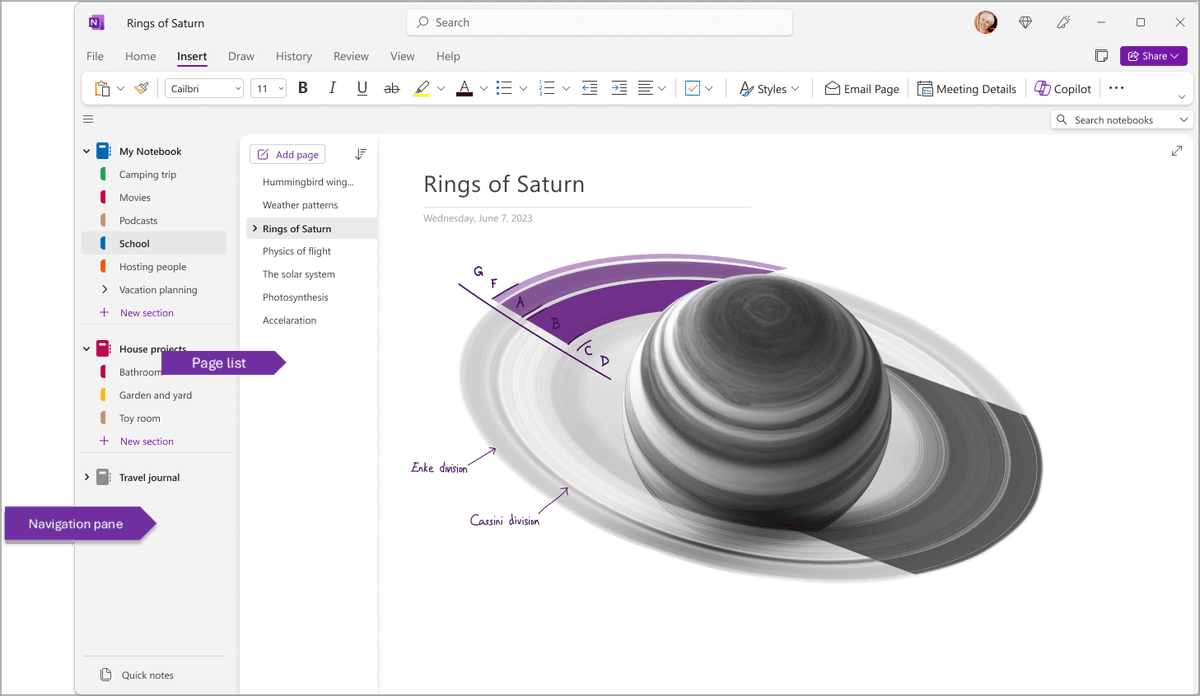
Microsoft's OneNote notebook panes guide shows the notebook pane and page list used for free-form capture.
The visible pane hierarchy lets users switch pages while keeping the selected note open. This is the capture and navigation workflow that OneNote handles better than Atlas.
OneNote is also the right call when your stack is already Microsoft 365. Outlook items can flow into pages. Teams notes can attach. SharePoint can handle project sharing. That depth is a real workflow advantage if your team lives there.
Choose OneNote for lecture audio, class notebooks, small-team notes, and free personal notes with a Microsoft account. Atlas becomes relevant when a source set must produce an answer with proof.
Common objections and edge cases
"I already have years of OneNote projects. Won't switching mean losing all that work?" No, because the move is not destructive. Keep the OneNote projects where they are, as a read-only archive. The page text and inserted PDFs aren't going anywhere. Atlas takes only the source PDFs you want mapped. Add them to one bounded Atlas project and build the Knowledge Maps there. The years of projects remain searchable in OneNote. Going-forward research stays inside the Atlas project where you place it. Most users settle into a two-tool stack within a month.
"Can Atlas handle handwritten margin notes on a PDF the way OneNote handles ink on a Surface?" Atlas is a structured workspace without free-form ink. If your reading flow depends on stylus margin notes, OneNote or a PDF-ink app like Notability or GoodNotes is the better capture tool.
Use OneNote to capture handwritten reactions, then upload the final PDFs to Atlas for maps, cited answers, and source-set synthesis.
"Does Atlas work for sources that aren't PDFs, the way OneNote can absorb anything onto a page?" Partially, yes. PDFs are the first-class input because the Knowledge Map is built around paper-like documents. Web pages, plain-text notes, and DOCX files can be added as sources, but they get less map treatment than a paper. OneNote's "absorb anything onto a page" model is a real advantage for capture-heavy work. Atlas trades that flexibility for source depth on papers.
The document-to-mind-map guide explains the source-first route for mixed file sets.
Atlas
Map research papers with cited answers
Upload papers, ask cited questions, and build a Knowledge Map from the evidence.
Frequently Asked Questions
Atlas explains the evidence behind each cited claim. Every answer is rendered as a claim-source-justification triple with the claim, passage, draws from, and a one-sentence explanation of why the passage supports the claim. You can click into the source paragraph and read the highlighted sentences in context. OneNote may cite at the sentence level or link to sources, but it does not render the reasoning trace that connects the claim to the passage. That trace helps when you need to defend a thesis sentence, brief paragraph, or treatment-plan summary. The Verifiable AI Research benchmark explains the method.