
Bear App Alternative for Research: Atlas vs Bear (2026)
Bear app alternative for research: Atlas is a visual research workspace that brings paper deconstruction and citation grounding to markdown note-taking.
- Byline

Summary
In 2026, use Atlas when Bear notes need source-grounded answers, visual maps, and citations you can inspect.
Use Bear when the job is polished Markdown writing on Mac, iPhone, or iPad.
The choice is not a normal notes-app swap. Bear is the writing surface, and Atlas is the research layer behind serious source work.
Many writers keep Bear for drafting and add Atlas for the papers, reports, and evidence behind the draft.
Note: We make Atlas. Our team wrote this comparison. Where Bear has the better answer, the article says so plainly.
Method note: Jet New, Atlas research engineer, ran the single-paper workflow used in this comparison: draft a Bear note, mark three claims that need evidence, upload the paper to Atlas, and check which tool gets back to the supporting passage faster.
Atlas and Bear solve different parts of a researcher's work. Bear is a polished Markdown app for Mac, iPhone, and iPad. It is fast, quiet, and excellent for drafting. Atlas is a visual research workspace for source-heavy work. It turns papers into maps, gives citation-grounded answers, and keeps each project's sources, notes, maps, and chats in one evidence context.
If you want a better daily writing surface inside the Apple ecosystem, Bear is the stronger choice. If you want to ask questions across papers and inspect the source behind each answer, Atlas is the stronger research layer. Many writers use Bear for prose and Atlas for the papers and evidence behind the prose.
For this comparison, I tested the same single-paper workflow in both tools. I wrote a note, marked three claims that would need evidence, and checked how quickly each tool got me back to the supporting passage. Bear was faster for the first draft note. Atlas was faster for the verification pass.

Atlas

Check the sources behind your Bear draft
Map your papers, ask a cited question, and verify the supporting passage.
Quick verdict: Atlas vs Bear
Use Bear when the main job is writing. It wins on Markdown flow, Apple-native design, fast capture, tags, themes, and offline drafting.
Use Atlas when the main job is understanding and citing sources. It wins when you need Knowledge Maps, Semantic Maps, source-grounded answers, and one focused evidence context inside the current project.
Do not treat this as a normal notes-app replacement question. Bear competes more directly with Apple Notes, Ulysses, Notion, Craft, and Roam Research for everyday capture and writing. Atlas enters the decision when the notes point back to papers, PDFs, reports, or sources you need to defend.
The evaluation therefore follows the evidence workflow. A feature count across two applications would obscure the different jobs they perform.
How we compared Atlas and Bear
I compared the tools on five jobs a Bear user might run during serious research:
- Capture notes and draft prose.
- Read a paper and recover its argument later.
- Ask questions across a source set.
- Move source material into a long-running project.
- Keep the source research useful after the current draft is done.
Bear wins when the job is writing inside Apple devices. Atlas wins when the job is source work that must be checked later.
That distinction matters because a notes app can feel excellent during capture and still leave the hard verification work untouched. The comparison below therefore treats polish, speed, and offline writing as real Bear strengths, while treating citations, source maps, and project-scoped context as separate research capabilities.
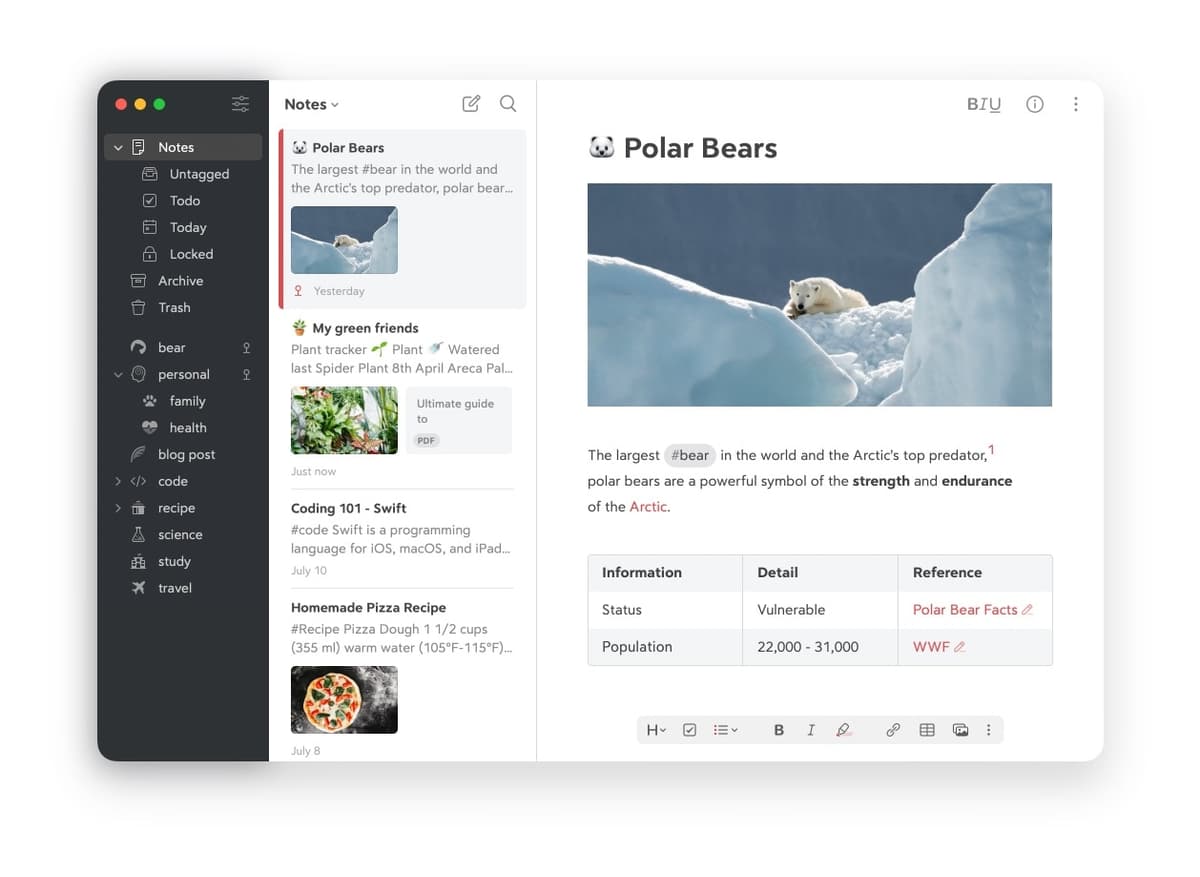
Bear's official screenshot uses Polar Bears and Homemade Pizza as sample notes; it does not show a real research project. The image is included to evaluate Bear's layout and file-handling features: science and study tags, a PDF attachment, a footnote, a reference table, and three-pane navigation. It demonstrates writing and organization, not passage-level citation checks.
Quick comparison table
This table shows a category split. Bear is the writing app. Atlas is the source-grounded research workspace.
| Atlas | Bear |
|---|---|
| Best when your notes depend on papers, PDFs, citations, and reports. | Best when your notes are drafts, journals, lists, and quick Markdown writing. |
| Builds Knowledge Maps for individual sources and Semantic Maps for projects. | Gives you a focused editor, tags, themes, and Apple-device sync. |
| Answers cite source passages, so you can inspect the evidence. | Links and citations are mostly manual writing decisions. |
| Keeps sources, notes, maps, and chats together inside one project. | Keeps personal notes fast and lightweight. |
| No full Markdown writing environment. | Excellent Markdown editor and offline writing flow. |
| Choose it when the next step is checking claims against sources. | Choose it when the next step is writing fast and well. |
| ✓ | ✓ for simple notes about one paper |
| ✗ | Bear wins: daily journals, quick notes, and Apple-native drafting ✓ |
Table 1: Atlas vs Bear overview comparing research source workflow vs. Apple-native Markdown writing.
How is Atlas different?
Atlas does not aim to become Bear with AI added. It handles the source-checking layer of a research workflow.
1. Atlas maps source arguments
Bear can hold your notes about a paper. Atlas turns the paper itself into a map. A Knowledge Map shows the paper's claims, evidence, definitions, and links between ideas. You can start from the main thesis, then click down into the passages that support it.
A Semantic Map shows a whole project at once. It groups sources, notes, chats, and citations by topic. That matters when a folder has grown from 10 papers to hundreds and search no longer restores the relationships between them.
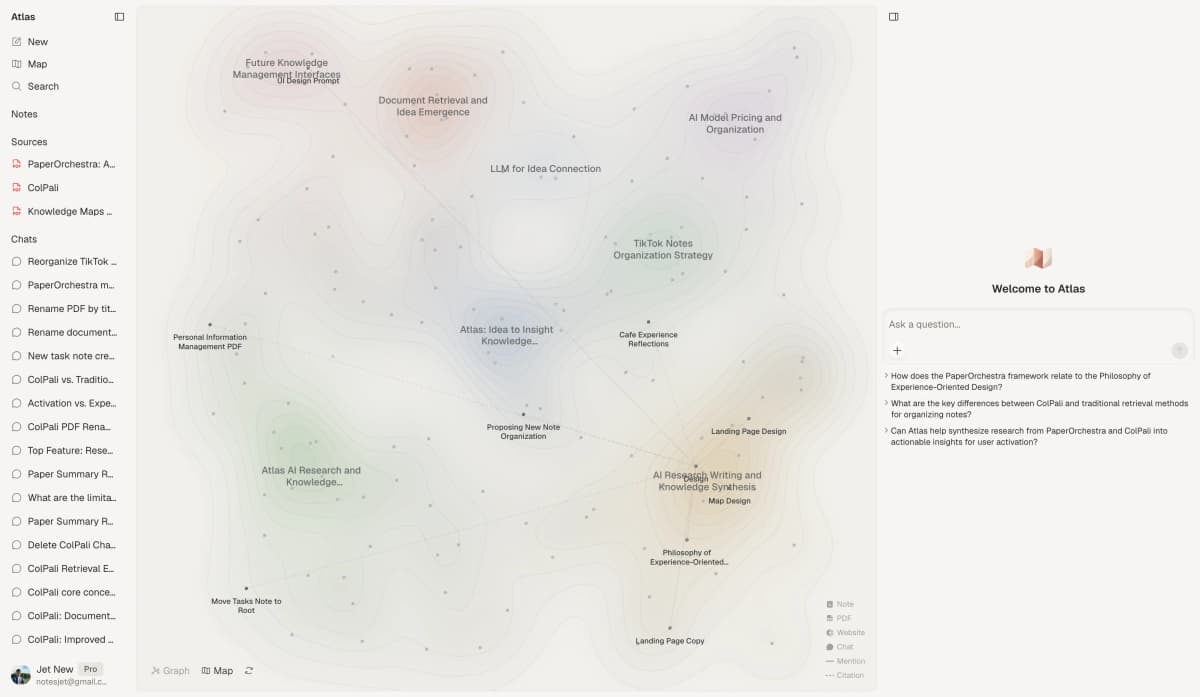
The Atlas Semantic Map groups source-backed topics across a project, while Bear stays closer to notes and tags.
"It's like an ultimate GPT. I can finally see what I've read." Kyle Lao, CEO & Co-founder of MenSC Labs
2. Atlas answers with cited passages
The risk in AI research is not only a made-up answer. A more subtle risk is a citation that does not support the sentence beside it.
Atlas answers with the claim, the source passage, and a short reason the passage supports the claim. You can click into the paragraph and check it yourself.
Atlas tracks this with the H/V ratio, which compares unsupported cited claims against supported cited claims. Atlas targets H/V below 0.1 on its citation benchmark, and we describe the method in Verifiable AI Research (2026): What It Actually Means. Bear is not built around passage-level claim checks. For casual notes, that is fine. For a thesis sentence or client brief, it matters.
3. Atlas keeps project context together
Bear keeps each note library easy to browse. Atlas keeps citations, notes, chats, Knowledge Maps, and Semantic Maps together inside one project. Those surfaces can provide context to later questions in that same project.
Separate Atlas projects have separate evidence bases. Add the same paper to another project when it belongs in both. Bear organizes notes at the library level, which is a fair trade for a lighter writing app.
Other Bear alternatives
Bear-alternative searches are rarely only about Atlas and Bear. The nearby choices solve different jobs:
| Alternative | Where it fits |
|---|---|
| Notion | Choose it for databases, team pages, and shared workspaces. It is heavier than Bear and broader than Atlas. |
| Craft | Choose it for polished documents, shared pages, and Apple-friendly knowledge work. It is closer to Bear's writing lane than Atlas's source-checking lane. |
| Roam Research | Choose it for networked notes and daily pages built around backlinks. It is stronger for linked thinking than polished writing. |
| Ulysses | Choose it for long-form Apple-first writing, publishing, and manuscript flow. It is closer to Bear than Atlas. |
| DailyVox | Choose it if your search intent is voice-first note capture. It is not a source-grounded research workspace. |
| Bear | Bear wins when the job is polished Apple-native Markdown rather than source-grounded research. |
Table 2: Where Notion, Craft, Roam Research, Ulysses, DailyVox, and Bear fit relative to Atlas for knowledge work.
Atlas belongs in this set only when the note-taking problem has become a source problem. If the job is just writing, the other apps may be the better comparison set.
For a broader map of this category, see the best second brain apps guide.
Apple Notes and Heptabase
Apple Notes is the built-in Apple choice for capture, shared notes, and a lower-friction device workflow. Heptabase is a visual knowledge base built around whiteboards, cards, sources, notes, and linked research. Apple Notes competes with Bear's capture lane, while Heptabase is the closer alternative when visual knowledge organization drives the decision.
Notion and Craft for shared documents
Notion combines documents, wikis, projects, and databases in a shared workspace. Craft centers polished documents while adding tasks, daily notes, collections, sharing, and cross-platform apps. The Atlas vs Notion and Atlas vs Craft comparisons cover those boundaries in more detail. Both products handle broader team and document work than Bear. Atlas becomes relevant when a source set needs passage-level verification.
Anytype and Tana for structured knowledge
Anytype is the local-first option in this group, with encrypted spaces for notes, documents, media, and linked content. Tana organizes knowledge through spaces and types, which suits people who want structured objects and reusable workflows. The Anytype comparison and Tana comparison separate those knowledge-management jobs from Atlas's source-checking role.
UpNote and DailyVox for capture
UpNote offers a cross-platform editor, notebooks, tags, offline access, links between notes, and Markdown export. DailyVox is the voice-first choice in this search set. They answer different capture preferences. Source verification remains a separate job: check each generated research claim against its supporting passage.
Buildin, Logseq, and Capacities
Buildin combines docs, projects, mind maps, databases, and AI in a broader workspace. Logseq is closer to local-first outlining and linked notes, while Capacities organizes knowledge around typed objects. Each is a more direct Bear alternative for knowledge organization than Atlas. Atlas enters when uploaded sources need maps and passage-level checks.
Platform, portability, and data ownership
Bear's biggest boundary is platform support. It is built for Mac, iPhone, and iPad. That is a strength if your workflow is fully Apple-based, because the app feels native and the sync model is simple. It is a blocker if your research also happens on Windows, Android, a lab computer, or a shared team machine.
Portability is the second boundary. Bear's Markdown export is a real advantage because your writing can leave the app in a readable format. Atlas does not replace that writing export. Atlas is where the source library, maps, and cited answers live.
| App | Platform and data ownership fit |
|---|---|
| Atlas | Web app for source-heavy research workflows. Uploaded sources, maps, and cited answers live in an Atlas project. |
| Bear | Mac, iPhone, and iPad. Markdown, HTML, PDF, and TextBundle export keep notes portable. |
| Notion | Web, desktop, and mobile. Flexible pages and databases come with heavier workspace structure. |
| Craft | Mac, iPhone, iPad, web, and Windows. Strong for polished docs and sharing, less focused on source-grounded research. |
| Roam Research | Web and desktop-style use. Strong backlink graph, less polished Apple-native writing. |
| Ulysses | Apple-first long-form writing. Strong export and publishing flow. |
| DailyVox | Voice-first capture intent. Useful when spoken notes matter more than source maps. |
Table 3: Atlas vs Bear on platform, portability, and data ownership, covering web vs. Apple-native apps and export formats.
Test the format you need to preserve. If you need your notes as portable Markdown files, Bear remains strong. If you need the reasoning behind a cited answer to stay attached to the source passage, Atlas is the better fit.
Privacy, collaboration, and AI boundaries
Privacy is a real reason to keep Bear. Bear's writing flow is local on Apple devices, with sync handled through the Apple ecosystem, and Bear documents its per-note encryption design. If the note is a private journal, a password-protected thought, or a draft that does not need AI, Bear's lower surface area is an advantage.
Atlas is cloud software. That is the trade for source ingestion, maps, cited answers, and project-scoped context. Your uploaded papers and chats are private to your account and are not used to train Atlas models. Atlas is still not a local-only Markdown folder. If local storage is a hard rule, Bear should stay in the writing stack.
The collaboration choice also depends on the job. Bear is mainly a personal writing app. It is not the place to run shared source review, assign evidence checks, or build a research workspace for multiple reviewers. Notion or Coda fit shared documentation better. Atlas fits the narrower job of making a source corpus easier to inspect.
AI features need the same boundary. Modern note apps now add transcription, drafting, tagging, and chat. Those features can be useful, but they do not all solve the same problem. Bear's value is still the writing surface. Atlas's value is the source-grounded answer, where the reader can inspect the passage behind a claim.
For advanced workflows, neither Bear nor Atlas should be treated as a broad automation platform. Bear gives writers portable files and a focused editor. Atlas gives researchers a source workspace. If you need APIs, calendar events, task automation, or a database-driven team wiki, compare Notion, Coda, or a dedicated project tool before choosing either one.
If that source workspace is the missing layer, test Atlas with one real paper from your current Bear project. Run a Knowledge Map and check whether the cited answer gets you back to the supporting passage faster than your note does.
Links, backlinks, and knowledge management
Bear's tag-based sidebar is good for personal recall. A nested tag such as #research/papers/llm can group related notes without forcing a rigid folder tree. You can also link notes together when you want a lightweight web of ideas.
Roam Research goes further on backlinks. It is built around daily pages, block references, and networked notes. Obsidian is another relevant option when local files and linked notes matter more than a managed source workspace.
Atlas sits on a different axis. It links your notes to sources, citations, maps, and chats. The important link is not only "this note mentions that idea." It is "this answer relies on that passage, and this passage came from that paper." That difference matters when a note becomes evidence in a thesis, memo, or report.
Comparing Atlas and Bear
The sections below compare the jobs that matter most for a Bear user evaluating Atlas: paper structure, project view, citation checks, pricing, and an end-to-end workflow. Each table includes a Bear win or a tie so the comparison stays fair.
Paper structure: maps vs notes
The Knowledge Map is Atlas's per-paper view. It turns one paper into a claim-and-evidence map. Node text is drawn faithfully from the paper's language. You can move from the main idea down to a specific paragraph.
| Atlas | Bear |
|---|---|
| Multi-level paper map | Markdown notes with PDF attachments |
| Links claims to supporting evidence | Manual notes and quotes |
| Shows labeled relations between ideas | Tags and links you create yourself |
| Lets you return to a paper's structure later | Keeps your own summary easy to edit |
| Not a beautiful writing editor | Beautiful writing editor and typography |
| ✓ | ✓ for personal paper notes you write yourself |
| ✗ | Bear wins: drafting and revising Markdown prose ✓ |
Table 4: Atlas vs Bear on paper structure, covering Knowledge Map argument maps vs. Markdown note editing.
Bear wins if you want to write your own paper notes. Atlas wins if you need the paper's structure recovered for you.
Project view: corpus vs library
Bear's tags are useful for a personal library. You can tag a note #research/papers/llm, search later, and keep writing without much setup.
Atlas is built for a different moment. It shows how sources relate across a project. The Semantic Map clusters papers and notes by topic, then lets you look at the same source set from a new angle.
| Atlas | Bear |
|---|---|
| Groups a project by source relationships | Groups notes by tags and search |
| Lets you ask questions across the source set | Lets you search your own notes |
| Reuses source context in later chats | Keeps notes simple and portable |
| Better for long-running research corpora | Better for personal writing libraries |
| ✓ | ✓ when the project is small and easy to remember |
| ✗ | Bear wins: fast tag-based personal organization ✓ |
Table 5: Atlas vs Bear on project view, covering Semantic Map corpus view vs. tag-based personal library organization.
If you work on many unrelated notes, Bear's lighter model is a strength. If you keep returning to the same body of sources, Atlas has more room to pay off.
Citation checks: defensible answers
Atlas answers with a claim, a passage, and a short explanation. That makes it easier to reject a weak answer before it enters your draft.
| Atlas | Bear |
|---|---|
| Cited answers link to source passages | Citations and links are manual |
| Shows why the passage supports the claim | You check the reasoning yourself |
| Published H/V benchmark target below 0.1 | No equivalent citation benchmark |
| Better for thesis, policy, legal, medical, or client-facing source work | Better for personal notes and prose |
| ✓ | ✓ for journals and drafts that need no cited source |
| ✗ | Bear wins: quick notes where citations are irrelevant ✓ |
Table 6: Atlas vs Bear on citation checks, covering cited reasoning triples and H/V benchmark vs. manual citations in notes.
Personal notes rarely require this audit trail. When a reviewer will inspect a thesis, brief, or report, the cited reasoning is the main reason to add Atlas.
The practical benefit is review speed: instead of reopening every PDF during editing, you can test the disputed sentence against the cited passage and decide whether it survives.
Bear draft, Atlas source check
Here is the concrete workflow I would use for a literature-review section.
First, draft the rough outline in Bear. Make a note for the section, add the question you are trying to answer, and list the papers you expect to cite. Bear is excellent here because the editor gets out of the way. You can write the ugly first version without thinking about a research interface.
Second, upload the underlying PDFs to one Atlas project. Generate a Knowledge Map for each paper. This gives you the argument structure before you ask for synthesis, which makes the later answer easier to inspect.
Third, ask Atlas a narrow question. Skip a broad "summarize these papers" prompt. A useful prompt is: "Where do these papers agree and disagree about retrieval failure, and which passages support each position?" Atlas should return claims with cited passages and short reasons.
Fourth, move only the checked material back into Bear. Keep Bear as the prose surface. Use Atlas as the source-checking layer. This verification pass is slower than writing from memory, but it is faster than reopening eight PDFs every time a sentence feels uncertain.
The source-checking step is where an Atlas trial becomes informative. Use one real paper from an existing Bear project. Run the Knowledge Map, ask one cited question, and compare the answer against the notes you would have written by hand.
A 20-minute test before you change tools
Run a small test before moving a library. Pick one paper you already understand well, preferably one you used in a real draft. In Bear, open your existing note and mark three claims you would need to defend if a reviewer asked for evidence.
Then upload the paper to Atlas and run a Knowledge Map. Do not judge the map by whether it looks impressive. Judge it by whether it helps you recover the paper's argument faster than your Bear note does.
Next, ask one narrow question that your Bear note cannot answer by itself. A useful prompt is "Which passage supports the claim that retrieval failure is mostly caused by missing context rather than model reasoning?" Open the cited passage and check whether it supports the answer.
I use this same three-claim check when evaluating Atlas against a writing app. The useful signal is not whether Atlas feels more powerful in a demo. The useful signal is whether it shortens the second pass, when a draft sentence has to be traced back to the paper that supports it. In those checks, Bear is usually faster for the first note, while Atlas is faster for the verification pass.
Use 3 checks:
- Atlas passes if the cited answer saves a PDF re-read.
- Bear passes if your existing note already answers the question.
- Bear wins if the source set is tiny, low stakes, and easy to remember.
If Atlas does not beat your Bear note on that test, keep using Bear for that project. If it does, add Atlas only to the projects where source checks slow you down.
I use this as the pass/fail test because it avoids demo bias. A polished map is only a first impression. The tool has to change how quickly you can verify a real sentence in a real draft.
Price comparison
Atlas costs more because it is not selling a Markdown editor. It is selling source ingestion, maps, cited answers, and project context.
| Atlas | Bear |
|---|---|
| Evaluation sample: 10 sources and 5 lifetime AI chats | Basic no-cost plan on macOS and iOS |
| Pro: $20/mo or $204/yr with unlimited AI chats and unlimited sources | Pro: $2.99/mo or $29.99/yr |
| Includes Knowledge Map, Semantic Map, cited answers, and project-scoped context | Includes sync, themes, export, and writing features |
| ✓ | ✓ for low-stakes note taking |
| ✗ | Bear wins: lower cost for Markdown drafting and note capture ✓ |
Table 7: Atlas vs Bear pricing, covering Atlas Pro at $20/mo vs. Bear Pro at $2.99/mo for Markdown drafting and note capture.
If all you need is writing, Bear is the lower-cost answer. If your draft depends on source material you must inspect, Atlas is the deeper tool.
Run the source comparison
The three-claim trial above gives you a decision test based on one real draft. Bear should win the writing pass. Atlas earns a place only if its Knowledge Map and cited answer shorten the later source check.
If Atlas shortened that check, repeat the test with the papers behind your current Bear draft. Upload those sources, generate a Knowledge Map, ask one cited question, and open the cited passage before you reuse the answer.
When to choose Atlas or Bear
Choose Atlas when:
- You are reading a source set you will revisit.
- You need answers with checkable citations.
- You want maps that show how papers and claims relate.
- You are writing a thesis, brief, report, literature review, or high-stakes analysis.
Choose Bear when:
- You want a fast Markdown editor.
- You work mainly on Apple devices.
- Your notes are personal drafts, journals, lists, or lightweight research notes.
- You value tags, themes, and offline writing more than source-grounded AI.
Tied: simple paper notes for your own memory. Both work fine when nobody else needs to audit the answer.
Want Apple-native Markdown writing? Go with Bear. Want cited answers across a source set? Go with Atlas.
Recommendations by user type
- Solo writers on Apple devices: choose Bear unless the draft depends on papers you must cite and defend.
- PhD researchers and thesis writers: use Atlas for the source corpus, then draft in Bear or another writing app.
- Consultants, analysts, and policy researchers: use Atlas when the client or reviewer may ask where a claim came from.
- Personal knowledge managers: choose Bear for a tidy Apple-first library, Roam Research for backlink-heavy thinking, and Atlas when the library becomes a source-checking problem.
- Mixed-platform research groups: choose Notion or another cross-platform workspace for shared notes. Add Atlas only for source-grounded research projects.
Migrating from Bear to Atlas
Do not migrate everything at once. That is usually unnecessary.
Bear's support library documents its export and migration features. If you want to bring source work into Atlas, start with the papers and reports behind the next project. Upload those sources to Atlas, then paste or upload the Bear notes that explain your own thinking.
Tags do not map cleanly. Bear organizes by tags, including nested tags such as #research/papers/llm. Atlas organizes by project. A practical move is to create one Atlas project for the next research corpus, then upload the sources and notes that belong to that corpus.
Encrypted notes should stay in Bear unless you have a clear reason to move them. Atlas does not replace Bear's private writing surface.
Literature review with both tools
Imagine you have 8 papers for a literature-review section.
In Bear, you create one note per paper. You tag each note, write your own summary, and pull quotes into a synthesis note by hand. This is pleasant if you like writing in Markdown. The hard part is checking whether each synthesis sentence is supported by the papers.
In Atlas, you upload the eight PDFs to one project. Each paper gets a Knowledge Map. The Semantic Map shows where the papers agree, differ, or cluster by topic. You can ask where the papers disagree, then inspect the cited passages before using the answer.
The clean workflow is often both tools together. Use Atlas to understand and check the source set. Use Bear to write the final prose.
When Bear is right
Bear is the better choice when the notes are personal, fast, and Apple-native. It is a strong place for journals, long-form drafts, meeting notes, checklists, and lightweight reading notes.
It also wins when offline writing matters. Bear works locally and syncs in the background. Atlas runs in the cloud and assumes a connection.
If these are your day-to-day jobs, adding Atlas would add overhead. Bear is already the right tool.
Common objections and edge cases
I already have hundreds of Bear notes. Should I move them? Usually no. Keep the old Bear library if it works, because a wholesale migration creates risk without proving that the next project needs a different research layer. Start Atlas only for the next source-heavy project.
Is Atlas worth it if I read only a few papers a month? It depends on whether those papers need to be checked later. If the notes are personal and low stakes, Bear is simpler. If the answer must be defended in a thesis, client report, policy memo, or major decision, Atlas has more value.
Can I use Atlas without giving up Bear? Yes. Draft in Bear, build the research corpus in Atlas, and move checked passages and citations into Bear when you write.
Final take
Bear is the better writing app. Atlas is the better research layer for source-grounded work. Choose Bear when the job is clean Markdown on Apple devices. Choose Atlas when one project needs a source set, visual maps, and claims you can check against passages.
Atlas
Check the sources behind your Bear draft
Map your papers, ask a cited question, and verify the supporting passage.
Frequently Asked Questions
Atlas does. It makes this the core of its citation surface. Every answer is rendered as a claim-source-justification triple: the claim, the passage it draws from, and a one-sentence explanation of why the passage supports the claim. You can click into the source paragraph and read the highlighted sentences in context. Bear may cite at the sentence level or link to sources, but it does not render the reasoning trace that connects the claim to the passage. That trace is the move when you need to defend a thesis sentence, a brief paragraph, or a treatment-plan summary. Read more about how Atlas grounds claims in Verifiable AI Research (2026): What It Actually Means.