
Atlas vs Capacities (2026): An In-Depth Research Comparison
Atlas is a visual research workspace. Capacities is an object-based note app. Compare paper deconstruction, cited answers, research context, and tool fit.
- Byline

Summary
As of 2026, use Atlas for citation-grounded answers and visual Knowledge Maps. Use Capacities for object-based personal knowledge management.
The comparison covers source proof, object structure, Knowledge Maps, migration, privacy, and project context.
Atlas explains claim support from passages, while Capacities organizes people, books, notes, and topics as objects.
Capacities can hold everyday PKM while Atlas handles research source sets.
Note: We make Atlas. Our team wrote this comparison. Where Capacities has the better answer for a given job, the article says so plainly. See the table rows where Capacities wins and the "When Capacities is right" section below. The goal is to help you pick the right tool for your research job. Atlas is not the answer to every research job.
Atlas is a visual research workspace for people whose work depends on a body of papers. That may be a thesis, a treatment choice, a purchase teardown, or a literature review.
Capacities is an object-based note app for personal knowledge management, or PKM. Instead of pages, you create typed objects: notes, ideas, people, and books. Those objects link to daily notes and a graph view.
Both tools touch a researcher's day. The wedge is what happens after the first answer.
Atlas turns each paper into a Knowledge Map, a visual map of the paper's claims and evidence. It projects a whole source set into a Semantic Map.
Atlas answers use claim-source-justification. The claim, source passage, and reason the passage supports the claim appear together. Sources, notes, maps, and chats share context inside the active project.
Capacities is the better PKM database. Its typed objects and daily notes are strong when you want more structure than a flat note graph. If you need to trust the answers for a thesis, treatment plan, brief, or hiring call, Atlas earns the comparison.

Atlas

Check evidence across your research papers
Use Atlas for cited synthesis and Capacities for daily notes and PKM.
Quick verdict: Atlas or Capacities?
For this 2026 update, we used one rule: start from the job, then ask which tool owns it. Atlas wins when the job is reading, mapping, citing, and revisiting a source set inside one project.
Capacities wins when the job is keeping typed PKM objects across daily notes, people, books, projects, and recurring records.
Decision criteria
Use the job you need to complete as the deciding factor. These 4 criteria expose the practical boundary between the products:
- Choose by source proof when an answer must trace back to a passage.
- Choose by workspace structure when typed objects and custom properties organize the workspace.
- Choose by visual recovery when you need to revisit a paper's argument or a project's themes.
- Choose by context boundaries when one source set should support later questions without mixing in unrelated work.
Feature comparison table
| Atlas | Capacities |
|---|---|
| Citation grounding: claim-source-justification shows the claim, source passage, and why the passage supports the claim. Use Atlas when a sentence must survive source review. | Notes and AI answers can point to linked content, but Capacities is not built around passage-level justification. |
| Knowledge Maps: per-paper maps show claims, evidence, definitions, and labeled links. Use Atlas for deep reading of papers. | Graph and object links show connected records. Capacities does not map a paper's argument structure. |
| Project, source, annotation, chat, Knowledge Map, and Semantic Map are the main units. | Object-based organization: typed objects for people, books, meetings, sources, projects, places, and custom types. Use Capacities for everyday PKM structure. |
| ✗ No custom object type database. Source metadata and project context are available, but Atlas is not built for saved object queries. | Typed properties and queries ✓. Custom fields, object types, collections, and queries make Capacities the better fit when schema is the main value. |
| Upload PDFs and keep markdown notes as project context or sidecars. Migrate one active research project first. | Export markdown or JSON plus attachments from the object workspace. |
| Project context: citations, notes, maps, chats, and sources share one bounded project. Use Atlas when cited synthesis needs a focused evidence base. | The object graph reuses typed records and links inside the PKM workspace. |
Table 1: Atlas proof features beside Capacities object notes.
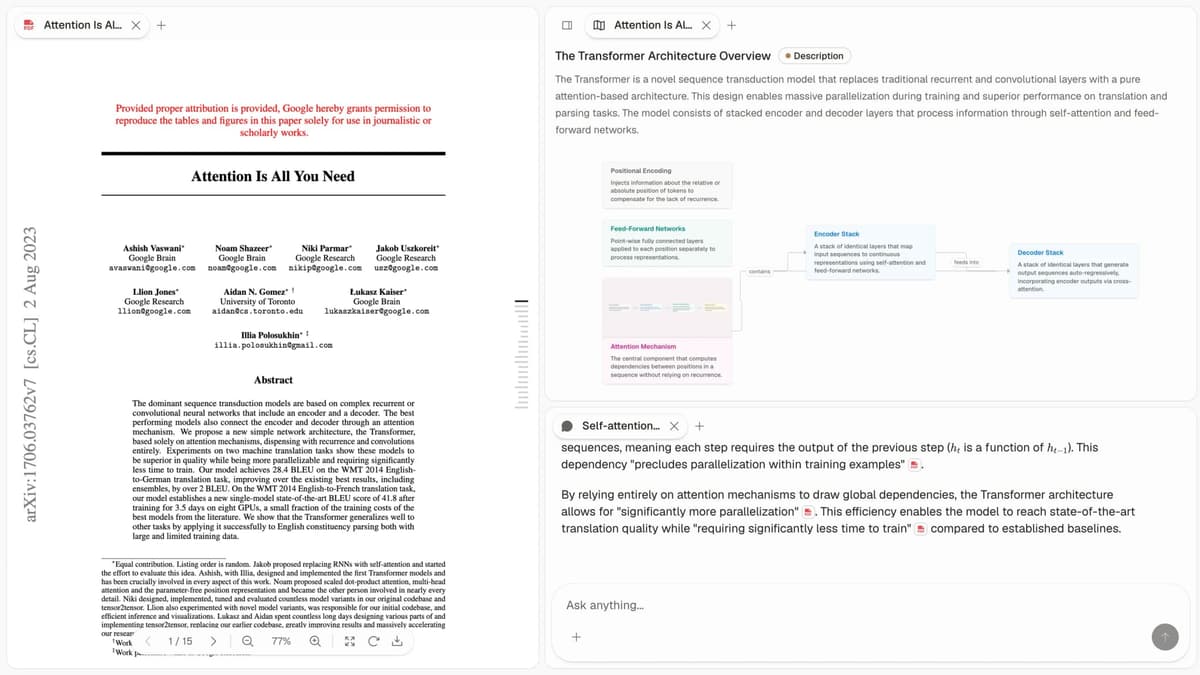
The first-party Atlas product view shows the paper map and citation trace used throughout this comparison.
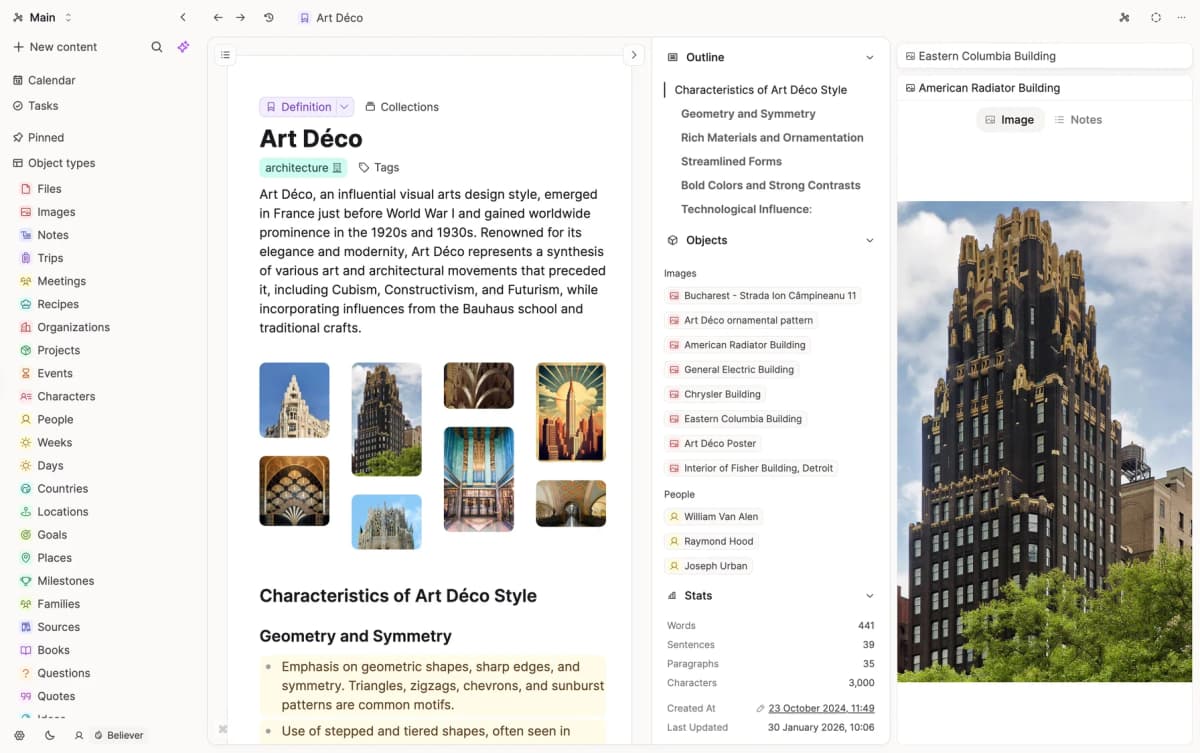
Capacities's official product view shows the typed-object workspace this comparison is about.
How is Atlas different?
Capacities and Atlas overlap at the surface. Both help with reading and source review. They split on 3 points that decide whether the output can be shared and defended.
Visual maps for papers and projects
Atlas builds two kinds of visual map as you read. A Knowledge Map breaks one paper into claims, evidence, definitions, and labeled links between them. You see the paper's spine first, then click down into the passages that support it.
A Semantic Map places your whole project on a canvas: sources, notes, chats, and cited passages. Related items cluster by topic. You can view the same canvas through a new topic angle without reading everything again.
This is how 200 papers stop being a folder and start being a source set.
"It's like an ultimate GPT. I can finally see what I've read." Kyle Lao, CEO & Co-founder of MenSC Labs
Capacities does not break each paper into claims and evidence. It also does not re-map a whole project by topic angle.
If you have spent an afternoon trying to recall a paper from three weeks ago, the Knowledge Map pays off first. Visual maps make a body of papers legible at a glance, and the Knowledge Map is the surface Atlas is built around.
Cited answers with justification
The hallucination problem in AI research tools includes a subtle failure: the model can put a source next to a claim that the passage does not prove.
Atlas renders each answer as claim proof: the claim, the passage, and a short reason the passage supports the claim. You can click into the source paragraph and read the highlighted lines in context.
Atlas tracks this with the H/V ratio. It measures generated sentences whose citation fails a passage check, divided by those that pass. Atlas targets H/V < 0.1, and we publish the method in the verifiable AI research benchmark.
Capacities can cite or link to sources, but the proof surface differs. It reaches sentence-to-citation at best. Atlas shows the claim, passage, and reason the passage supports the claim.
For casual Q&A the difference may not matter. For a thesis sentence, legal brief, or treatment note, it does. Every claim traces to its source, and Atlas explains why the source justifies it.
Project-scoped research context
Capacities connects typed objects across its PKM workspace. Atlas uses a narrower project boundary for research evidence.
Atlas keeps cited passages, notes, maps, chats, and sources together inside the project where they were created. Later questions in that project can use the same bounded corpus.
A separate project starts with its own evidence base. Add a source to each relevant project rather than expecting another project's notes or chat history to appear automatically.
Capacities is broader for reusable typed objects. Atlas is deeper for source-grounded synthesis inside a focused research project.
Comparing Atlas and Capacities: feature comparison
Both tools touch a researcher's day, but they live in different categories. Atlas covers paper maps, project maps, source-cited answers, and context within a source set.
Capacities covers typed objects, daily notes, and a graph view. Its object model is broader for general PKM. Atlas goes deeper at the source-proof layer.
The next sections cover paper maps, project maps, cited answers, source annotations, project context, and price. Each table includes at least one row where Capacities wins or ties.
Paper deconstruction (Knowledge Map)
The Knowledge Map is Atlas's per-paper surface. It breaks one paper into a layered claim map. The links show how claims, evidence, and definitions relate.
Node text is drawn faithfully from the paper's language. Breadcrumbs let you move from the high-level thesis down to a specific paragraph.
| Atlas | Capacities |
|---|---|
| Multi-level argument structure ✓ | Typed "book" or "paper" objects with manual notes |
| Labeled relations (motivates, causes, enables) ✓ | ✗ |
| Faithful-to-source node text ✓ | ✗ |
| Hierarchical breadcrumbs ✓ | ✗ |
| ✗ | Object-based personal knowledge management substrate (typed objects) ✓. Capacities organizes your PKM substrate. Atlas deconstructs source arguments |
Table 2: Paper map rows beside Capacities object notes.
Good to know: The bottom row belongs to Capacities. Atlas does not ship that surface. The Knowledge Map's payoff is recovering a paper's argument three weeks after you first read it, when topic chips alone are no longer enough.
Try Atlas: Use the evaluation sample (10 sources · 5 lifetime AI chats) to run a Knowledge Map on one of your own papers. Review the cited-answer method before checking the result. Used by researchers at NUS, NTU, SMU, and eight other universities.
Project map (Semantic Map)
The Semantic Map is Atlas's per-project surface. It places sources, notes, chats, and cited passages on a canvas.
Related items cluster by topic. You can view the same canvas from another topic angle without ingesting files again.
| Atlas | Capacities |
|---|---|
| Spatial embedding of sources + notes + chats ✓ | Object graph + collections |
| Auto-labeled topic clusters ✓ | ✗ |
| Topic-angle re-projection ✓ | ✗ |
| One project-scoped evidence view ✓ | ✗ |
| ✗ | Daily-note workflow integrated with objects ✓. Capacities integrates daily notes with objects. Atlas focuses on citation grounding across sources |
Table 3: Project map rows beside Capacities object links.
Good to know: Capacities's strength on that row is genuine. If your work depends on it, that's the boundary. The Semantic Map pays off when 200 papers stop being a folder. They become a corpus you can view from new topic angles without re-reading.
Source-backed answers
Atlas produces claim proof. Each answer includes the claim, passage, and a short reason the passage supports the claim.
You can jump to the source paragraph, read the highlighted lines, and check whether the reasoning holds.
The NotebookLM alternatives guide shows how this proof step differs from another source-chat workflow.
| Atlas | Capacities |
|---|---|
| Claim-source-justification triples ✓ | ✗ |
| Reasoning traces (why this passage supports this claim) ✓ | ✗ |
| Jump-to-source with passage highlight ✓ | ✗ |
| H/V ratio < 0.1 benchmark published ✓ | ✗ |
| ✗ | Object templates for different content types ✓. Capacities gives you structured templates. Atlas generates reasoning traces from source passages |
Table 4: Cited answer rows beside Capacities note templates.
Good to know: Both tools have a citation surface. Atlas also explains why a passage justifies a claim. For everyday Q&A that difference is easy to miss. For a thesis sentence or a brief paragraph, it determines whether you can audit the answer.
Literature-grounded annotations
Atlas adds source notes when a paper is ingested. Citations inside the paper become first-class objects.
When a cited source is open access, Atlas can resolve it and pull the relevant passage. You can see how the paper builds its case across sources without leaving the document.
| Atlas | Capacities |
|---|---|
| Auto-annotate on ingest ✓ | Manual notes on typed objects |
| Multi-citation synthesis (how citations build the argument) ✓ | ✗ |
| Resolve cited sources (open-access) ✓ | ✗ |
| Exact passage / page / paragraph anchors ✓ | ✗ |
| ✗ | Markdown export and database queries ✓. Capacities gives you schema-driven queries. Atlas generates source-cited answers from passages |
Table 5: Source note rows beside Capacities query exports.
Good to know: This feature resolves citations inside the paper you're reading. When a paper cites an open-access source, Atlas pulls in the cited passage. It is not web grounding. It shows how one paper builds its case from the sources it cites.
Project-scoped context
Atlas keeps citations, notes, Knowledge Maps, Semantic Maps, and chats inside one project. A separate project starts with its own sources and context.
| Atlas | Capacities |
|---|---|
| Project-scoped research context ✓ | Persistent object graph |
| Sources + notes + maps + chats share one project ✓ | Objects link across the PKM workspace ✓ |
| Separate projects isolate unrelated context ✓ | Collections organize related objects ✓ |
| Sources must be added to each relevant project | Objects remain reusable in Capacities ✓ |
| ✗ | No-cost plan for solo personal knowledge management use ✓. Capacities has a pricing advantage for solo PKM. It does not cover source-cited answers or Knowledge Maps |
Table 6: Atlas project context beside Capacities object history.
Good to know: Atlas keeps one project's evidence together across sessions. Capacities has the broader reusable object graph, while separate Atlas projects preserve distinct evidence boundaries.
Price comparison
Atlas is a paid product. There is no perpetual no-cost plan. You get a short evaluation sample (10 sources · 5 lifetime AI chats), followed by $20/mo or $204/yr for Atlas Pro.
At the paid tier, Atlas includes Knowledge Map, Semantic Map, claim-source-justification, unlimited AI chats, and unlimited sources. The Capacities pricing page should be checked before purchase because its packages can change.
| Atlas | Capacities |
|---|---|
| Free: ✗ (evaluation sample only: 10 sources · 5 lifetime AI chats) | Free: No-cost plan: full features for personal use ✓ |
| Pro: $20/mo or $204/yr (unlimited sources · unlimited AI chats · all features) | Paid: Pro $10/mo, AI features, advanced queries |
| Pro unlocks Knowledge Map, Semantic Map, and claim-source-justification ✓ | ✗ |
Table 7: Atlas paid plan beside Capacities free and paid plans.
When to choose Atlas vs Capacities
Choose Atlas when a research answer must be checked against source passages. Choose Capacities when typed objects and daily notes are the main organizing system.
Keep both when general PKM and passage-level research proof matter in the same week. Move only the source-heavy project into Atlas.
- Want paper structure deconstructed multi-level? Go with Atlas. (Knowledge Map)
- Want answers that explain how each citation justifies the claim? Go with Atlas. (claim-source-justification)
- Want one focused evidence base for maps, notes, and cited chat? Go with Atlas. (project-scoped context)
- Want typed objects and daily notes for PKM? Go with Capacities.
- Tied: keeping a typed-object database of papers you have read**: both work fine for different jobs. The wedge only opens up once you're building a corpus you'll return to.
Recommendations by user type
- PhD researchers: Atlas. The Knowledge Map helps you avoid re-reading each paper, while claim proof anchors thesis sentences to passages. Capacities works for one-off tasks. Atlas keeps the selected sources, maps, and cited chats together inside the thesis project.
- Students doing literature reviews and thesis research: Atlas, scoped to the thesis or lit-review workflow. The Knowledge Map saves the most time during reading. Later questions in the same project can use its selected sources and Semantic Map.
- Knowledge workers (consultants, analysts, PMs, journalists): Atlas when reading and citing papers is the core work. Capacities when typed PKM objects are the daily need.
- Personal researchers with high-stakes questions: Atlas. Use it for medical, legal, major-purchase, or deep self-study research where you need to defend the answer. Capacities is a fine starting tool. Atlas is the tool you graduate to once the source trail matters.
Capacities is built for object-based PKM: people, books, meetings, ideas, and projects connected by typed notes. Atlas is built for source-heavy research where each answer needs a passage trail and each paper benefits from a Knowledge Map.
Pick Capacities when the object model is the organizing system. Pick Atlas when the source set is the organizing system and the same evidence will be queried again.
When Capacities is right
Capacities is a good fit for several jobs Atlas does not do. If each day links to people you met, books you started, ideas you had, and tasks you opened, its connected-object views are strong.
Its daily note plus typed-object model is clean. Atlas does not have a daily-note surface and does not try to be a PKM database.
A personal CRM use case is exactly where Capacities's typed objects pay for themselves. Think notes on 80 people you stay in touch with, with object types for "contact," "company," and "interaction."
The links between objects are the value. The AI answering layer is secondary. Atlas is built for research corpora and would feel awkward stretched over a CRM workflow.
Podcast and book tracking is another Capacities sweet spot. You want custom object types with fields for rating, status, recommender, and themes. You want a query for "all unread books from people I met this year."
You also want the daily note to surface those queries as you write. Atlas's project-and-source model has no good answer for this workflow. Its focus is defending a research claim from a body of sources.
Capacities is a strong general PKM tool with daily notes and typed objects. Atlas is a research corpus tool with Knowledge Maps and source proof. Each product serves a different category of work.
Alternatives and migration
Obsidian, Notion, and Anytype
The broader search results usually bring in 3 nearby tools: Obsidian, Notion, and Anytype. Each one solves a different version of "connected knowledge." The second-brain app guide covers the wider field. None is a one-for-one Capacities swap inside this article.
- Obsidian: Choose it for local markdown files, backlinks, plugins, and graph views. It is closer to a personal knowledge base than to Atlas. The Obsidian and Capacities comparison covers that narrower PKM decision.
- Notion: Choose it when the workspace is shared with a team. Docs, wikis, projects, and databases sit in one place. Notion AI works across that shared space, while passage-level proof for a paper corpus is a different job.
- Anytype: Choose it when ownership, privacy, and object structure are the deciding constraints. It also uses objects, templates, graph/database views, and a local-first posture.
Choose Capacities when its object experience and daily-note workflow fit your PKM habits better. Choose Atlas when you need to defend a research claim from its source passage.
Migrating from Capacities
Capacities organizes work around typed objects. A "paper" object can hold authors, year, journal, custom fields, linked authors, linked tags, and markdown notes.
Daily notes link back to those objects. Queries can surface objects that match a filter. It is a clean model. When you move to Atlas, the practical question is what survives.
Start with the Capacities export documentation. Open the collection you want to move. A literature review usually starts with the "Paper" collection plus any linked "Author" and "Tag" collections.
Export to markdown and you get one .md file per object, with frontmatter for the properties and a body for the notes. Attached PDFs export alongside the markdown when you include attachments.
The source files and markdown body of your notes migrate cleanly. That includes PDFs, EPUBs, and web captures.
Upload the PDFs to a new Atlas project and they become Knowledge Maps on ingest. Your manual Capacities notes can become Atlas project notes or remain as markdown sidecars.
Custom object types, typed links between objects, and saved property queries do not migrate as native concepts. Atlas's main unit is the project. A "Paper" object becomes a source inside a project.
Linked "Author" and "Method" objects become notes or tags. They do not carry over as typed records. If your setup depends on multi-hop queries, Atlas does not replace that surface. The Semantic Map instead clusters sources, notes, and chats within one project.
A practical migration approach is to move one active project first. Start with 10 to 30 sources. Let Atlas generate Knowledge Maps, then run a few cited chats and compare the source trail.
Decide whether the rest of the corpus belongs there after that trial. Many users keep Capacities for daily notes and general PKM while moving paper-heavy projects to Atlas.
Worked example: a literature-review section
Suppose you are writing a related-work section on RAG. You have 18 papers. They cover sparse search, dense search, hybrid methods, and recent end-to-end systems. Here are the steps in Atlas and Capacities.
In Atlas, you create a project and drop the 18 PDFs in. Each paper gets a Knowledge Map. Claims appear as nodes, evidence appears as support, and links show how the pieces relate.
Atlas keeps node text anchored to the paper's own language. You open the map for the foundational DPR paper and see the spine of the argument. Drop two levels to read the passage that defines the in-batch negatives sampling trick.
Repeat that review for the other 17 papers. You move through arguments instead of re-reading each PDF from the start.
Then you open the Semantic Map for the project. The 18 papers cluster by topic automatically. Sparse search groups on one side, dense search in the middle, and hybrid and end-to-end systems on the other.
Switch to the angle "training-data strategy." The same 18 papers now cluster by how each one builds its training set. That second view turns 18 PDFs into a corpus you can reason over.
Next, ask Atlas which three approaches to out-of-domain queries are most defensible across these papers. The answer comes back as claim proof. Each claim has the source passage attached and a short reason why the passage supports it.
Open the third claim and read the highlighted sentences in the source paragraph. Decide whether to keep, rewrite, or discard it. Draft the section from the verified claims, with citations attached.
In Capacities, you create a "Paper" object for each PDF. You paste the abstract and notes, link each paper to "Method" and "Author" objects, then tag the relevant ones.
To draft the related-work section, scroll through your manual notes and hand-pick useful lines. Write the prose and place citations from memory or by checking the source object.
Capacities stores the paper as an object. You still recover its argument structure from the PDF when you write. The linking is hand-typed, and the source proof depends on your own process. For 18 papers it is workable. For 80 it becomes the bottleneck.
Common objections and edge cases
"I already have hundreds of typed objects in Capacities. Will I lose all that structure if I switch?" The typed structure does not migrate as a first-class concept because Atlas does not have typed objects. You keep the source PDFs and markdown note content, but the schema and saved queries remain in Capacities.
The practical path is to keep Capacities for the structured PKM you have built. Use Atlas beside it for literature-heavy work where maps and source proof earn their keep. Sources must be uploaded to each tool separately.
"My research is short bursts of 10 to 20 sources. Does project context matter?" It matters when those sources need to support cited answers, maps, and notes in one bounded workspace.
For self-contained bursts, the Knowledge Map and claim-source-justification can still help. If typed objects and daily notes matter more than source-grounded synthesis, Capacities fits that pattern better and the upgrade case for Atlas is weaker.
"What about privacy and where my papers are stored?" Atlas runs on cloud infrastructure. Your uploaded papers and chats are private to your account and are not used to train Atlas's models.
If you need local-only storage, that is a real trade-off. Review the Capacities privacy policy and your organization's cloud requirements before choosing either tool.
Atlas
Check evidence across your research papers
Use Atlas for cited synthesis and Capacities for daily notes and PKM.
Frequently Asked Questions
Yes, that is the core of Atlas's citation surface. Every answer is rendered as a claim-source-justification triple: the claim, the passage it draws from, and a one-sentence explanation of why the passage supports the claim. You can click into the source paragraph and read the highlighted sentences in context. Capacities may cite at the sentence level or link to sources, but it does not render the reasoning trace that connects the claim to the passage. That trace is the move when you need to defend a thesis sentence, a brief paragraph, or a treatment-plan summary. Read more about how Atlas grounds claims in the verifiable AI research benchmark.