
Atlas vs Napkin AI (2026): An In-Depth Research Comparison
Atlas is a visual research workspace, Napkin AI is a tool that turns text into visual diagrams. Compare paper deconstruction, citation grounding, and fit.
- Byline

Summary
Use Atlas for source-grounded research maps. Use Napkin AI when finished prose needs a fast visual.
The table below compares source trust, maps, exports, upload flow, price, and fit.
Atlas reconstructs paper arguments from sources, while Napkin AI creates diagrams from supplied text.
Napkin AI can remain useful for presentation visuals while Atlas handles source libraries that need citations.
Note: We make Atlas and know it firsthand. We checked Napkin AI against its current product and pricing pages. The tables below show where each tool wins.
Atlas is a research workspace for people who work across many papers. Napkin AI turns text into charts, maps, and other graphics.
In short, Atlas gives you Knowledge Maps and citation-grounded answers. Napkin AI gives you fast visuals from text.
The tools start at different stages. Atlas turns each paper into a Knowledge Map and a whole source set into a Semantic Map.
Atlas also shows each claim, its source text, and why that text supports it. Sources, notes, and chats stay in the project for later use. The second-brain apps guide explains this model.
Napkin AI offers graphics you can edit and a free plan for testing the tool. Choose Atlas when a thesis, brief, or decision needs a source trail.
Napkin AI's export flow is also a real strength. PNG, SVG, and PDF outputs move a visual into a slide deck, memo, or social post without rebuilding the layout by hand.
If the job is turning a paragraph into a polished slide visual, go with Napkin AI.

Atlas

Map papers from their source evidence
Build cited maps from uploaded papers, then inspect each source passage.
Quick verdict: Atlas vs Napkin AI
Choose Atlas when you need to map a paper's claims, open the source text, or compare many papers over time. Knowledge Maps cover one paper, while Semantic Maps cover a project.
Choose Napkin AI when your text is ready and you need a diagram, mind map, or slide graphic. You can edit the result and export it for a deck or report.
How we compared Atlas and Napkin AI
We compared two jobs. Atlas helps build and check a view across sources. Napkin AI turns finished text into a visual you can share.
We checked Napkin AI's current product workflow, PPT export release, and pricing page. The table compares sources, visuals, editing, export, reuse, and price.
How is Atlas different?
Feature comparison matrix
Read this as the proof surface for the comparison. On citation grounding, Atlas shows the claim, passage, and reason together. Napkin AI does not make that reasoning trace the main surface. On Knowledge Maps, Atlas maps uploaded source documents. Napkin AI turns supplied prose into visuals. On exports and price, Napkin AI is stronger for quick presentation graphics and free trials.
| Atlas | Napkin AI |
|---|---|
| Citation grounding: claim, source passage, and justification shown together. Atlas wins for defended synthesis. | Source links may appear, but the reasoning trace is not the core surface. |
| Knowledge Maps: builds a per-paper map from claims, evidence, and relations. Atlas wins for research recall. | Generates diagrams from pasted text. Napkin AI wins for visual explanation. |
| ✗ Presentation diagrams from arbitrary prose. Atlas is built around uploaded sources. | ✓ Diagram generation: turns text into clean diagrams, flowcharts, and infographics. Napkin AI wins here. |
| Source upload: upload papers and build maps, chats, and notes from the corpus. Atlas wins for source libraries. | Paste or import text for visual output. |
| Research workspace output and notes. Diagrams are not the main export. | ✓ Export options: PNG, SVG, and PDF diagram export. Napkin AI wins here. |
| Pricing: evaluation sample, then Atlas Pro at $20/mo or $204/yr. | ✓ Pricing: Free at $0, Plus at $9/person/month, and Pro at $22/person/month. |
Table 1: The table gives the side-by-side proof. It covers source trust, Knowledge Maps, diagrams from text, exports, uploads, and price.
Use this table as the decision frame for the rest of the article. The sections below expand the rows that matter most: paper maps, project maps, cited answers, annotation depth, project memory, and price.
Interface snapshots
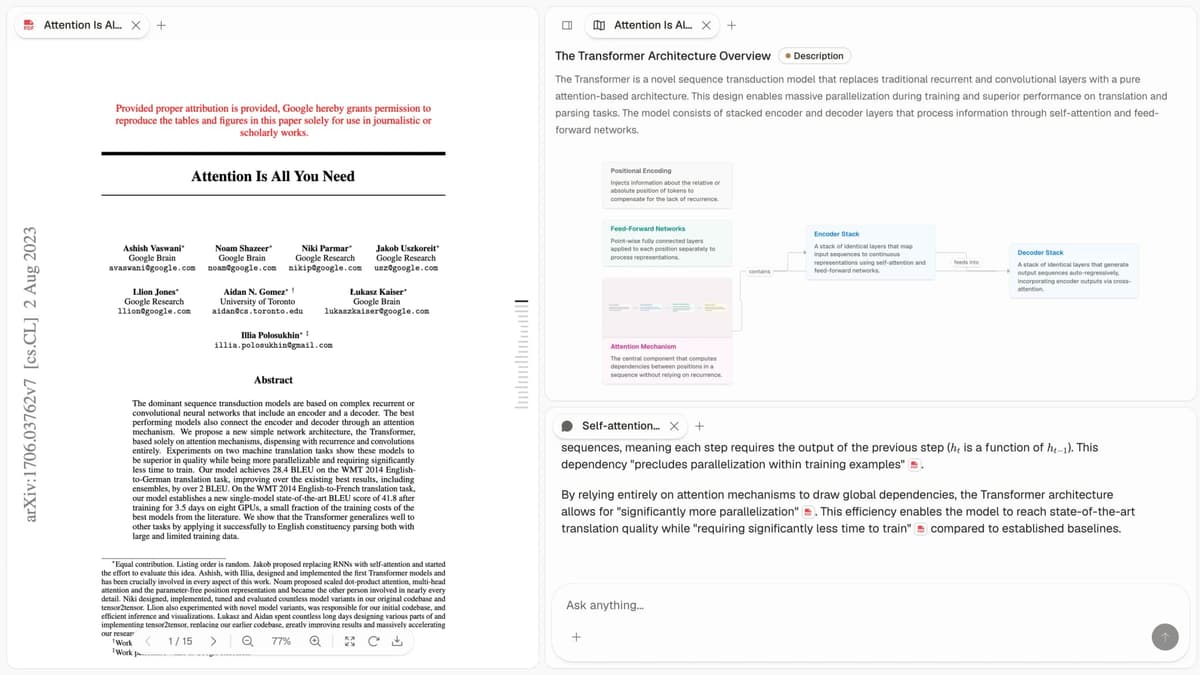
This Atlas screen keeps the cited answer beside the research map. Open a citation to read the source behind a claim.
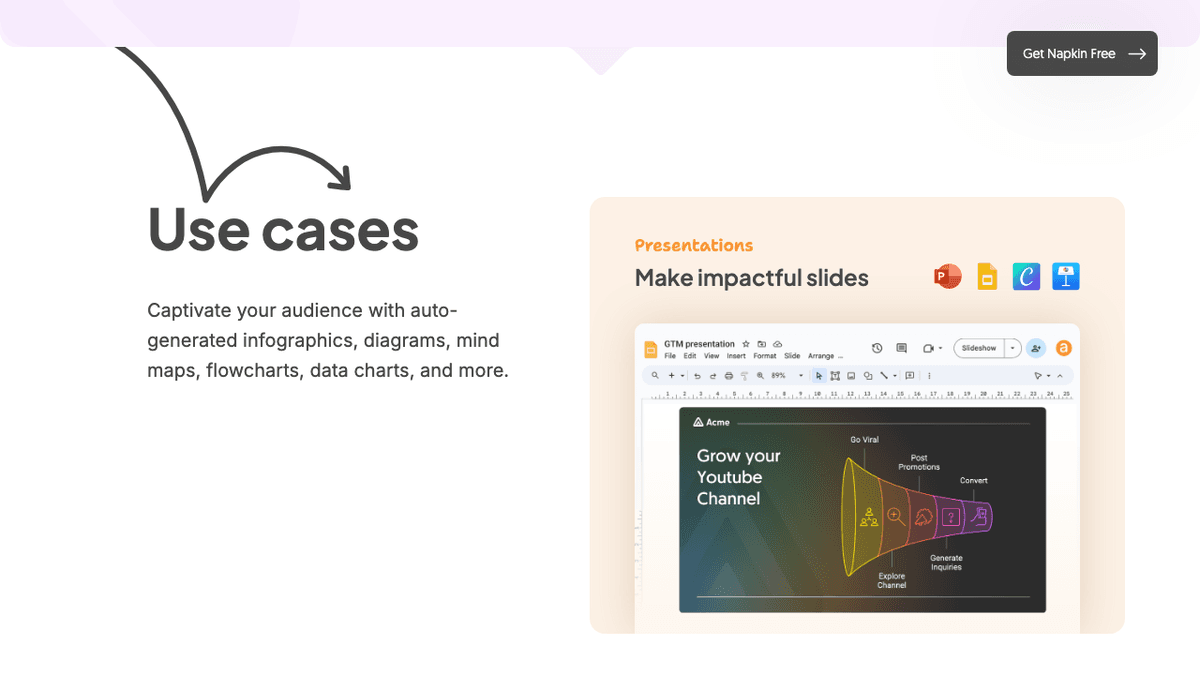
This screen from Napkin AI shows its strength: turning supplied text into a slide graphic.
Input and output boundary
Atlas starts with papers and builds maps, cited answers, and notes. Napkin AI starts with supplied text and makes graphics you can edit. They solve different stages of the work.
Comparing Atlas and Napkin AI
Both tools can help explain an idea. The next sections show whether that explanation stays tied to research sources.
Maps for papers and projects
Atlas builds two visual maps as you read. A Knowledge Map breaks each paper into claims, evidence, definitions, and labeled links. You see the paper's spine first, then open supporting passages with a click.
A Semantic Map shows the whole project on a canvas. Sources, notes, chats, and cited passages cluster by topic. You can view the same canvas from a new topic angle without rereading the papers. The research-note organization guide covers the underlying source-to-note workflow.
"It's like an ultimate GPT. I can finally see what I've read." Kyle Lao, CEO & Co-founder of MenSC Labs
Napkin AI does not have a per-paper claim-evidence map or a project-wide topic re-map. If you have tried to recover a paper you read three weeks ago, the Knowledge Map pays off fast. Visual maps make a body of papers legible at a glance. The AI mind-map generators guide compares this research surface with other visual formats.
Atlas explains every cited claim
An answer can cite a real source that does not support its claim. Atlas shows the claim, source text, and a short reason the text supports it. Open the source paragraph to read the marked sentences in context.
Atlas tests this link with its H/V ratio. The test asks whether the cited text supports the answer. Atlas targets H/V below 0.1 and explains the test in Verifiable AI Research. The AI citation checker guide shows how to run the same check by hand.
Napkin AI makes visuals from the text you provide, so source checks happen first. Atlas keeps each research claim linked to its source.
Project-scoped research context
Atlas keeps sources, notes, chats, and maps inside one project. They all use the same set of sources for the research question.
A new Atlas project starts with its own sources. This keeps material from another topic out of the answer. Napkin AI keeps text and its graphics in documents instead.
Choose Atlas when maps, notes, and cited chat should use the same sources. Choose Napkin AI when checked text needs a polished graphic.
Detailed workflow comparison
Atlas and Napkin AI both create visual outputs, but they start from different inputs. Atlas starts from source documents. Napkin AI starts from prose. That difference explains the rest of the comparison.
Paper deconstruction with a Knowledge Map
The Knowledge Map is Atlas's per-paper surface. It turns a paper into a multilevel argument map with claims, evidence, definitions, and labeled links. Node text comes from the source. The chat-with-PDF guide provides questions for checking the underlying passage.
| Atlas | Napkin AI |
|---|---|
| Multi-level argument structure ✓ | AI-generated diagram from pasted paper abstract |
| Labeled relations (motivates, causes, enables) ✓ | ✗ |
| Faithful-to-source node text ✓ | ✗ |
| Hierarchical breadcrumbs ✓ | ✗ |
| ✗ | Text-to-diagram AI generation ✓. This surface creates presentation diagrams. |
Table 2: Atlas reconstructs a paper's argument, while Napkin AI turns selected prose into an editable visual.
Good to know: Napkin AI owns text-to-diagram generation. Atlas does not generate presentation diagrams from arbitrary prose. The Knowledge Map helps you recover a paper's argument weeks after you first read it.
Project view with a Semantic Map
The Semantic Map covers one Atlas project. It groups sources, notes, chats, and citations by topic. You can view the same material from a new topic angle without adding it again.
| Atlas | Napkin AI |
|---|---|
| Spatial embedding of sources + notes + chats ✓ | ✗ |
| Auto-labeled topic clusters ✓ | ✗ |
| Topic-angle re-projection ✓ | ✗ |
| One project-scoped evidence view ✓ | ✗ |
| ✗ | Visual style themes and diagram variations ✓. This surface controls presentation styling. |
Table 3: Atlas maps links across a set of research sources. Napkin AI gives you more control over the look of a graphic.
Good to know: Napkin AI has more themes and graphic styles. Atlas can group a large paper set by topic and show it from several angles.
Citation-grounded answers
Each Atlas answer shows the claim, source text, and why that text supports it. Open the source paragraph and read the marked sentences to check the link yourself. The cited-chat guide explains why a real source can still fail to support a claim.
| Atlas | Napkin AI |
|---|---|
| Claim-source-justification triples ✓ | ✗ |
| Reasoning traces (why this passage supports this claim) ✓ | ✗ |
| Jump-to-source with passage highlight ✓ | ✗ |
| H/V ratio < 0.1 benchmark published ✓ | ✗ |
| ✗ | Fast iteration on visual explanations ✓. This surface speeds visual editing. |
Table 4: Atlas links answers to source text. Napkin AI makes visual editing faster.
Good to know: A quick slide graphic may not need a source check. A claim in a thesis or brief often does.
Literature-grounded annotations
Atlas marks up a paper when you add it. It can follow a citation to an open paper and pull in the cited text. The AI citation analysis guide explains how this source chain differs from a slide graphic.
| Atlas | Napkin AI |
|---|---|
| Auto-annotate on ingest ✓ | ✗ |
| Multi-citation synthesis (how citations build the argument) ✓ | ✗ |
| Resolve cited sources (open-access) ✓ | ✗ |
| Exact passage / page / paragraph anchors ✓ | ✗ |
| ✗ | Export to PNG, PDF for presentations ✓. These formats support presentation workflows. |
Table 5: Atlas exposes the cited source chain, while Napkin AI supplies portable visual exports for presentation workflows.
Good to know: Atlas can resolve citations inside the paper you're reading. When a paper cites an open-access source, Atlas pulls in the cited passage. That makes the source chain visible as part of the paper's structure.
Project-scoped context
Atlas keeps sources, notes, maps, and chats inside one project. A separate project has a separate evidence base.
| Atlas | Napkin AI |
|---|---|
| Project-scoped research context ✓ | Per-document visual workspace ✓ |
| Sources, notes, maps, and chats share one evidence base ✓ | Text and generated visuals stay together ✓ |
| Separate projects isolate unrelated context ✓ | Separate documents isolate visual tasks ✓ |
| Sources must be added to each relevant Atlas project | Visuals export to PNG, SVG, and PDF ✓ |
| ✗ | No-cost plan for solo users ✓. The free tier limits AI credits and branding. |
Table 6: Atlas keeps research sources in one project. Napkin AI keeps text and its graphics in one document.
Good to know: Put sources for the same question in one Atlas project. Start a new project when the topics should stay apart.
Price comparison
Atlas is a paid product with no perpetual free plan. Its evaluation includes exactly 10 sources and 5 lifetime AI chats. Atlas Pro costs $20 per month or $204 per year and includes unlimited sources, unlimited AI chats, Knowledge Maps, Semantic Maps, and claim-source-justification.
Napkin AI's Free plan includes 500 AI credits per week, unlimited editing and file import, and PNG/PDF export with Napkin branding. Plus costs $9 per person each month and includes 10,000 monthly credits plus PPT/SVG export.
Pro costs $22 per person each month and includes 30,000 monthly credits and unlimited custom branding. Annual billing is discounted by 25%. Verify current limits on Napkin AI pricing.
| Atlas | Napkin AI |
|---|---|
| Free: ✗ (evaluation sample only: 10 sources · 5 lifetime AI chats) | Free: $0 with 500 AI credits/week, unlimited PNG/PDF export, and Napkin branding ✓ |
| Pro: $20/mo or $204/yr (unlimited sources · unlimited AI chats · all features) | Paid: Plus $9/person/month · Pro $22/person/month |
| Pro unlocks Knowledge Map, Semantic Map, and claim-source-justification ✓ | ✗ |
Table 7: Price matters after you know whether the task needs presentation visuals or source-grounded research maps.
Where Esri, WrenAI, Vanna, and Metabase fit
Some search results solve other visual jobs. Esri maps places and location data. WrenAI, Vanna, and Metabase turn database queries into charts or dashboards.
Atlas does not replace those tools. It maps ideas across source documents and links answers back to them. Napkin AI turns finished text into a graphic.
MyLens AI, Lucidchart, Miro, Venngage, and Jitter
MyLens AI also makes visual stories. Lucidchart and Miro are shared spaces for drawing by hand. Venngage makes graphics and slides, while Jitter makes motion graphics. Choose by the file you need to deliver. Atlas remains focused on research with cited sources.
When to choose Atlas vs Napkin AI
Choose by the source of the visual. Atlas starts with papers and preserves the evidence trail through maps and cited answers. Napkin AI starts with text that is ready to communicate and turns it into a polished graphic.
The tools can work in sequence. Build and check the research in Atlas. Move the final text into Napkin AI when a slide, report, or social post needs a graphic.
- Want paper structure deconstructed multi-level? Go with Atlas. (Knowledge Map)
- Want answers that explain how each citation justifies the claim? Go with Atlas. (claim-source-justification)
- Want one project-scoped evidence base for maps, notes, and cited chat? Go with Atlas.
- Want AI diagrams from text for slides or explainers? Go with Napkin AI.
- Tied: generating a visual diagram from an abstract you want to share. Both work fine. Napkin gives you the diagram surface, while Atlas gives you the citation-anchored Knowledge Map. The wedge only opens up once you are building a source set you will return to.
Recommendations by user type
- PhD researchers: Atlas. Years 1-2 of a literature review benefit from the Knowledge Map, because each paper stays easy to recover. Years 3-4 benefit from cited answers, because thesis sentences need source support. Napkin AI still works for one-off visuals. Atlas is the better fit when the project spans years.
- Students doing literature reviews and thesis research: Atlas. The Knowledge Map supports the workflow in the literature-review guide, and one project keeps the relevant source set and cited conversations together.
- Knowledge workers: Atlas when cited reasoning and project memory matter. Napkin AI when the daily need is a fast diagram for a deck, memo, or post.
- Personal high-stakes research: Atlas. Medical, legal, major-purchase, and deep self-study work often need cited reasoning. Napkin AI is a fine starting tool, but Atlas is the better fit once you need to defend the answer.
Napkin AI is useful when the goal is to turn an idea or a paragraph into a quick visual. Atlas is useful when the visual layer needs to come from a body of sources and remain tied to citations. If the output is a lightweight concept graphic, Napkin AI is faster. If the output is a defensible research synthesis, Atlas is the better workspace.
Migration and worked example
Migrating from Napkin AI to Atlas
Napkin AI's core model is text-to-visual. You supply an outline, summary, or paragraph, then Napkin renders it as a flowchart, infographic, or schematic. You can swap visual styles, edit nodes, and export.
Napkin stores the visual form of text you already wrote. Atlas needs the underlying prose and source PDFs to reconstruct the research. Napkin visual styles remain in Napkin, while the original sources can move into Atlas.
The practical migration path runs in two tracks. First, move the source material. Collect the PDFs, articles, and notes that fed the diagrams you made in Napkin AI, then upload them to Atlas. On ingest, each paper becomes a Knowledge Map. The citation-tool guide helps keep bibliography metadata in the right system while the PDFs move.
The second track is to keep the visual artifacts. Napkin AI exports diagrams as PNG, SVG, and PDF. Those files remain portable. If you need a diagram for a slide deck, appendix, or social post, keep using the exported file alongside Atlas.
Some Napkin objects do not migrate as native Atlas objects. Visual styles, theme variations, color palettes, and icon sets remain tied to Napkin's renderer.
Atlas's Knowledge Map uses claim nodes, evidence nodes, and labeled relations generated from the paper. Slide layouts remain in Napkin because Atlas does not provide a slide-authoring surface.
Treat the move as a simple split. Move the corpus. Keep the diagrams as exports. Regenerate Knowledge Maps from the underlying papers. Most researchers who run both tools keep Napkin for presentation visuals and use Atlas for the research corpus underneath. One output serves an audience watching a talk. The other serves a thesis committee reading a draft.
Worked example with 8 papers
Imagine you are writing a literature-review section from 8 papers on one topic, such as sparse attention in long-context language models. The output is about 800 words with inline sources and must stand up to a committee.
With Napkin AI, the text-to-visual flow assumes you already have the synthesis. You read the 8 papers, take notes, and draft the section in another editor. Then you paste paragraphs into Napkin to make supporting visuals.
You might create a flowchart of sparse-attention methods or a graphic comparing all 8 papers. The diagrams are fast to revise and ready for slides. Reading, note-taking, claim tracking, and prose writing happen before visual generation in Napkin.
With Atlas, you upload the 8 papers first. Each paper becomes a Knowledge Map with claims, evidence, labeled links, and source-faithful nodes. Atlas can also open cited sources when they are open access. The best AI tools for students guide shows where this research stage fits in a wider tool stack.
Open the Semantic Map to see papers cluster by sparse-attention method. Re-project the map under "evaluation method," and the same sources cluster by benchmark choice.
Ask the chat to summarize the trade-off between local-window and learned-sparsity approaches across the 8 papers. The answer ties each sentence to a passage and explains why the passage supports the claim. You can inspect the highlighted paragraph before moving cited claims into a Note.
Napkin AI assumes the synthesis exists and helps communicate it visually. Atlas builds the synthesis from papers with the source trail intact, then lets you export the prose.
A committee-facing draft depends on that source trail. A completed synthesis that needs a conference graphic benefits from Napkin's faster presentation layer. Many researchers build the section in Atlas, then paste final paragraphs into Napkin for conference-talk diagrams.
When Napkin AI is the right call
Napkin AI is the better pick in several clear cases. It is worth naming them plainly instead of pretending Atlas is the universal answer.
- Turn prose into slide visuals: You have a finished paragraph, abstract, or outline. You need a diagram for a slide or paper appendix. Napkin's text-to-visual renderer is fast. The output is ready to present without manual layout work. Atlas does not ship this surface.
- Make graphics for slides: Conference talks, team updates, classroom explainers, and demo decks fit Napkin AI well. Its strength is visual quality from short prose blocks, with style themes and quick revision. If your deliverable is a slide, Napkin is the right tool to reach for.
- Lightweight diagrams from text: You want a flowchart or schematic for a blog post, tutorial, or README. Pasting prose into Napkin and exporting an SVG is faster than opening a diagramming app and laying out nodes by hand.
- Social visuals: Short explainers for Twitter, LinkedIn, or Substack benefit from Napkin's speed and style choices. The unit of work is one image that sums up one idea, which is exactly Napkin's lane.
For each of these jobs, the answer is Napkin AI. Atlas becomes relevant when the task shifts from communicating a finished synthesis to building a defensible synthesis from papers you will revisit.
Common objections and edge cases
"I just need a quick visual of a paragraph I wrote. Isn't Atlas overkill?" Napkin AI is the right call for that request. Atlas generates a Knowledge Map from a paper's argument structure. A single diagram for a slide belongs in Napkin AI. Atlas becomes useful when you are building a source set to re-read, question, and cite over several months.
"Can Atlas generate the infographic-style diagrams Napkin AI makes?" Atlas does not provide that presentation surface. Its Knowledge Map shows one paper's argument, and its Semantic Map shows topic structure across a source set. Source-faithful node text and labeled relations help you recover the paper, claim, and passage. Use Napkin AI for a presentation-ready infographic and Atlas for a research map you will revisit.
"What if I want to run both tools alongside each other?" Use Atlas for ingest, paper maps, source-cited answers, and one project-scoped evidence base. Use Napkin AI when a deliverable needs a polished diagram.
There is no direct integration between the products, so source material must be added to each separately. If you keep only one, ask whether the task needs cited research inside one project or a self-contained presentation visual.
Atlas
Map papers from their source evidence
Build cited maps from uploaded papers, then inspect each source passage.
Frequently Asked Questions
Atlas makes that explanation the core of its citation surface. Every answer is rendered as a claim-source-justification triple: the claim, the passage it draws from, and a one-sentence explanation of why the passage supports the claim. You can click into the source paragraph and read the highlighted sentences in context. Napkin AI may cite at the sentence level or link to sources, but it does not render the reasoning trace that connects the claim to the passage. That trace is the move when you need to defend a thesis sentence, a brief paragraph, or a treatment-plan summary. Read more about how Atlas grounds claims in Verifiable AI Research (2026): What It Actually Means.