


ChatGPT is useful when it helps you learn, practice for an exam, plan study time, or get feedback before you write the final draft. It is a weaker fit when the assignment depends on exact passages, school rules, or a claim you have not checked in the source.
The student workflow I would use is:
- Explain the concept in ChatGPT.
- Practice with Study Mode, quizzes, or short drills.
- Collect the readings, papers, slides, or web sources that matter for the assignment.
- Compare the evidence across those sources.
- Draft in your own words.
- Verify citations and source passages.
- Preserve the notes you may need again.
That workflow matters because ChatGPT can make a hard topic feel less scary. A fluent answer is still not the same as a checked claim.

Compare your class sources in Atlas
Compare class readings, inspect citations, and save verified findings.
Quick verdict
Use ChatGPT for students when you need a tutor, a practice partner, or a place to brainstorm. It also helps with code and draft review.
OpenAI's student page shows use cases such as flashcards, quizzes, reading summaries, hard concepts, career prep, and weekly planning. Choose ChatGPT first when the job is help, practice, feedback, code, or career prep.
Use Study Mode when the goal is to build understanding before you see a final answer. OpenAI says it can ask questions, guide your thinking, explain step by step, check understanding, and reference uploaded class materials. That makes it a better default for homework practice and exam prep than asking for a finished response.
Use another tool when the assignment depends on sources. NotebookLM is often better for studying from a bounded set of uploaded class materials. Perplexity is often better for finding current web sources. If the problem is class dashboards, assignments, and project organization, use the Notion for students guide instead. Atlas fits when you have readings, papers, PDFs, or web pages to compare before a claim goes into notes or a paper.
Where ChatGPT helps students most
ChatGPT is strongest when you can go back and forth.
You can ask a rough question, react to the answer, point out where you are stuck, and make the explanation more specific.
Best everyday uses
Good student uses include:
- Explaining hard concepts: Ask for a concept at your current level, then ask for the next layer of detail.
- Making quiz prompts: Turn notes into flashcards, quiz items, or short answers.
- Checking your reasoning: Paste your attempt and ask where the logic breaks, instead of asking for the answer first.
- Summing up readings: Use summaries to get started, then return to the reading for exact claims and proof.
- Getting draft feedback: Ask for notes on the rubric, structure, weak points, or counterarguments. Do not submit generated prose as your own work.
- Learning code: Ask for the reason behind an error, a smaller example, or a step-by-step debugging path.
- Preparing for careers: Practice interview answers, improve a resume draft, or explore internship titles that match your skills.
- Planning study time: Build a weekly schedule around classes, labs, work, sleep, and exam dates.
Avoid the prompt "do this assignment." Use this instead: "Ask me where I am stuck. Then explain the next step without writing the final answer for me."
That phrasing keeps the chat focused on learning. It also gives you a record of the reasoning you can compare against your class notes.
Using Study Mode to keep learning
Study Mode is the ChatGPT feature I would start with for practice problems, exam review, and concept repair.
OpenAI says it can guide thinking, ask questions, and explain in layers. It can also check your grasp and use uploaded notes, slides, readings, syllabi, worksheets, textbook excerpts, images, or PDFs.
Run it as a learning loop
Use it as a loop:
- Name the exact learning goal. "I need to understand photosynthesis well enough to answer short-answer exam questions."
- Ask for one question at a time. Do not let the chat turn into a long answer sheet.
- Answer before asking for feedback. Write your attempt, even if it is incomplete.
- Ask what you misunderstood. A useful answer should identify the missing step before it gives the final result.
- Upload the relevant class material when allowed. Notes, slides, and readings help the explanation match your course.
- Ask for a harder version. Move from "I know it when I see it" to recall, then to use.
- Check against your course policy. For graded work, follow the rules from your instructor, school, or exam.
Here is a prompt pattern that usually works:
I am studying [topic] for [course/exam]. Use Study Mode. Ask one question at a time. Wait for my answer. Explain mistakes without giving away the next answer. Use the class notes when they matter.
If Study Mode misses something in a file or image, narrow the request: name the page, section, slide, equation, or problem number.
If the answer still matters for a graded assignment, confirm it against your course material.
Free, Go, Plus, and student pricing caveats
Most students should start with the free tier, then pay only when a real limit blocks repeated work. The question is not "Is the paid plan better?" It is "Which limit is stopping my study routine?"
What the plans mean for students
OpenAI describes ChatGPT Go as a low-cost paid plan. It adds more access to chat, file uploads, images, data tools, memory, projects, tasks, custom GPTs, and Library.
Go is useful when you want more everyday usage than Free without paying for Plus. It is not a student discount by itself.
OpenAI describes ChatGPT Plus as a $20/month plan. It adds higher limits, reasoning help, faster replies, file analysis, Deep Research where available, voice, images, and custom GPTs.
Plus is more compelling when you use ChatGPT several days a week for files, long sessions, reasoning-heavy work, or research planning.
There was also a two-month ChatGPT Plus student promotion for eligible college students in the United States and Canada in 2025.
That promotion ended on May 31, 2025. Do not assume a current student discount. Check the current ChatGPT pricing page before you rely on one.
When to pay
Use this budget rule:
- Stay on Free if you mainly need quick help, flashcards, ideas, and short study sessions.
- Try Go if limits block study, file review, or project folders.
- Consider Plus if you often need higher limits, reasoning help, Deep Research, file analysis, or faster work during exams and job season.
- Skip paid ChatGPT if your main problem is source verification. A paid model can still produce claims you need to inspect.
What to look for
Start with the assignment in front of you. For this page, the useful criteria are whether the tool helps you learn the concept, practice without skipping the reasoning, bring in class sources, inspect citations, and keep verified notes for later assignments.
ChatGPT vs other AI tools for students
Students often get better results from a small tool stack than from forcing one assistant to do every job.
Use ChatGPT for explanation and practice, then switch tools when the job changes.
| Tool | Best student job | Where it helps | What to verify |
|---|---|---|---|
| Atlas | Source-grounded research workspace | Questions across saved readings, papers, PDFs, and web sources with citation passage inspection | Whether the cited passage supports the claim strongly enough |
| ChatGPT | Flexible tutor and study partner | Explanations, brainstorming, practice questions, writing feedback, coding help, career prep | Course policy, facts, citations, and final wording |
| ChatGPT Study Mode | Learning loop | Step-by-step guidance, quizzes, understanding checks, uploaded class materials | Whether the reasoning matches your course notes |
| ChatGPT Go | Budget upgrade | More everyday ChatGPT usage than Free without jumping to Plus | Current regional price, limits, and feature availability |
| ChatGPT Plus | Higher-limit ChatGPT work | Advanced reasoning, file analysis, Deep Research where available, faster responses | Whether the paid features solve your actual bottleneck |
| NotebookLM | Bounded source study | Study guides, quizzes, summaries, and cited answers from uploaded materials | Whether cited passages support the answer |
| Gemini | Google-connected study help | Step-by-step explanations, uploaded notes, study guides, Google workflow fit | Regional offers, account eligibility, and source support |
| Claude | Writing and reasoning feedback | Draft critique, long-context reasoning, institution-led education access | Whether your school provides access and what data rules apply |
| Perplexity | Web source discovery | Current source leads, cited web answers, research starting points | Whether the linked source supports the claim |
Table 1: That table is job-based. "Best AI tool for students" is too broad by itself. First decide whether you need to learn a concept, find sources, review a draft, check a citation, or save notes.
For a deeper comparison after this ChatGPT-first choice, read NotebookLM for students, Perplexity for students, and ChatGPT Projects vs NotebookLM. If the student writing decision is specifically about Jenni AI, compare Jenni AI alternatives before choosing a drafting, citation, or source-checking tool.
For source-heavy work, see AI that cites sources and AI tools for academic research. For student workflows, see best study apps for college students and a student's guide to AI research.
Best AI tool roles for students
The ranked order below is not a universal leaderboard. It is the order I would use when a student starts with ChatGPT and then discovers the job is more specific.
1. Verified source workspace: Atlas
Use Atlas when the sources are important enough to keep, compare, and cite later. The fit is strongest when you need grounded questions, source separation, synthesis, and citation passage checks.
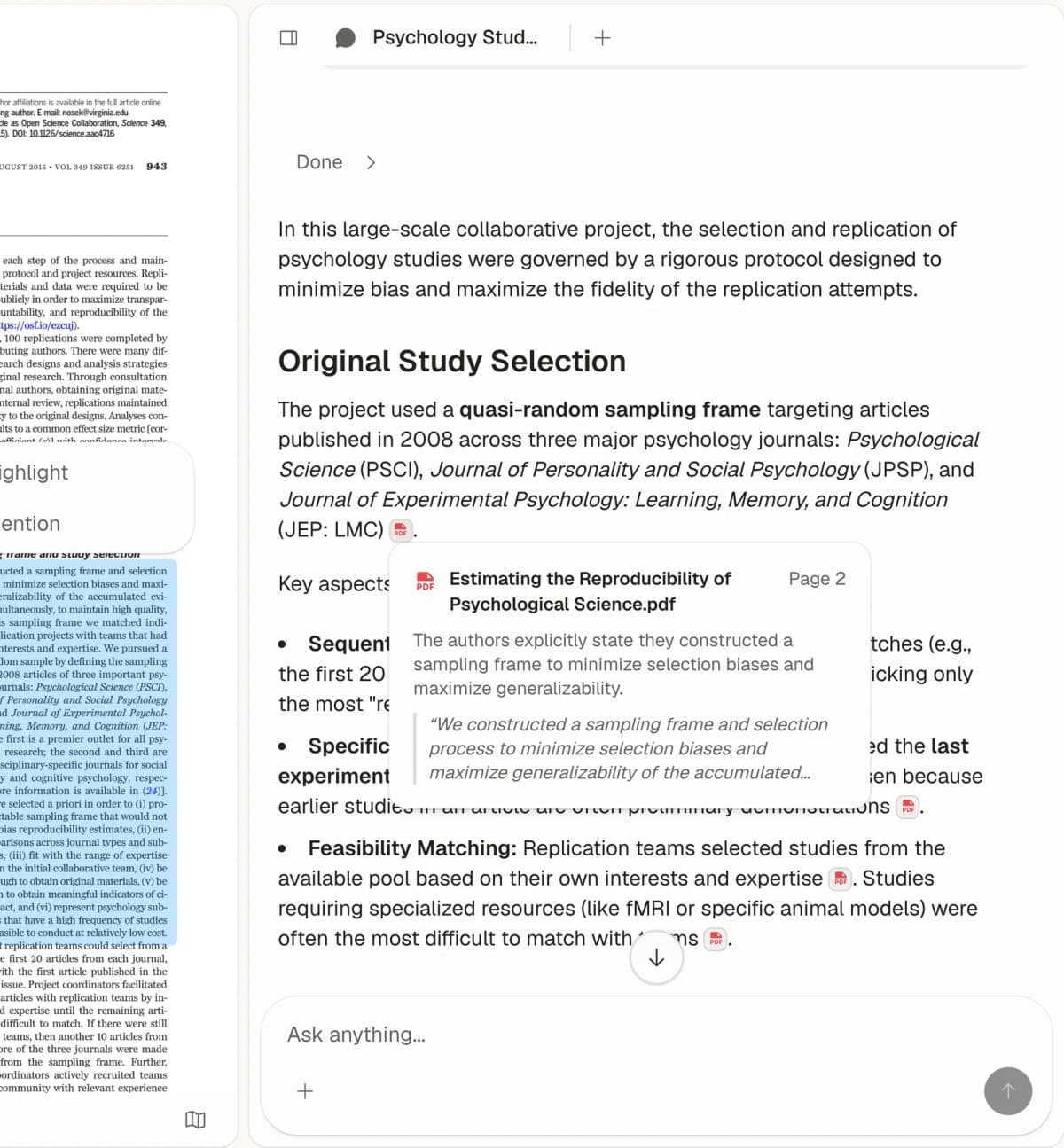
This view shows the verification step: compare the answer with the passage attached to its citation. It is a source-checking workflow rather than a general tutor or note-capture interface.
2. General tutor: ChatGPT
Start with ChatGPT when you need explanation, practice prompts, writing feedback, career prep, code help, or a study schedule. It is the broadest assistant in this set.
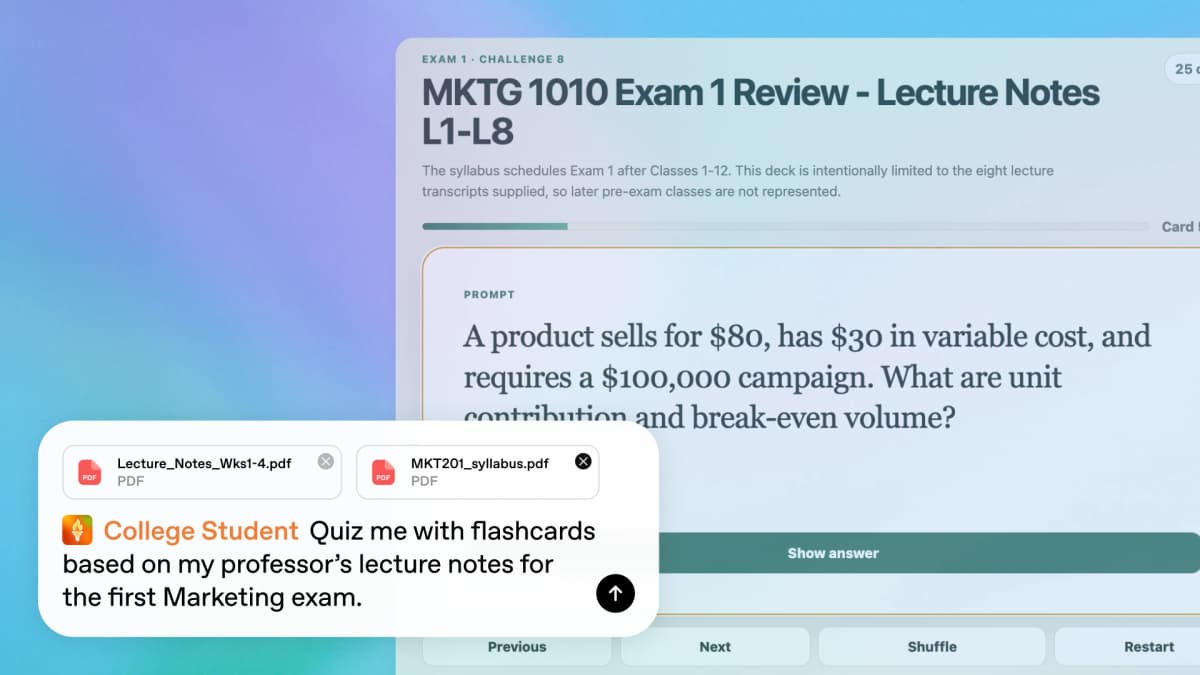
OpenAI's education example shows ChatGPT turning supplied class materials into practice. It is a product illustration, not an independent test of the generated flashcards.
3. Guided study loop: ChatGPT Study Mode
Switch into Study Mode when the material should be learned step by step. It is better than a normal chat prompt when you need questions, feedback, and understanding checks.
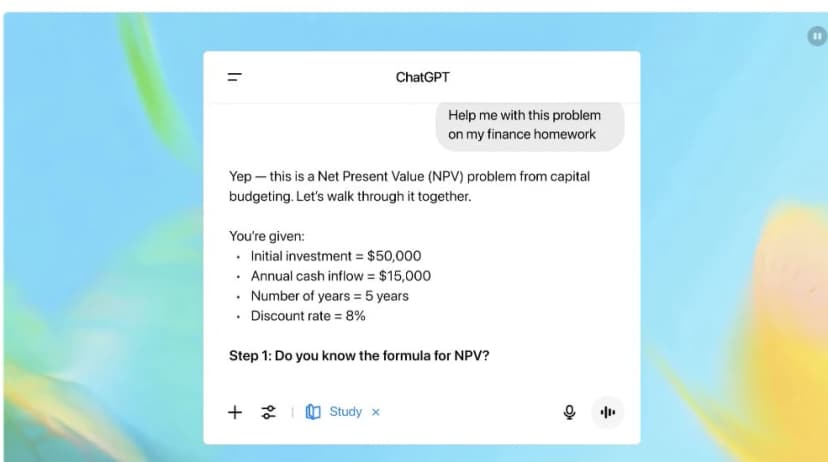
OpenAI's launch example shows the guided question format. It illustrates the interface, not independent evidence of tutoring accuracy.
4. Bounded source notebook: NotebookLM
Use NotebookLM when the source set is already fixed. That might be one course unit, exam packet, slide deck, or batch of readings.
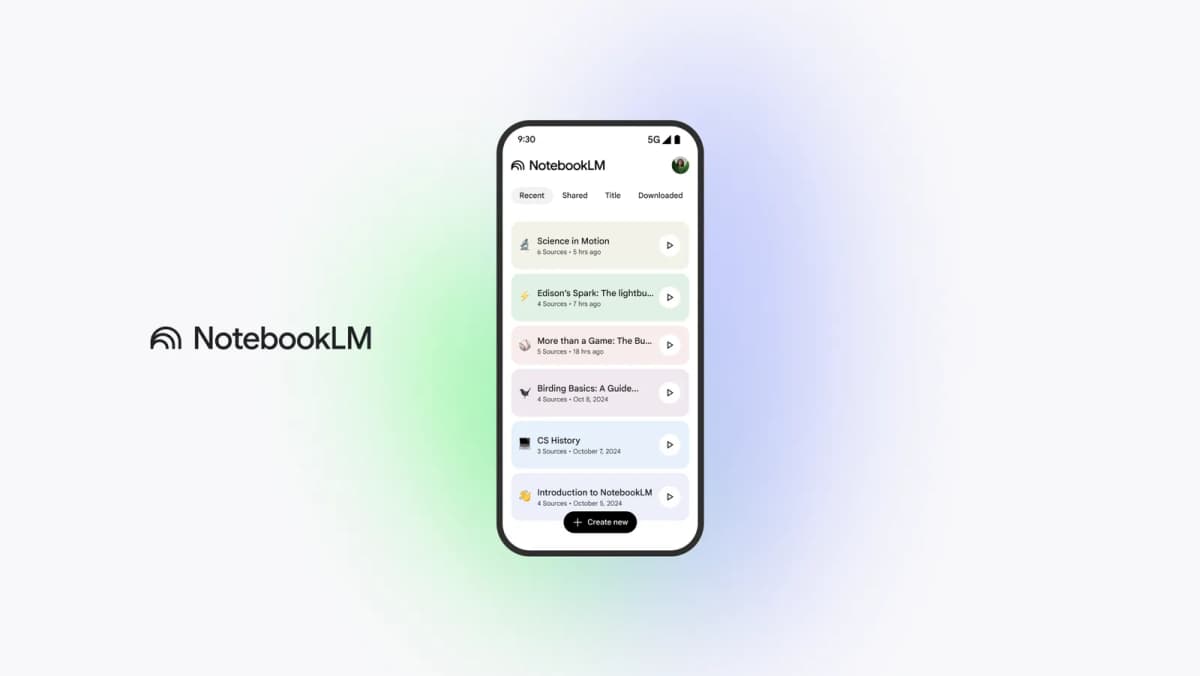
Google's official interface shows the bounded notebook model: students add a defined source set, then keep questions and source-grounded work inside that notebook. This is more suitable than a general chat when every answer should stay tied to assigned material.
5. Web source discovery: Perplexity
Use Perplexity when you need current source leads from the web. Treat the linked sources as starting points, then open them before you trust the claim.
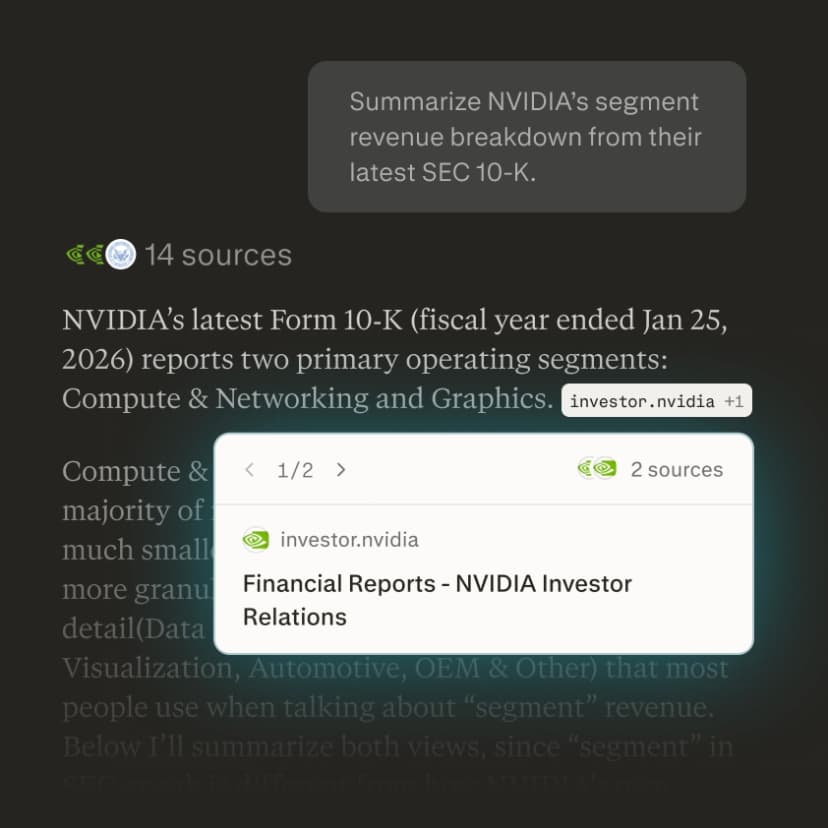
The official example makes the source path visible: a generated response is paired with a count and a clickable source card. It demonstrates the interface only; it does not establish that this answer is accurate or relevant to a student's assignment.
When Atlas fits
Use Atlas after ChatGPT has helped you understand the assignment and you now need to work with the actual materials. The risky part of student AI use is carrying an unchecked answer into a paper, lab report, slide deck, or exam prep sheet as if it came from the source.
The source-checking sequence
Use this workflow when sources matter:
- Explain: Ask ChatGPT to explain the topic at your level.
- Practice: Use Study Mode or quiz prompts until you can answer without looking.
- Collect sources: Gather the assigned readings, papers, slides, textbook excerpts, or web pages you are allowed to use.
- Compare evidence: Ask what the sources agree on, where they differ, and which source supports each point.
- Draft in your own words: Write from your notes and source checks. Keep pasted AI prose out of submitted assignments unless your course policy allows it.
- Check citations: Open the passage behind each key citation or source link.
- Preserve notes: Save the verified finding, source, page, quote, or caveat where you can find it later.
At the source-checking stage, ChatGPT and a source-grounded tool do different jobs. ChatGPT can help you understand the reading. A source workspace helps you keep the reading, question it, compare it with other material, and inspect the passage behind a claim. A citation link tells you where to check. It does not prove that the answer read the source correctly or caught the caveat your instructor expects.
A worked handoff
- Ask ChatGPT or Study Mode to explain the concept you are struggling with.
- Identify the sources that matter: the assigned article, lecture PDF, textbook chapter, and 2 papers you plan to cite.
- Add those materials to one Atlas project.
- Ask a grounded question. For example: "Which source gives the strongest proof that retrieval practice improves exam results?"
- Ask Atlas to separate the answer by source, proof, limit, and citation.
- Open the citation badges for the claims you might use.
- Read the highlighted passage and surrounding paragraph.
- Save the verified finding with the source and caveat before moving it into your notes or draft.
Atlas can answer questions against sources in a project, return citation badges tied to exact passages, and combine several sources for synthesis. The relevant source still has to be in the project and processed, and a citation still needs human review.
Recommendation for students
Yes, students should use ChatGPT when it helps them learn by doing. Use it to explain a hard topic, practice before an exam, get draft feedback, debug code, plan a week, or prep for interviews.
Study Mode is the better default when you want to build understanding before you see a finished answer.
Students should be more careful when ChatGPT touches graded work, citations, or source-dependent claims. Follow your course policy, write submitted work in your own words, and verify important claims against the original material.
The practical decision rule is:
- Use ChatGPT when you need an interactive tutor or thinking partner.
- Use Study Mode when you need practice and understanding checks.
- Pay for Go or Plus only when current limits interrupt work you do often.
- Use Atlas, NotebookLM, or Perplexity when sources become the center of the assignment.
- Use Atlas when you need a project-based place to ask grounded questions, compare sources, inspect citation passages, and keep verified findings.
ChatGPT can make studying faster.
The better student workflow makes it harder to confuse speed with understanding.
Compare your class sources in Atlas
Compare class readings, inspect citations, and save verified findings.