


Choose Perplexity when you need current web results, source links, and a fast scan of what is available. Choose Claude when you need to think through a problem, write, code, or work with files over several turns.
That is the practical answer to Perplexity vs Claude. Perplexity is closer to an AI answer engine. Its own help center describes real-time internet search, summaries, follow-up context, and numbered source citations.
Claude is a broader assistant. It can reason through text, write, code, search the web, and work with files. Its Projects feature can also keep chosen background material with an ongoing task.
The source-risk rule is the same for both. Visible citations and source links are inspection paths. They do not prove that every generated sentence is fully supported.
If a claim will go into a paper, memo, client deliverable, or decision, open the source and inspect the passage before relying on it.
After either tool, check the sources you plan to keep. Save them together when you need to compare them or use their claims later.
Use Perplexity to find sources.
Use Claude to reason through chosen files or drafts. Use a cited workspace such as Atlas to ask questions across imported sources and inspect the passages behind the answer.

Compare selected sources in Atlas
Compare selected sources and inspect cited passages before reuse.
Quick verdict
Use Perplexity when your first question is "what sources exist right now?" It is the better default for live web search, source links, recent questions, paper scouting, and quick page scans.
Use Claude when your first question is "help me think, write, code, or analyze this file." It is the better default for drafts, long reasoning, file review, project context, code review, artifacts, and revision over several turns.
Use both when search and drafting are separate jobs. Perplexity can find sources and map the current web. Claude can reason through the chosen files, draft a memo, or help write code. Keep the cited pages beside the draft until you have checked which source supports each final claim.
Add Atlas when the job changes from "answer this" to "keep these sources and verify what they support." It is useful when chosen PDFs, articles, notes, or reports need cited comparison and passage-level review.
Compare by workflow stage
Feature lists make Perplexity and Claude look more similar than they feel in daily use. Both can touch search, files, citations, and research. The better question is where the source task starts and what must survive after the answer.
Use this source-lifecycle rubric:
Discovery and inspection
- Discover: find current pages, papers, sources, terms, news, or starting points.
- Inspect: open the cited page or file and decide whether it deserves attention.
Reasoning, verification, and preservation
- Reason: compare claims, identify caveats, plan an argument, debug code, or reason through a hard question.
- Draft: turn selected material into prose, code, tables, slides, outlines, or a memo.
- Verify: check whether each important claim is supported by the cited source.
- Preserve: keep the source set, notes, and verified findings somewhere you can return to later.
Perplexity is strongest at discover and inspect when the open web is the starting point. Its product frame is search-first: ask a question, get a synthesized answer, and open the sources behind it.
Perplexity file uploads and Perplexity Projects extend the search session with uploaded context, project organization, connectors, sharing, and source selection. The center of gravity is still answer search.
Claude is strongest at reason and draft. Claude can search and research in supported contexts.
Its broader advantage is assistant execution: reading supplied material, changing a draft's structure, finding weak reasoning, producing code, and keeping a focused workspace through Projects.
Claude Projects let you keep chats, knowledge, and instructions together. Claude Research is built for deeper investigation when available on the user's plan and client.
Verification and preservation are separate jobs. Perplexity and Claude can both show citations in the right modes.
The reader still has to check whether a source supports the exact sentence.
If the same source set will support future writing or decisions, move it out of a one-off search or chat thread.
Perplexity vs Claude compared
This table uses official Perplexity and Anthropic docs for product claims. Secondary comparison pages only shape reader questions and common decision criteria.
Exact model names, usage limits, plan access, and file quotas change quickly. Use the table to choose the task stage before comparing paid plans.
For volatile facts, refresh current docs before quoting limits:
- Perplexity overview
- Perplexity file uploads
- Perplexity Projects
- Perplexity Pro Search
- Claude getting started
- Claude file uploads
- Claude Projects
- Claude Research
- Claude web search
- Claude artifacts
- Claude public product page
| Research task | Perplexity | Claude | Best fit |
|---|---|---|---|
| Current web discovery | Searches the internet in real time, summarizes sources, and exposes numbered citations. | Can use web search and Research in supported contexts, but search is one tool inside a broader assistant. | Perplexity when the first job is finding current sources quickly. |
| Citation and source inspection | Source links are central to the answer surface and help you open the pages behind a response. | Research and web-search workflows can return citations, but normal assistant work may not be source-visible. | Perplexity for fast source-visible lookup. Both require source inspection. |
| Files and document analysis | File uploads add session or project context for follow-up questions and can handle several media types within documented limits. | Stronger fit for reading, comparing, transforming, drafting from, and reasoning through supplied documents. | Claude for deep document analysis. Perplexity for file-informed search and Q&A. |
| Project context | Projects organize threads, files, instructions, sharing, connectors, and selected sources around a topic. | Projects create self-contained workspaces with chat history, knowledge, files, and instructions. | Tie. Choose by whether the workspace is search-first or assistant-first. |
| Reasoning and writing | Useful for source-backed summaries and quick explanations, but not primarily a drafting assistant. | Strong fit for careful writing, revision, multi-step reasoning, code, and iterative problem solving. | Claude. |
| Coding and artifacts | Can answer technical questions and create some outputs, especially in search or project contexts. | Better fit for code reasoning, refactoring help, and substantial generated artifacts or files. | Claude. |
| Deep research | Perplexity research modes run repeated web searches and produce source-backed reports. | Claude Research can investigate across web and connected/internal context where available. | Perplexity for web-search-led research. Claude when research is part of a broader reasoning or drafting task. |
| Source verification and preservation | Source links help inspection, but the answer can still overstate, blend, or miss context. | Claude can reason through selected sources, but important claims still need passage checks. | Add a cited verification layer after sources are selected. |
The table shows the core split in this comparison. Perplexity is usually the faster first stop for current-source discovery. Claude is usually the stronger partner once you know which material you want to reason through.
Search, citations, files, and reasoning
Search starts with Perplexity
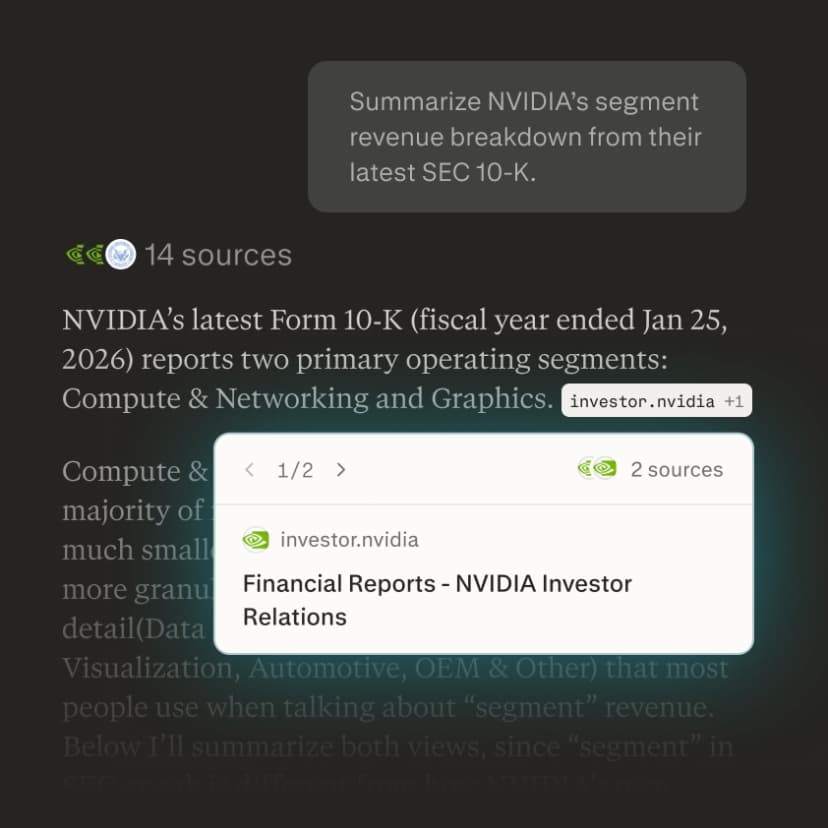
Perplexity's strength is that it starts with sources. Ask about a current market, policy change, product release, paper, or public question. Perplexity is built to search, sum up, and show the pages it used.
That makes it useful for scouting. It also makes weak answers easier to check. You can open the cited pages and see whether the answer relied on thin, old, or off-topic sources.
The limit is that citation visibility is not the same as source truth. A search answer can quote a relevant page and still overgeneralize. It can combine several sources in a way none of them fully supports.
It can also miss the better primary source because a secondary page was easier to retrieve. Use Perplexity for source finding and first-pass synthesis. Make the final claim only after source review.
Reasoning starts with Claude
Claude's strength is what happens after the source set is chosen. It is often better for tasks that need judgment across a document, a draft, a codebase, or a messy argument.
Give Claude a paper, notes, a transcript, or a memo. It can help find structure, narrow a claim, spot conflicts, draft text, or write code. Projects make that context easier to reuse.
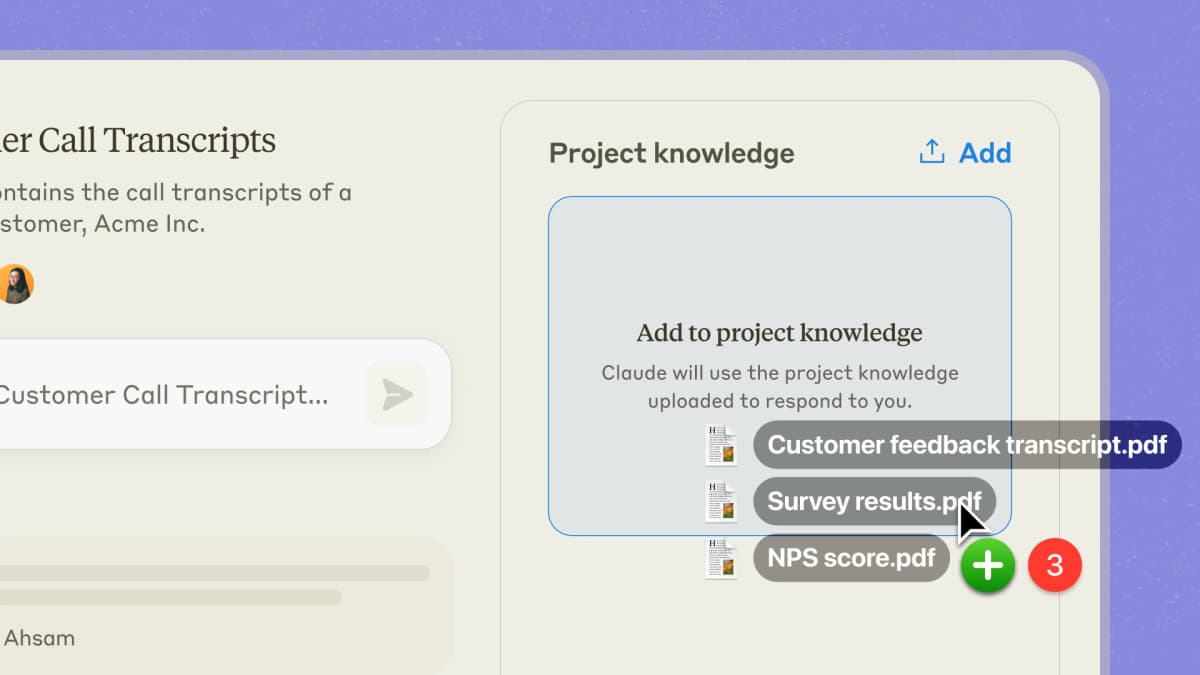
Claude now overlaps more with search than older comparisons suggest. Research and web search can produce current, cited answers when available.
That does not turn Claude into the same product as Perplexity. Perplexity still feels faster when the job is "find the web sources." Claude is stronger when the job is "analyze the material once I know what matters."
Files still need source checks
Files follow the same search-versus-analysis split. Perplexity file uploads help the answer engine use attached material in a session or project. Claude file and project flows are usually better when you want to transform, critique, draft from, or reason through the contents over several turns.
For high-stakes claims, neither tool removes the final check: open the relevant passage and decide whether the claim is supported.
Verify selected sources after either tool
Import selected sources
Use a cited workspace if the chosen sources need to become durable, citable project evidence after Perplexity or Claude.
The source must be imported into the Atlas project and processed before it can support a grounded answer.
Atlas can use PDFs, web pages, YouTube transcripts, paper search results, Markdown or text notes, and attachments. Check extraction quality, login walls, missing transcripts, and temporary files before you trust the result.
The proof surface is the same whether the source started in Perplexity or Claude:
- Add the selected papers, PDFs, articles, notes, or reports to one Atlas project.
- Ask a focused grounded question, such as "Compare these sources on the claim that retrieval reduces hallucination. Cite each bullet."
- Ask Atlas to separate sources when a blended answer is hard to audit.
- Open citation badges for the important claims.
- Read the cited passage and nearby context before reusing the answer.
Atlas is useful here because the verification job depends on a stable source set. Grounded answers are meant to use project sources and expose citation badges that link back to passages. Multi-source synthesis works best when the sources are in the same project, processed, and tied to a specific comparison question.
Inspect before reusing
For example, an analyst might use Perplexity to find current company pages, regulator notices, and market reports. Claude can help turn the material into a first memo and pressure-test the reasoning.
Atlas can keep the chosen PDFs and pages together when that verification layer is needed. It can answer a grounded question across them and expose the passage behind each important claim before the memo is shared.
Students and researchers can use the same sequence. Perplexity helps find papers and recent commentary. Claude helps summarize a file or draft a literature-review paragraph.
Atlas can help compare the selected papers and inspect citations before the finding becomes part of the final draft.
This proof table shows where source discovery ends and where cited verification begins.
| Stage | Perplexity or Claude role | Verification role |
|---|---|---|
| Find sources | Perplexity finds current pages, papers, and source links. | Import the sources worth keeping. |
| Work with files | Claude helps reason through chosen files or draft from them. | Ask a grounded comparison question across the imported set. |
| Reuse claims | Either tool can produce a useful sentence or memo paragraph. | Open citation badges and check the source passage before reusing the claim. |
Table 1: The table shows why cited verification works best after source discovery and drafting.
Atlas has limits worth naming. It cannot cite evidence that was never imported or processed. Broad questions can retrieve weak passages. A citation can be present but incomplete.
For important research claims, use Atlas as an evidence workspace. Ask narrow questions. Inspect citation passages. Revise claims when the source is weaker than the answer.
Use both without losing traceability
A strong combined process separates search, drafting, and proof.
Discovery to drafting
Start with Perplexity when you do not yet know which sources matter. Ask for official sources, opposing views, recent changes, or papers worth reading. Open the citations as you go. Save the pages and files that matter. Do not save only the answer text.
Move to Claude when you have selected material to understand or produce from. Ask it to compare 2 documents, rewrite a memo, critique a draft, reason through a decision, or generate code.
Keep the prompt tied to the selected sources and ask Claude to name uncertainty instead of smoothing it away.
Source check before publication
Before you share a memo paragraph, literature-review sentence, code comment, or client note, run a source check:
- Open the cited page, uploaded file, or source passage.
- Check that the passage supports the exact claim.
- Read nearby context for limits, scope, or disagreement.
- Revise the claim if the source passage is narrower than the generated wording.
- Save the source trail with the final note or draft.
Save enough detail that a future reader can repeat the check:
- Original URL or file name
- Source title
- Author or publisher
- Publication or update date
- Exact claim you plan to reuse
- Page, section, or passage
- Tool used to find or draft from it
- Citations you opened
- Remaining claim to verify
The move from a search answer to a polished draft can hide weak source support. A Perplexity answer may link to a page that does not support the full claim. A Claude draft may make the prose sound stronger than the source. Keep each page, file, or passage linked to the claim from the first search through the final draft.
For adjacent comparisons, see Atlas vs Perplexity, Atlas vs Claude, Perplexity vs ChatGPT, and Claude vs ChatGPT.
For broader tool research, see ChatGPT alternatives, NotebookLM vs Perplexity, NotebookLM vs Claude Projects, and NotebookLM alternatives.
Which should you choose?
Choose Perplexity if your main question is current, web-first, or source-discovery heavy. It is the better default for "what happened?", "what sources should I read?", "what are people citing?", and "show me the pages behind this answer."
Choose Claude if your main question needs reasoning, writing, coding, document analysis, artifacts, or sustained iteration. It is the better default for "help me understand this material," "turn this into a memo," "review this code," or "think through this decision with me."
Use both when the project moves from discovery into production. Perplexity can help you find candidate sources. Claude can help you reason and draft from selected material. Keep source links, uploaded files, and final claims checkable as the project moves from discovery to drafting.
Use Atlas when the source set needs to be preserved and verified. That usually means a paper, report, memo, policy decision, research note, or client deliverable where a future reader may ask, "Which source supports this?"
Perplexity is faster for source search. Claude is stronger once the files are chosen. Atlas helps verify and preserve the sources that matter after either tool has done its part.
Conclusion
Perplexity vs Claude is not a single winner comparison. It is a workflow choice.
Perplexity is search-first, source-visible, and strong for current discovery. Claude is assistant-first, reasoning-heavy, and strong for writing, coding, files, projects, and iterative drafting.
If you are still gathering sources, begin with Perplexity. If you already have material and need to think or draft, begin with Claude.
If the answer depends on sources you need to defend later, move the chosen files into Atlas. Inspect the citation passages before the claim leaves your workspace.
Compare selected sources in Atlas
Compare selected sources and inspect cited passages before reuse.