


SciSpace can help students find papers, read PDFs, start a review, and draft source-backed work. It does not remove your duty to check sources, follow class rules, and own the final claim.
Before you choose it, name the job. Are you finding papers or reading 1 hard paper? Are you comparing sources, studying class files, drafting with sources, or checking a claim before you submit?
As of July 5, 2026, SciSpace access is more than "free or paid." The SciSpace editor pricing page mentions a University Program path for students who cannot afford Premium. The SciSpace discount help page lists 30% discount codes for yearly plans. It says those codes do not apply to monthly plans.
Check those pages again before paying. Student access, coupon rules, credits, and plan limits can change.

Compare your sources in Atlas
Add selected papers, compare their claims, and inspect every cited passage.
Quick verdict
Choose SciSpace if you need to find papers, read a hard PDF, or start a review. It is also useful for writing and citation tools. It is the best default here when your school has access or your class starts with scholarly papers.
Choose Atlas if you already have papers, PDFs, or class files. Add the sources. Ask a focused comparison question. Open the citation badges. Check the passages before you save a note or draft claim.
Choose Elicit for paper search, screening, reports, or data pulls. Choose Consensus when you need a quick evidence direction for a yes/no research question. Choose NotebookLM when your main job is studying from class files.
What to look for in SciSpace
Start with the assignment before you compare features. A methods class, a review chapter, and a weekly reading response create different risks.
Student fit checks
Use these checks before choosing SciSpace or another tool:
- Access and price: Check school access. Check whether a yearly discount applies. Confirm the plan fits your deadline.
- Allowed use: Read the course AI policy before using AI writing, paraphrasing, citation, or summary tools.
- Paper search: Decide whether you need broad search, a DOI/title lookup, or a formal search process.
- PDF reading: Check whether the tool helps you understand methods, limits, terms, and cited passages in one paper.
- Comparing sources: You should be able to tell which source supports each claim.
- Citation checks: A citation helps only if you can open the passage and confirm that it supports the sentence.
- Export and handoff: Notes, tables, citations, and source lists should leave the tool in a format your class accepts.
- Final checks: The tool can speed up reading, but you still own the final claim, source, and class-rule decision.
Source-trust checks
The source-trust rule is similar. Use product pages for current price, access, and feature claims. Use school or library guides for caution. Use teacher examples for class work.
Reddit or complaint threads can show student fears about price, refunds, reliability, and citations. Product pages should settle current facts.
SciSpace and student research tools compared
This table routes the student job first. It is not a universal ranking. A tool can be strong for paper search. The same tool may still be wrong for lecture slides or a final paper.
| Tool | Best student job | Source boundary | Evidence traceability | Affordability caveat | Claims to refresh |
|---|---|---|---|---|---|
| Atlas | Compare selected class PDFs or papers and synthesize across sources with inspectable citations | Sources must be added to the Atlas project and finish processing | Citation badges link answers back to source passages for inspection | Use it when the source set matters more than broad discovery or discount access | Source import quality, citation relevance, and whether each answer is supported by the uploaded materials |
| SciSpace | Find papers, read PDFs, start literature-review work, and use writing-adjacent academic tools | Public scholarly paper workflows plus SciSpace writing and research surfaces | SciSpace surfaces citations and paper context, but students still need to open and verify important claims | Student access may involve university licensing, a yearly-plan discount, or a paid plan | Current student discount, free-license language, credits, plan limits, refund terms, and export limits |
| Elicit | Structured scientific search, extraction, reports, and systematic-review-adjacent work | Scientific papers and workflows built around search, screening, extraction, and reports | Elicit says AI-generated claims are supported with sentence-level citations | Pricing and usage pools can matter for students doing repeated reviews | Current plan limits, data sources, search coverage, and export/report limits |
| Consensus | Evidence-backed answers to research questions and yes/no claim checks | Peer-reviewed research database, with full text when available | Consensus Meter summarizes evidence direction only when enough relevant papers support it | Useful for quick evidence direction before the student reads and reviews the papers | Database coverage, full-text availability, medical-mode boundaries, and meter requirements |
| NotebookLM | Study from class files, assigned PDFs, lecture notes, and syllabi | User-provided files. Use another tool when you need scholarly paper search | Answers depend on the files you add and should be checked against source text | Often attractive when your school already uses Google tools | School availability, source limits, export needs, and whether paper search is required |
| Zotero | Collect, organize, annotate, cite, and share research sources | Reference manager and bibliography workflow for source libraries and citations | Traceability comes from your saved items, notes, attachments, and bibliography records | Free core tool. Storage and school setup may affect heavy PDF workflows | Storage needs, group-library rules, citation-style requirements, and whether AI synthesis is needed |
Table 1: Use the table to route the next student task. The right tool depends on the next step: search, reading, class study, source checks, or handoff to a draft.
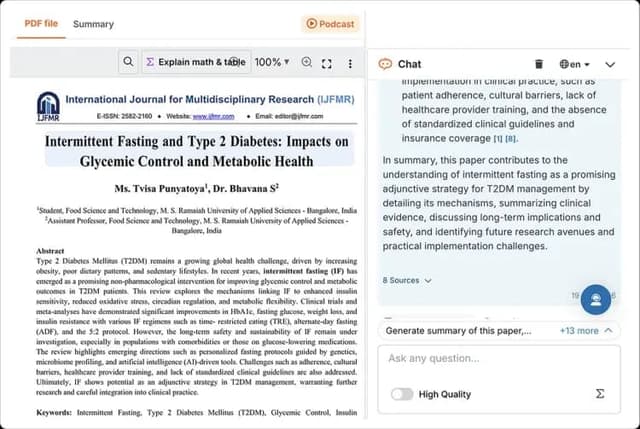
The paper remains visible beside the chat response, with eight source links shown below it. Open the linked passages and check them against the paper before using the answer in an assignment.
Where SciSpace helps students most
SciSpace is strongest when a student is still close to paper search and reading. The literature review page frames SciSpace around search, review tables, PDF reading, data pulls, exports, and citation tasks. Its AI Writer page covers drafts, templates, edits, and citations. The university page pitches bulk licenses for faculty and students.
In text form, the screenshot shows this PDF-reading workflow:
- Keep the paper open while asking a focused question in the chat panel.
- Use the response's source links to locate the passages behind its answer.
- Read those passages in the paper and check whether they support the response.
- Write your own conclusion and cite the paper under your class rules.
That makes SciSpace a reasonable first stop for these jobs:
- Finding papers: Search for papers and related work before you know which sources belong in the assignment.
- Reading 1 PDF: Use PDF help and chat to clarify methods, terms, and findings. Then mark up the paper yourself.
- Starting a literature review: Build a first map of themes, papers, and possible gaps, then verify each source manually.
- Writing with sources: Use writing support only inside your school's rules. Check generated citations before you submit any draft.
- Checking access paths: Look for school access or the current yearly-plan discount before using third-party coupon pages.
Most student AI research tools share the same limit. Speed does not remove the need to inspect sources. A review paragraph can look polished while blending papers that should stay separate.
A citation can point to a related paper without proving the exact claim. A class policy can allow summaries but ban AI-written prose. Build the paper-review process so those checks happen before the deadline.
Best SciSpace alternatives for students
Atlas for cited source checks
Choose Atlas when the paper set is already chosen or when your class files matter more than public search. Add your PDFs or papers. Wait for processing. Ask a focused grounded question. Inspect the citation badges before saving a source note.
This cited comparison helps with concrete questions. Which paper gives the strongest proof for this claim? Where do these 3 authors disagree? What limit appears across the sources?
SciSpace remains the place to check student discounts, AI Writer, paraphrasing, citation tools, AI detection, and broad paper search. Atlas keeps the comparison tied to sources you can inspect.
Use this sequence after selecting papers in SciSpace, Elicit, Google Scholar, a school database, or a class reading list:
- Add the class PDFs or selected papers to one Atlas project.
- Wait for source processing to finish, because unprocessed sources cannot support grounded answers.
- Ask a focused question, such as "Compare these 3 papers on sample, method, outcome, and stated limits."
- Ask for source separation if the first answer blends evidence across papers.
- Open citation badges for the important claims.
- Check whether each cited passage supports the answer. Check whether nearby text changes the meaning. Check whether the claim is too strong.
- Save a synthesis note that records the question, the verified points, disagreements, and follow-up reading.
Elicit for paper search
Choose Elicit when your student project looks like a formal review. It helps you search papers, screen them, pull fields, and make a report. Elicit's product page stresses paper search, reports, review support, saved papers, alerts, and sentence-level citations for AI claims. Check Elicit pricing before using it for repeated class projects.
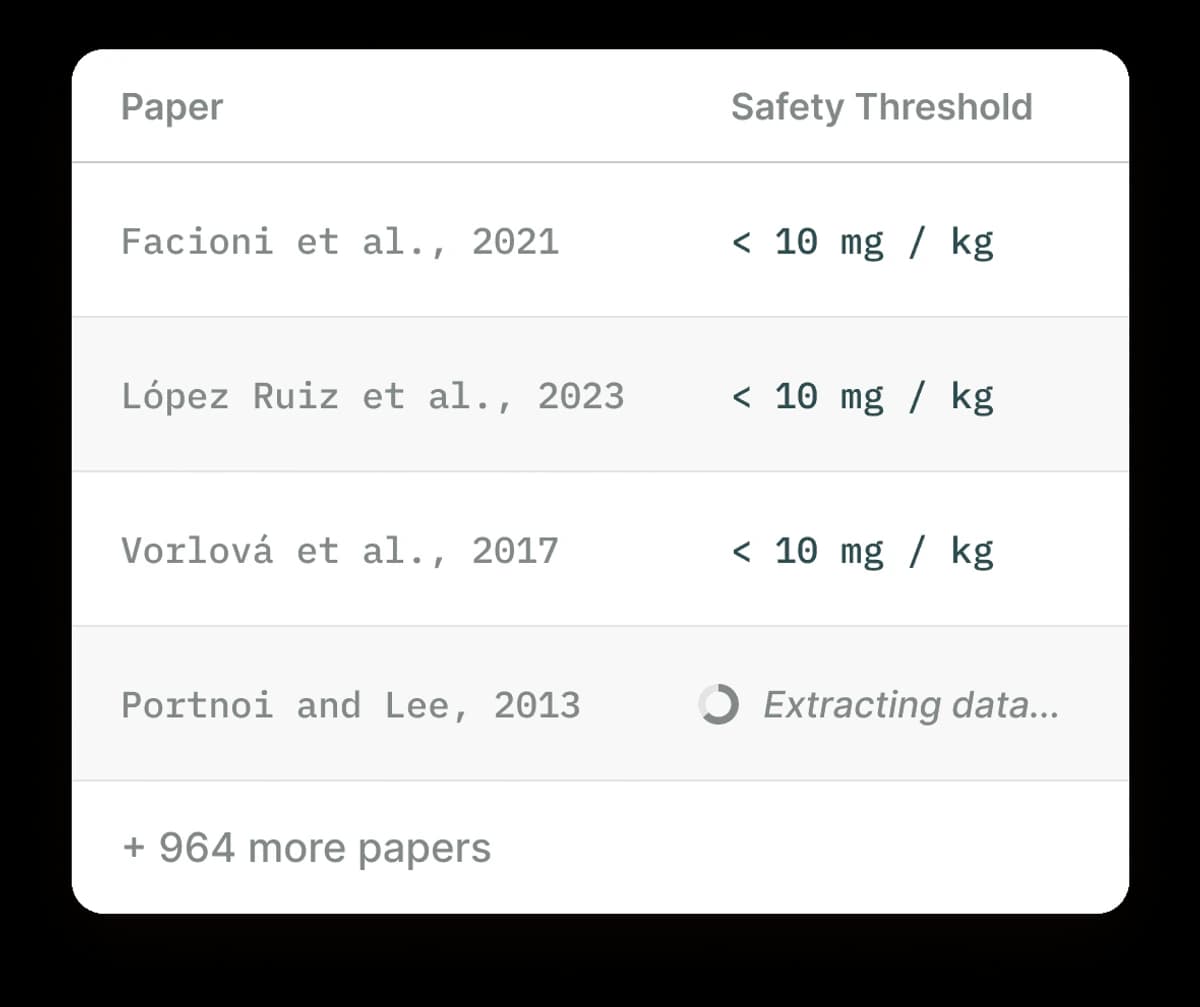
The Elicit screenshot shows a table workflow for review assignments. Paper rows sit beside extracted fields. A student can compare methods, outcomes, and notes across sources. Use that workflow when the assignment needs structured literature-review extraction across a source set. Check Elicit's current product page before you commit a class project to that workflow.
For a student, the practical question is whether Elicit's search process is worth the plan limits and learning curve. If your class needs a small set of readings, Elicit may be more tool than you need. If your class needs a defendable search, Elicit may fit. It can also help when the assignment needs paper data pulls.
Consensus for claim checks
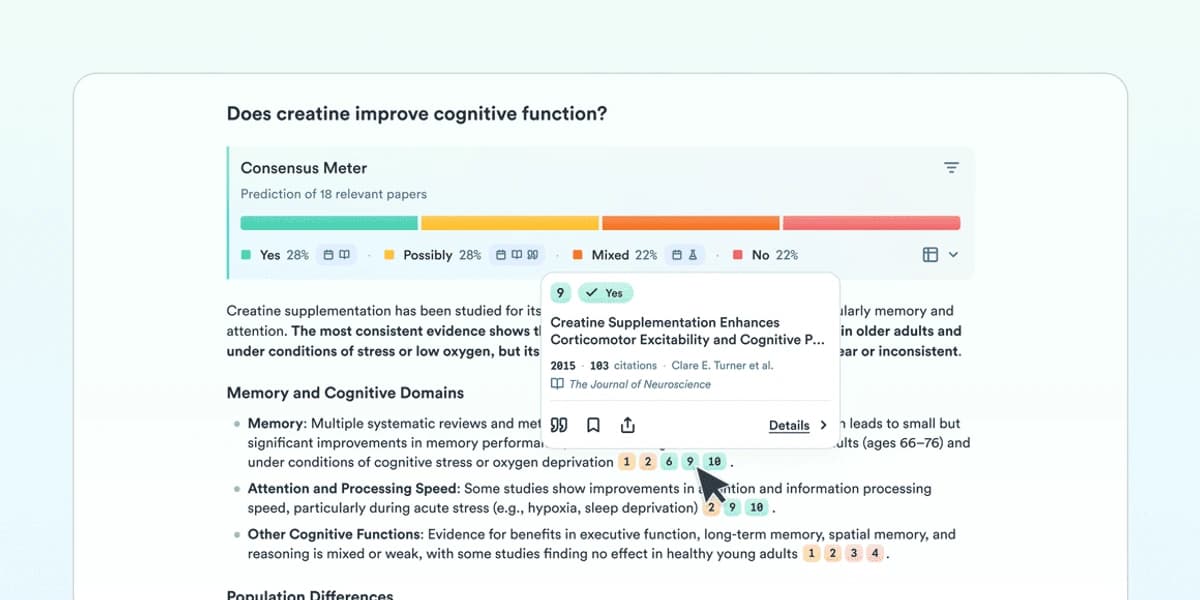
The meter summarizes the direction of papers returned for this question. Review its linked studies and the paper-count condition before drawing a broader conclusion.
Choose Consensus when your question is closer to "What does the evidence suggest?" than "Help me organize these PDFs." Consensus is useful for yes/no research questions. It can help you decide which papers to read first.
Do not treat the Consensus Meter as a final answer. The Consensus help page explains the database and meter rules, including peer-reviewed coverage, full-text limits, and the need for enough relevant papers. Use it to aim your reading, then open the sources.
NotebookLM for class study
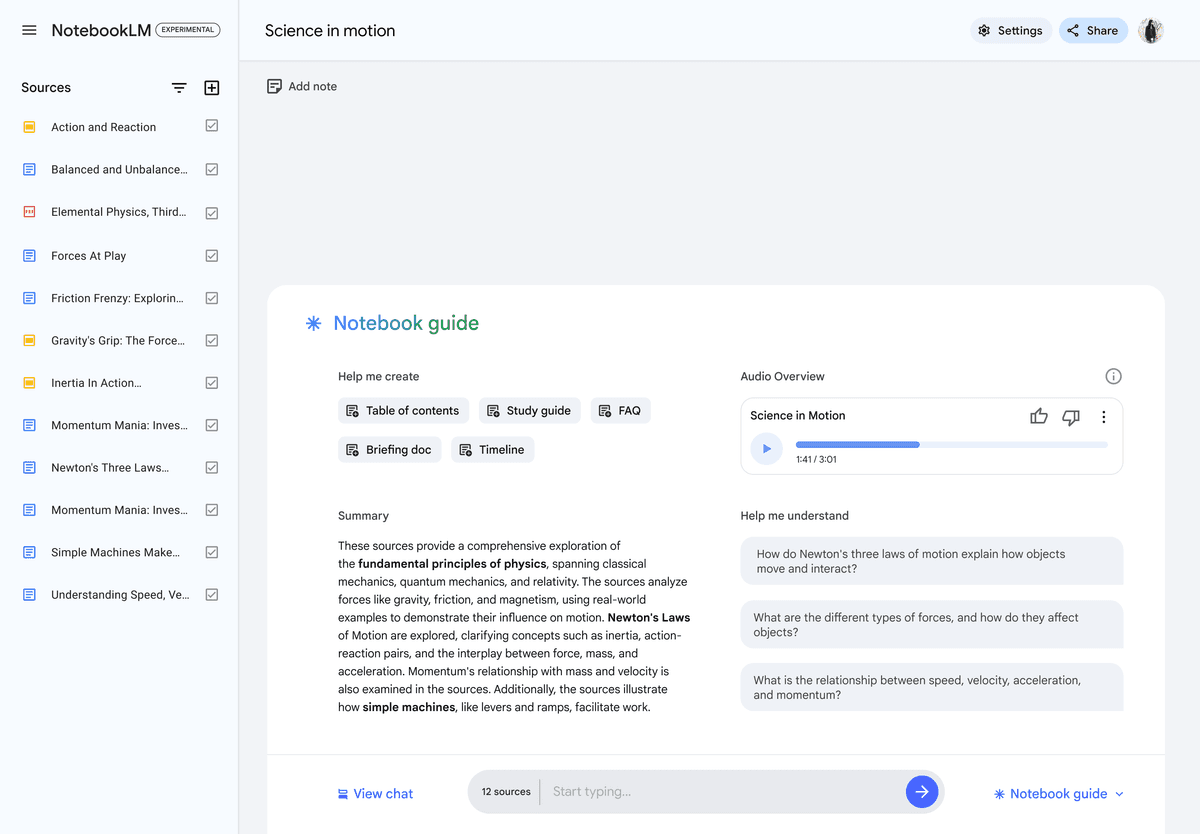
The listed source documents show how NotebookLM can keep a study session within selected class materials. Check answers against the cited source passages.
Choose NotebookLM when your source set is your professor's syllabus, lecture notes, assigned PDFs, and study docs. Google's education page frames NotebookLM as a tool for research, learning, summaries, study help, and uploaded files.
NotebookLM serves a different student job from SciSpace. Use it when you already have the files and need to study them. Add the syllabus, lecture notes, and assigned PDFs. Then ask about terms, themes, and likely exam points.
It is weaker as a SciSpace swap when the class starts with scholarly paper search or literature-review search.
SciSpace for broad academic research
Stay with SciSpace when you want the broad paper research bundle. That means search, review tools, PDF support, writing tools, citation work, and student or school access. If your teacher approves it or your school provides it, setup may be easier than stitching several tools together.
The tradeoff is dependency. If search, notes, writing, and checks all live in one app, test export first. Also check citations, refunds, and class rules before a major deadline.
Zotero for citation management
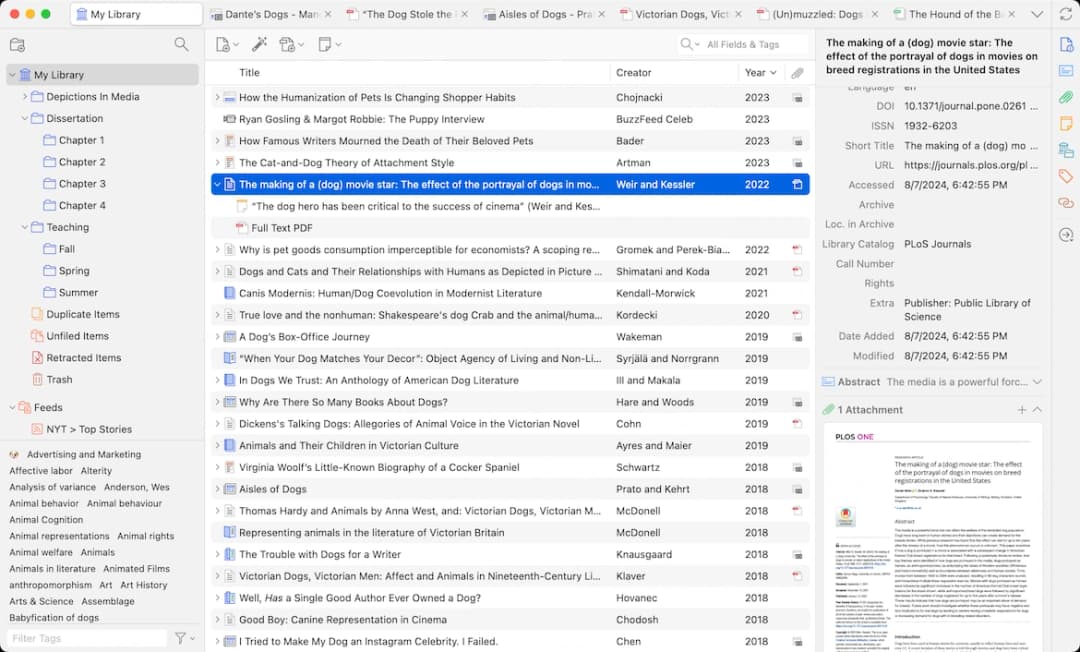
The library view combines collections and citation metadata for a selected paper. Confirm each record against the publisher source before citing it.
Choose Zotero when the problem is source storage and bibliographies. Zotero can sit beside Atlas, SciSpace, Elicit, Consensus, or NotebookLM. Student research still needs a source library, citation styles, notes, files, and exports.
When Atlas is the better student workflow
Atlas is the better fit when you already have papers and need a claim that still points back to proof.
That sequence matches Atlas grounding in practice. Answers depend on the sources inside the active project. Retrieval picks relevant passages, and citations connect the answer back to the source text.
Treat those citations as checks. If a citation is missing, weak, or tied to the wrong passage, narrow the question. Revise the claim before using it. For multi-source assignments, use Atlas synthesis after the source set is stable.
Atlas fits after search and first reading. Use SciSpace to explore, read, and start the paper review. Use Atlas when your selected materials need a cited synthesis that you can inspect line by line.
For a broader tool stack, see the AI tools for academic research guide. For a direct swap, use the SciSpace alternative comparison.
Which tool should students choose?
Choose SciSpace if you need a broad paper research assistant and current access works for your budget. It is the best fit here when the job begins with scholarly papers. It can also support reading, writing, citation, and review work.
Choose Atlas if your professor, advisor, or draft will force you to defend exactly which source supports each claim. Atlas fits after paper selection and before final writing. Use it when you need comparison, synthesis, and citation checks over your own source set.
Choose Elicit if your class needs structured scientific search or data pulls. Choose Consensus if you need quick evidence direction for a research question. Choose NotebookLM if you are studying from class files and do not need a scholarly search database.
If your comparison starts with Microsoft or GitHub AI instead of a paper database, use the Copilot for students guide to separate coding help, Microsoft 365 work, school-account chat, and source-grounded study workflows.
No tool should be the final authority on a submitted student claim. The best setup leaves you with sources you can open. It also leaves you with citations you can inspect and a final answer that matches your course rules.
Compare your sources in Atlas
Add selected papers, compare their claims, and inspect every cited passage.