
Atlas vs Heptabase (2026): An In-Depth Research Comparison
Atlas is a visual research workspace, while Heptabase is a visual note-taking tool with whiteboards and card-based notes. Compare deconstruction and citations.
- Byline

Summary
Use Atlas for citation-grounded research depth. Use Heptabase for visual thinking with whiteboards and card-based notes.
The updated comparison covers citation grounding, Knowledge Maps, whiteboard export, source migration, and visual workflow fit.
Atlas reconstructs paper arguments from sources, while Heptabase helps users arrange ideas spatially by hand.
Heptabase can remain the thinking canvas while Atlas handles research sources that need verifiable synthesis.
Note: We make Atlas. This comparison comes from the team that built it, so read it knowing that. Where Heptabase has the better answer for a given research job, the article says so plainly. See the table rows where Heptabase wins and the "When to choose Heptabase" section below. The goal is to give you the data you need to choose the right tool for the kind of work in front of you. Atlas is not the answer to every research job.
Atlas is a visual research workspace for people who need to understand a body of papers: a thesis, treatment choice, purchase brief, or literature review.
Heptabase is a visual note app. Its fundamental elements include cards and whiteboards, so the board becomes the place where you think.
Both tools can sit in a researcher's daily routine. The split comes after the first answer. Atlas turns each paper into a Knowledge Map, which maps the paper's claims and evidence. The mind map and knowledge graph comparison explains why source structure differs from a hand-built board.
Atlas also turns one project into a Semantic Map, so related sources sit near each other. It shows why a cited passage backs a claim, while sources, maps, notes, and chats remain scoped to that project.
Heptabase is strong when you want to place cards by hand, move them around, and export clean markdown. If you need answers you can defend in a thesis, brief, or high-stakes memo, Atlas is built for that source-checking job.

Atlas

Map the papers behind your Heptabase cards
Upload source PDFs and compare generated argument maps with your whiteboard.
Quick verdict: Atlas or Heptabase?
Choose Heptabase when arranging cards on a free-form board is how you think. Choose Atlas when uploaded papers must produce argument maps, cited answers, and one project-scoped research context.
The products can also work together. Keep Heptabase as the manual thinking canvas, then use Atlas for the source-heavy project that needs passage-level proof.
Criteria and comparison table
This comparison uses 5 criteria:
- Source depth: We checked whether the tool maps paper claims back to passages, because research notes are only useful if you can trust them later.
- Map type: We checked whether the map is built from source structure or arranged by hand. Atlas and Heptabase are both visual, but the map means different things.
- Corpus work: We checked whether the current project's papers, maps, notes, and chats share a bounded evidence base.
- Daily fit: We checked whether the daily loop fits how users think and write. A strong tool still fails if that loop feels wrong.
- Exit path: We checked whether source files and notes can move out. Serious research should not be trapped in one app.
Search results also compare Heptabase with Obsidian, Notion, and Fabric. Those tools are useful reference points. Obsidian is the local markdown and plugin-heavy option. Notion is the broad team workspace. Fabric is a web and AI memory workspace.
For a broader replacement shortlist, compare the main Heptabase alternatives before narrowing to this direct choice. Atlas is narrower than all 3 because it is built for source-grounded research maps and cited answers.
The table applies those criteria to citation grounding, generated and manual Knowledge Maps, whiteboard layout, card-based notes, source migration, and synthesis depth.
| Atlas | Heptabase |
|---|---|
| Citation grounding: shows the claim, the source passage, and why the passage supports the claim. Atlas wins when the cite must be defended. | Citation grounding: lets highlights and source links live on cards, but does not show the same claim-level proof. |
| AI-generated vs. manual Knowledge Maps: Atlas builds a map from each uploaded paper's claims, evidence, and links. Atlas wins for source-built maps. | AI-generated vs. manual Knowledge Maps: Heptabase users create cards and arrange them into their own visual structure. Heptabase wins for hand-built maps. |
| Whiteboard spatial layout: Atlas offers structured Knowledge Maps and Semantic Maps. It has no free canvas. | Whiteboard spatial layout: Heptabase lets you place cards, draw arrows, and group ideas by hand. Heptabase wins here. |
| ✗ Free-form whiteboard canvas | ✓ Free-form whiteboard with cards, arrows, and hand-built groups |
| Card-based notes: notes sit inside Atlas source projects and maps. | Card-based notes: cards are the core unit of Heptabase. Heptabase wins here. |
| Source migration: Atlas accepts exported markdown notes and the PDF files behind a Heptabase board. Source files move well into Atlas. | Source migration: Heptabase exports markdown files plus attachments, while board layout stays in Heptabase. |
| Synthesis depth: Atlas keeps maps, cites, notes, and chats inside one project. Atlas wins for bounded cited synthesis. | Synthesis depth: Heptabase keeps research close to cards and whiteboards. This is better for manual spatial thinking. |
| Best daily loop: upload sources, inspect maps, ask cited questions, and verify passages. | Best daily loop: read, highlight, make cards, and arrange a board. |
Table 1: Atlas vs Heptabase feature comparison across citation grounding, Knowledge Maps, whiteboard layout, card-based notes, source migration, and synthesis depth.
How is Atlas different?
Heptabase and Atlas overlap at the surface. Both help you read, save, and reason over sources. They differ on 3 points that decide whether the output is easy to defend.
Visual maps for papers and projects
Atlas builds 2 maps as you read. A Knowledge Map turns one paper into claims, evidence, definitions, and links between them. You see the paper's spine first, then click into the passages that support it.
A Semantic Map turns a project into a topic map. Sources, notes, chats, and cites cluster by theme. You can view the same project from a new angle without reading it from scratch. The research-notes guide covers the underlying source organization.
"It's like an ultimate GPT. I can finally see what I've read." Kyle Lao, CEO & Co-founder of MenSC Labs
Heptabase does not build a claim-and-evidence map for each paper. It also does not re-map a full project by topic angle. If you have spent an afternoon trying to recover a paper you read three weeks ago, the Knowledge Map is the Atlas surface that pays off first.
Claims tied to source passages
The AI research problem goes beyond invented text. A weak citation may sit beside a claim that its passage does not prove. Atlas shows the claim, the passage, and a short note on why the passage supports it.
You can open the source paragraph and read the highlighted lines in context. The Atlas verifiability benchmark explains the passage-level check.
Atlas checks this with the H/V ratio, or bad cites over verified cites. Atlas targets H/V < 0.1 on its grounding benchmark. Heptabase may show cites or source links, but it does not show the same claim-level proof.
That difference may not matter for casual questions. It matters for a thesis line, legal brief, or treatment note.
Project-scoped research context
Atlas keeps sources, notes, chats, Knowledge Maps, and the Semantic Map inside the project where they were created. Those surfaces share one evidence base for the research question.
A separate Atlas project has separate sources and context. That isolation prevents unrelated evidence from entering a cited answer. Heptabase takes a different approach through cards and whiteboards.
Choose Atlas when maps, notes, and cited chat should share one bounded source set. Choose Heptabase when you want to arrange ideas across boards by hand.
Comparing Atlas and Heptabase: feature comparison
Both products touch a researcher's daily routine, but they sit in different lanes. Atlas covers paper maps, project maps, cited AI answers, and long-term context. Heptabase covers cards, whiteboards, PDF notes, and visual layout.
Heptabase is broader for hand-built boards. Atlas is deeper when the source proof matters. Heptabase's getting-started guide documents the card-and-board model.
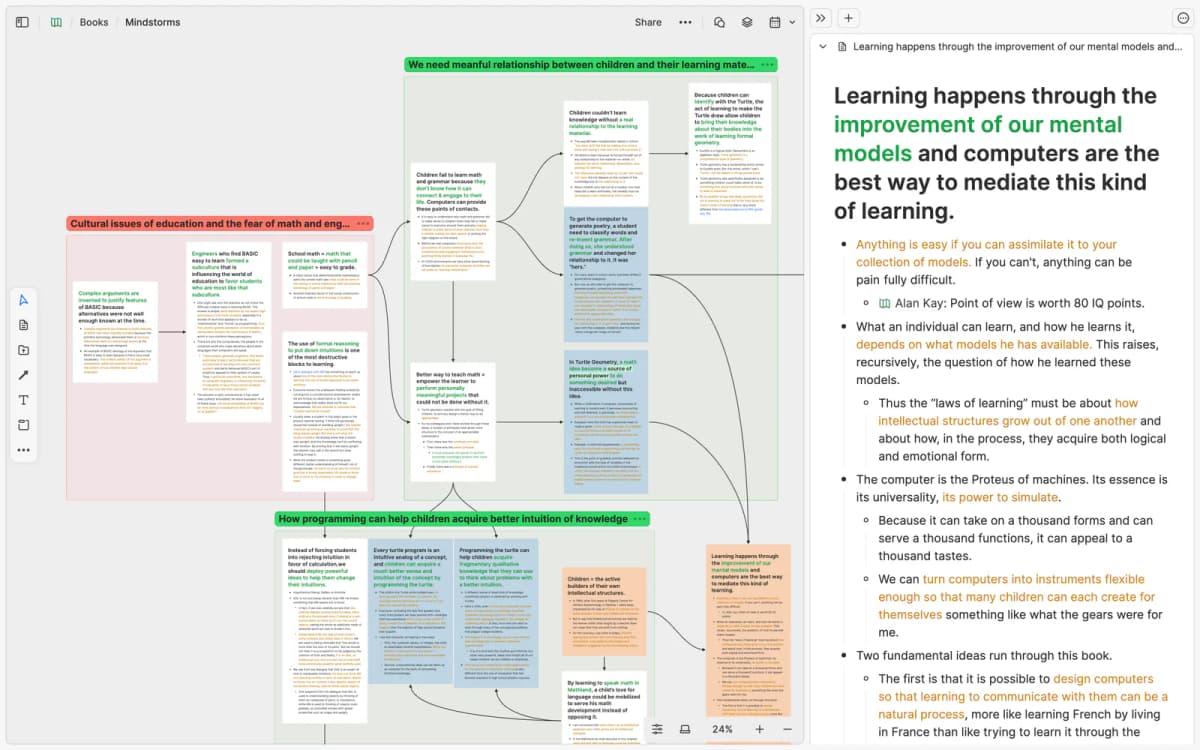
Heptabase's official homepage image supports the spatial-thinking comparison by showing cards placed on a visual whiteboard.
The sections below unpack those rows. Each table includes at least one place where Heptabase wins or ties.
Use the matrix above as the decision frame. The detailed rows below show where each product wins in actual research work.
Paper deconstruction (Knowledge Map)
The Knowledge Map is Atlas's per-paper surface. It deconstructs a single paper into a multi-level argument structure with labeled relations between claims. Node text comes directly from source passages, and breadcrumbs let you move from the high-level thesis to a specific paragraph.
| Atlas | Heptabase |
|---|---|
| Multi-level argument structure ✓ | Card-based notes per paper with PDF highlight extraction |
| Labeled relations (motivates, causes, enables) ✓ | ✗ |
| Faithful-to-source node text ✓ | ✗ |
| Hierarchical breadcrumbs ✓ | ✗ |
| ✗ | Whiteboard with cards arranged spatially ✓. Free-form canvas for hand-built layouts. Auto-deconstruction is a different surface. |
Table 2: Atlas vs Heptabase on Knowledge Map and paper deconstruction capabilities.
Good to know: The bottom row belongs to Heptabase. Atlas does not ship that surface. Topic chips can orient you quickly. The Knowledge Map adds the paper's argument when you need to recover it weeks later.
Project view (Semantic Map)
The Semantic Map is Atlas's per-project surface. It projects sources, notes, chats, and citations into a spatial view where related items cluster by topic. You can view the same source set under a different angle without ingesting it again.
| Atlas | Heptabase |
|---|---|
| Spatial embedding of sources + notes + chats ✓ | Whiteboard with linked cards |
| Auto-labeled topic clusters ✓ | ✗ |
| Topic-angle re-projection ✓ | ✗ |
| One project-scoped evidence view ✓ | ✗ |
| ✗ | Spatial arrangement of cards across boards ✓. Flexible card placement across multiple boards. Source-level reasoning is a different surface. |
Table 3: Atlas vs Heptabase on project corpus view and Semantic Map capabilities.
Good to know: Heptabase's strength on that row is genuine. If your work depends on it, that's the boundary. The Semantic Map's payoff is when 200 papers stop being a folder and start being a corpus you can re-project under different topic angles without re-reading.
Citation-grounded answers
Atlas produces claim-source-justification triples. Each answer shows the claim, the passage, and a short explanation of why the passage supports the claim.
You can jump to the source paragraph, read the highlighted sentences, and check whether the reasoning holds. Heptabase's PDF annotation guide documents its highlight-to-card workflow.
| Atlas | Heptabase |
|---|---|
| Claim-source-justification triples ✓ | Card-to-highlight backlinks |
| Reasoning traces (why this passage supports this claim) ✓ | ✗ |
| Jump-to-source with passage highlight ✓ | ✗ |
| H/V ratio < 0.1 benchmark published ✓ | ✗ |
| ✗ | PDF highlight extraction onto cards ✓. Pull key passages directly onto cards. Claim-source-justification triples are a different surface. |
Table 4: Atlas vs Heptabase on citation-grounded answers and source evidence quality.
Good to know: Both tools can carry links to sources. Atlas also explains why a passage justifies a claim. That extra check may be unnecessary for everyday questions, but it matters for a thesis sentence or evidence-heavy paragraph.
Literature-grounded annotations
Atlas auto-annotates each paper on ingest. Citations inside the paper become first-class objects. Atlas resolves the cited source when it is open-access, pulls the relevant passage, and shows how a citation builds the paper's argument across sources without leaving the document.
| Atlas | Heptabase |
|---|---|
| Auto-annotate on ingest ✓ | PDF highlights surfaced as cards |
| Multi-citation synthesis (how citations build the argument) ✓ | ✗ |
| Resolve cited sources (open-access) ✓ | ✗ |
| Exact passage / page / paragraph anchors ✓ | ✗ |
| ✗ | Card mind map view per whiteboard ✓. Visual layout of cards per board. Argument deconstruction depth is a different surface. |
Table 5: Atlas vs Heptabase on literature-grounded annotations and citation chain resolution.
Good to know: Literature-Grounded Annotations resolve citations inside the paper you're reading. When a paper cites a source that's open-access, Atlas pulls in the cited passage. It is not a web-grounding feature. It is a way to see how a single paper builds its argument across the sources it cites.
Project-scoped context
Atlas keeps citations, notes, maps, and chats inside one project. A separate project has a separate evidence base.
| Atlas | Heptabase |
|---|---|
| Project-scoped research context ✓ | Per-whiteboard organisation ✓ |
| Sources, notes, maps, and chats share one evidence base ✓ | Cards can appear across whiteboards ✓ |
| Separate projects isolate unrelated context ✓ | Whiteboards can organize related cards ✓ |
| Sources must be added to each relevant Atlas project | Markdown export moves notes and attachments ✓ |
| ✗ | Markdown export and offline mode ✓. Clean export and works offline. Citation grounding is a different surface. |
Table 6: Atlas vs Heptabase on project-scoped context and whiteboard organization.
Good to know: Atlas's project boundary is deliberate. Put sources that answer the same question together, and start a separate project when the evidence should remain isolated.
Price comparison
Atlas is a paid product. There is no long-term free plan. The short sample includes 10 sources and 5 lifetime AI chats. After that, Atlas Pro is $20/mo or $204/yr. The paid tier includes unlimited sources, unlimited AI chats, Knowledge Maps, Semantic Maps, and claim-level source proof.
| Atlas | Heptabase |
|---|---|
| Free: ✗ (evaluation sample only: 10 sources · 5 lifetime AI chats) | Free: 7-day free trial, no perpetual no-cost plan ✓ |
| Pro: $20/mo or $204/yr (unlimited sources · unlimited AI chats · all features) | Paid: Plus $11.99/mo or $107.88/yr |
| Pro unlocks Knowledge Map, Semantic Map, and claim-source-justification ✓ | ✗ |
Table 7: Atlas vs Heptabase pricing comparison across free trials and paid tiers.
To test the source-built side of the decision, map the papers behind your Heptabase cards in Atlas. Upload one source and compare its generated argument structure with the board you arranged by hand.
When to choose Atlas vs Heptabase
- Want paper structure deconstructed multi-level? Go with Atlas. (Knowledge Map)
- Want answers that explain how each citation justifies the claim? Go with Atlas. (claim-source-justification)
- Want one project-scoped evidence base for maps, notes, and cited chat? Go with Atlas.
- Want a whiteboard with cards arranged spatially for visual thinking? Go with Heptabase.
- Tied: extracting highlights from PDFs onto a visual canvas. Both work. Heptabase is built for the card-on-board loop. Atlas is built for the Knowledge Map loop. The gap opens once you build a corpus you will return to.
Choose based on who should create the structure. Heptabase gives you manual control over the board. Atlas extracts the argument structure from uploaded sources and keeps each claim tied to a passage.
For a mixed workflow, build the visual outline in Heptabase and move the source-heavy project into Atlas when proof becomes necessary. Review Heptabase's AI workflow if its card context already covers your question-answering needs.
Recommendations by user type
- PhD researchers: Choose Atlas for long literature reviews. Knowledge Maps help in the reading phase. Claim-level source proof helps when thesis lines need to hold up.
- Students doing thesis work: Choose Atlas for dissertations, theses, and literature reviews. The map saves time early, while the project's sources, maps, and cited chats keep the relevant work easy to find.
- Knowledge workers: Choose Atlas when source proof and reuse matter. Choose Heptabase when a free board of cards matters more.
- High-stakes personal research: Choose Atlas for medical, legal, or major purchase research that you may need to defend. Heptabase is a fine starting point, but Atlas is stronger once proof matters.
Heptabase is the better fit when the board layout carries the meaning. Atlas is the better fit when the source argument should be mapped and tied back to passages. The choice is not visual versus nonvisual work. It is who creates the structure: you on a canvas, or the sources through Atlas maps.
The personal knowledge management guide explains how either choice fits into a broader system.
Migration and worked example
Bringing Heptabase sources into Atlas
Heptabase is built around cards and boards. Cards hold notes, highlights, or PDF excerpts. Boards are the canvases where you place cards, draw arrows, and group ideas.
Exports leave Heptabase as markdown files plus an attachments/ folder with the PDFs you imported. Test the move with a small board before transferring a full archive.
Card text, daily notes, PDF files, and plain-text highlights move well. Each card can become a source paragraph or a note in Atlas. Each PDF can be uploaded again, then Atlas builds a Knowledge Map from it. The chat-with-PDF guide covers the source-checking step after upload.
Board layout, card position, arrows, grouped sections, and the per-board mind-map view do not move. Atlas uses structured Knowledge Maps and Semantic Maps. If your layout carries meaning, restate that meaning in Atlas notes.
Most moves require you to re-upload the PDFs, paste the card markdown, and let Atlas map the corpus from the sources.
Eight-paper literature-review example
Imagine the same job in both tools. You have 8 papers on transformer interpretability. You need a 600-word prior-work section for a paper on sparse autoencoders. The section must cite each source and hold up when a reviewer checks the cites.
The Heptabase sequence starts with cards. You import each PDF, read it, highlight key passages, and pull each highlight onto a board. Then you cluster cards by method. Probing might sit in one area, dictionary learning in another, and circuit research along the bottom.
You draw arrows and write a synthesis card in the center. The board becomes the thinking surface. When you write, you translate that board into prose. You control the layout, while source logic still requires a reread of the highlights.
The Atlas sequence starts with maps. You upload the same PDFs, and Atlas builds a Knowledge Map for each one. You skim the maps to find the lineage, then ask for a cited summary of how each paper treats probing baselines.
Atlas returns claims with passages and short proof notes. You open the cites you plan to use, check the highlighted lines, and paste only verified prose into your draft. The Semantic Map shows how the 8 papers cluster by topic, so a missing angle in your own study is easier to spot.
The two workflows can produce a good section. Heptabase rewards a small corpus you have processed by hand. Atlas rewards a larger corpus where you need proof for each cite.
Heptabase fit and objections
Nearby visual and PKM tools
Obsidian, Notion, Fabric, and Confluence show up often around this search because many buyers are choosing the form of their whole knowledge system.
Obsidian is the best fit when local markdown files, plugins, and long-term ownership matter most. It is powerful for users who want to tune their own system. The Heptabase vs Obsidian comparison covers that visual-PKM decision.
Obsidian is less direct when the job is to turn papers into cited answers. You can build a strong research setup in Obsidian, but you usually assemble more of the research stack yourself.
Notion is the best fit when notes, docs, tasks, and shared pages need to live in one broad workspace. It is easier to share with collaborators than a personal whiteboard tool. The Notion AI alternatives guide covers nearby AI-assisted options.
Notion is not a paper-first research system. For literature review work, it often becomes the place where final notes live. Source proof checking is a different job.
Fabric is closer to an AI memory workspace. It can be useful for saving web pages, files, and snippets from daily work. The best second-brain apps guide compares this wider memory category.
Fabric differs from Heptabase's board-first thinking and Atlas's source-grounded paper maps. If your core need is broad memory capture, Fabric deserves a look. For defensible synthesis from PDFs, Atlas and Heptabase are the more direct comparison.
Confluence is the shared knowledge-base reference point. It is the better fit for policy pages, project documentation, meeting decisions, and company permissions.
Confluence provides neither Heptabase's visual card board nor Atlas's paper-first research map. Bring it into the decision when the output must become shared documentation. Keep Atlas or Heptabase in view during source analysis and thinking.
When Heptabase is the right call
Heptabase is the right tool in four cases.
First, choose it when your thinking is board-based. You place ideas on a 2D canvas, draw arrows, and move clusters as your view changes. Atlas maps are structured rather than free-form boards.
Second, choose Heptabase when the core loop is highlight, drag to card, and place the card next to a related idea. Atlas extracts cites and builds maps, but it is not built around manual card placement.
Third, choose Heptabase for free-form idea work outside papers: brainstorms, mood boards, and projects where the board itself is the unit of thought.
Fourth, choose Heptabase for a small corpus you will not revisit. Atlas pays off when the source set needs Knowledge Maps or cited answers. If the board only needs manual arrangement, Heptabase is lighter.
Common objections and edge cases
"I already have 200 cards in Heptabase. Should I keep both?" Often, yes. Keep old boards in Heptabase if the layout already carries meaning. Start new source-heavy work in Atlas. There is no integration, so sources must be uploaded to each tool. The workflows can still stay clear: Heptabase for boards, Atlas for source proof.
"My PDFs have hand-drawn diagrams or poor OCR. Does that affect either tool?" Yes. Both tools depend on the text layer for many tasks. Heptabase lets you screenshot a diagram and place it on a card. Atlas needs readable text to build a fuller Knowledge Map. For scans or slide decks, OCR the files before uploading them.
"I write in a language other than English. Does the Knowledge Map work?" Atlas is strongest on English sources. Non-English sources work, but map quality can vary. Heptabase is more language-neutral because you create the cards yourself. If most of your corpus is non-English, test both tools on your own PDFs first.
Atlas
Map the papers behind your Heptabase cards
Upload source PDFs and compare generated argument maps with your whiteboard.
Frequently Asked Questions
Atlas explains the link between each claim and its evidence. Every answer is rendered as a claim-source-justification triple: the claim, the passage it draws from, and a one-sentence explanation of why the passage supports the claim. You can click into the source paragraph and read the highlighted sentences in context. Heptabase may cite at the sentence level or link to sources, but it does not render the reasoning trace that connects the claim to the passage. That trace is the move when you need to defend a thesis sentence, a brief paragraph, or a treatment-plan summary. Read more about how Atlas grounds claims in Verifiable AI Research (2026).