
Atlas vs Miro (2026): An In-Depth Research Comparison
Atlas is a visual research workspace, Miro is a collaborative whiteboard. Compare paper deconstruction, citation grounding, and project-scoped context.
- Byline

Summary
Use Atlas to map research sources and check answers against cited passages. Use Miro to run workshops and draw together on a shared board.
The comparison covers source links, research maps, sticky-note exports, moving work between the tools, and working with a team.
Atlas keeps findings tied to PDFs, web pages, and notes. Miro helps people arrange their own ideas on a blank canvas.
A research team can plan together in Miro, then use Atlas to compare sources and check the claims in its final work.
Atlas is a visual research workspace. It helps people understand a set of sources for work such as a thesis, a health choice, a major purchase, or a literature review.
Miro is a shared whiteboard. Its mapping guide covers its large canvas, templates, live group work, and exports for workshops and planning.
Choose Miro when the board itself is the result, as it is in a workshop, brainstorm, journey map, review, or live planning session. Choose Atlas when a map helps you understand papers and notes. Atlas builds a Knowledge Map from one source and a Semantic Map across a project. Its citation-grounded answers include a source passage and explain why that passage supports the claim. A team can sketch together in Miro, then use Atlas to check claims against the source text.

Atlas

Try source-grounded maps in Atlas
Map papers and trace each visual claim to its cited source.
Criteria and methodology
I compared the tools on five common research jobs. These include visual note-taking and reading research papers, where either product may seem useful:
- Map a single source.
- Map a whole project.
- Ask questions and check citations.
- Move source notes from a whiteboard into a research library.
- Keep the current project's sources, maps, notes, and chats together.
Miro wins when the job needs a live shared canvas. Atlas wins when the job needs sources, passages, and answers that can be checked with an AI citation checker.
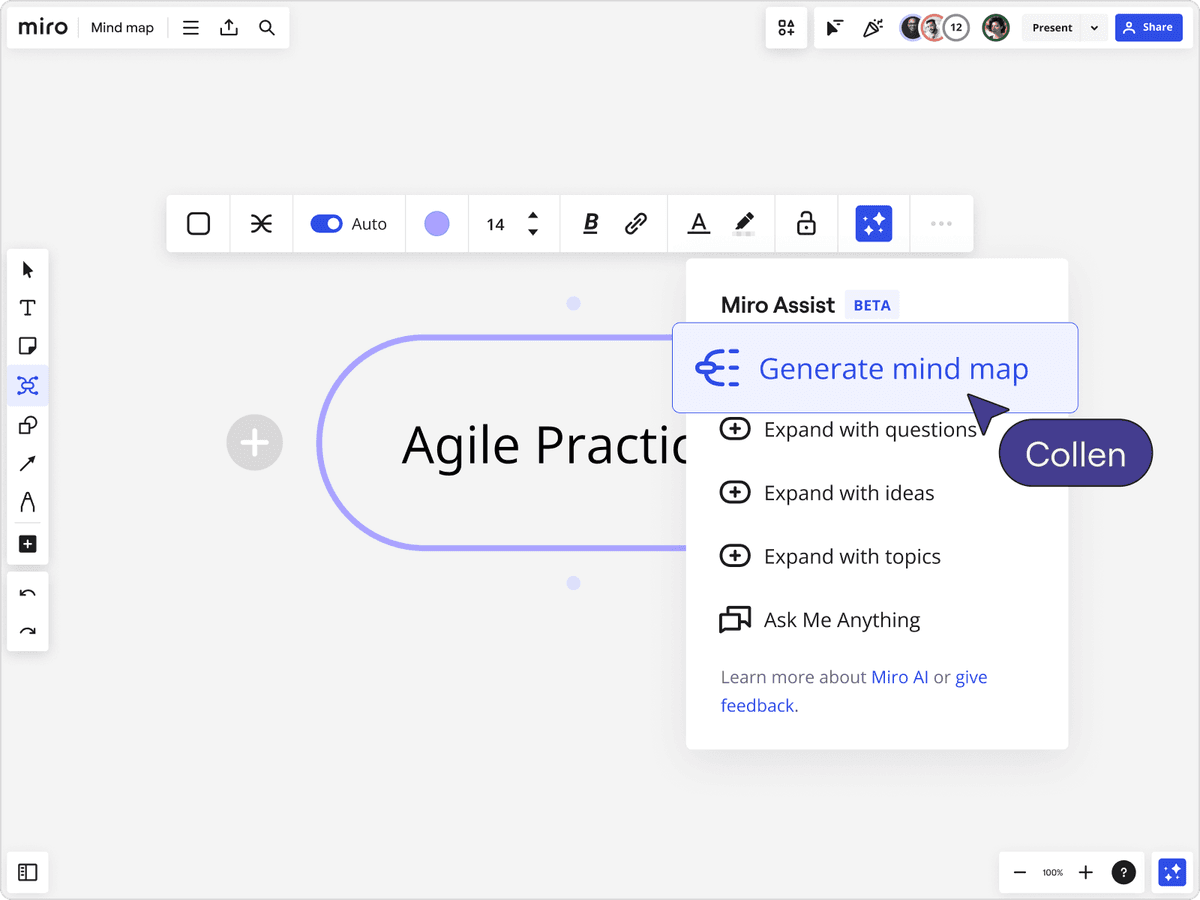
This visual shows the Miro AI mind-map workflow. It supports generating and expanding branches on the shared canvas. Atlas map nodes remain tied to uploaded sources.
Quick comparison table
This table shows the basic difference. Atlas starts with source files. Miro starts with a blank board for live group work.
| Atlas | Miro |
|---|---|
| Best when a project starts from PDFs, notes, websites, and source text. | Best when a project starts from sticky notes, diagram objects, images, embeds, and templates. |
| Builds Knowledge Maps for individual sources and Semantic Maps for projects. | Gives you a freeform canvas that collaborators can arrange by hand. |
| Answers cite uploaded source passages, so the reader can inspect the evidence. | Links and references are usually manual or attached to board objects. |
| Shared workspace is organized around source material and research questions. | Real-time canvas collaboration is the core strength. |
| ✗ No live workshop facilitation tools. | ✓ Miro includes voting, timers, templates, and live cursor collaboration. |
| Choose it when the next step is asking a cited question across a source set. | Choose it when the next step is inviting people into a live board. |
Table 1: Atlas helps you check findings against sources. Miro helps people build a board together.
Test both tools on one research task
A short trial will reveal more than a feature list. Pick one research question and gather three source files that give different parts of the answer. Include at least one long PDF so you can test whether each tool helps you return to a precise passage.
In Miro, add one note for each important finding. Link related notes, mark any disagreement, and invite a teammate to move or comment on them. Then export the board. Check whether the exported file keeps the links and detail that matter to your next step.
In Atlas, add the same three sources to one project. Open the Knowledge Map for one file, then use the Semantic Map to see how topics connect across the project. Ask a question that requires all three sources. Open every citation in the answer and read the source text around it.
Compare the results with four questions:
- Which tool made it easier for two people to work on ideas at the same time?
- Which tool made it easier to find the passage behind a claim?
- Which result can move into your next task without being rebuilt?
- Which gaps would force your team to keep another app open?
This test should make the choice clear. Miro should win when the value comes from people arranging a shared board. Atlas should win when the value comes from reading a set of sources and checking the written result. If each tool wins a different part, use Miro for the live session and Atlas for the source review that follows.
How is Atlas different
Both tools can help people map ideas. The key difference is what sits behind the map. Atlas links findings to source text, while Miro gives people a flexible canvas for their own notes and visual objects.
Visual maps for papers and projects
Atlas builds two kinds of map as you read. A Knowledge Map turns one paper into its argument structure: claims, evidence, definitions, and links between them. You see the paper's spine first, then click into the passages that support it.
A Semantic Map shows a whole project at once. It clusters sources, notes, chats, and citations by topic. You can look at the same project from a new angle without rereading every source. This is how 200 papers stop being a folder and start being a corpus.
"It's like an ultimate GPT. I can finally see what I've read." Kyle Lao, CEO & Co-founder of MenSC Labs
Miro does not build a claim map from each paper or tie a project map to citations. Its mind-map guide explains how people can arrange branches and expand them with AI. Atlas instead maps the claims and support found in a source.
If you have spent an afternoon trying to recover a paper you read weeks ago, this is the Atlas surface that pays off first. Our mind map and knowledge graph comparison explains the underlying model.
Source traces for every claim
The citation problem is not just that an AI model can make things up. It can also put a source next to a claim the source does not support. Atlas answers with a claim, the source passage, and a short reason the passage supports the claim. You can click into the source paragraph and check it.
Atlas tracks this with the H/V ratio: unsupported cited claims divided by supported cited claims. Atlas targets H/V below 0.1 on its citation benchmark, and we publish the method in Verifiable AI Research. The related citation-analysis guide shows why passage checks matter. Miro may include links or citations, but it is not built around passage-level claim checks. For casual Q&A, that gap may not matter. For a thesis sentence, brief paragraph, or treatment note, it does.
Project-scoped research context
Atlas keeps the sources, notes, chats, and maps for one research question in the same project. Its answers use only the sources added to that project.
Another Atlas project has its own source set. This helps keep unrelated research out of an answer. Miro separates work through independent boards. For more context, compare knowledge graph AI with a whiteboard and see how second-brain apps keep notes over time.
Comparing Atlas and Miro: features
Atlas and Miro live in different categories. Atlas helps you read, map, cite, and reuse source material. Miro helps people work together on a canvas with blocks, sticky notes, and templates.
The tables below compare 5 areas where the tools differ most: source maps, project maps, cited answers, annotations, and long-term context. Each table also includes a row where Miro wins or ties.
Paper deconstruction with Knowledge Maps
The Knowledge Map is Atlas's per-paper surface. It turns one paper into a claim-and-evidence map. Node text stays faithful to the paper. You can move from the main thesis down to a specific paragraph, then organize the original file with a research paper organizer.
| Atlas | Miro |
|---|---|
| Multi-level argument structure ✓ | Sticky-note summaries on a board |
| Labeled relations (motivates, causes, enables) ✓ | ✗ |
| Faithful-to-source node text ✓ | ✗ |
| Hierarchical breadcrumbs ✓ | ✗ |
| ✗ | Collaborative whiteboard with infinite canvas ✓. The canvas supports manual mapping. |
Table 2: This table compares automatic source deconstruction with manual canvas mapping.
Good to know: The bottom row belongs to Miro. Atlas does not ship that surface. The Knowledge Map's payoff is recovering a paper's argument three weeks after you first read it, when topic chips alone are no longer enough.
Project and corpus view with Semantic Maps
The Semantic Map shows one Atlas project. It groups sources, notes, chats, and citations by topic. You can ask it to group the same material around another topic without adding the files again.
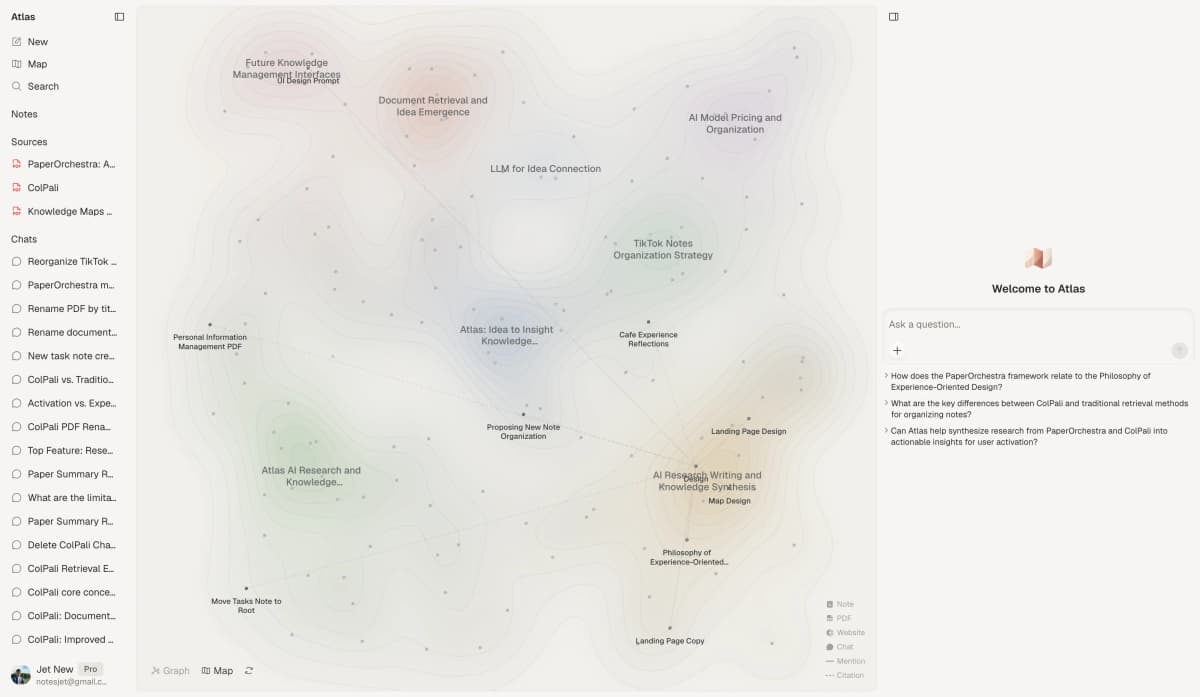
The Atlas Semantic Map clusters source-backed topics across a project, while Miro remains a hand-arranged canvas.
| Atlas | Miro |
|---|---|
| Spatial embedding of sources + notes + chats ✓ | Boards with sticky notes and blocks |
| Auto-labeled topic clusters ✓ | ✗ |
| Topic-angle re-projection ✓ | ✗ |
| One project-scoped evidence view ✓ | ✗ |
| ✗ | Real-time multi-user collaboration ✓. This is Miro's core collaboration surface. |
Table 3: Atlas groups a body of sources by topic. Miro lets people edit a canvas together in real time.
Good to know: Choose Miro when several people need to edit a board at the same time. Choose the Semantic Map when you need to find patterns across a large set of papers and view them from more than one angle.
Citation-grounded answers
Atlas answers with a claim, its source passage, and a short explanation. You can jump to the source paragraph and check whether the answer holds. This supports a stricter workflow than tracking citation links alone.
| Atlas | Miro |
|---|---|
| Claim-source-justification triples ✓ | ✗ |
| Reasoning traces (why this passage supports this claim) ✓ | ✗ |
| Jump-to-source with passage highlight ✓ | ✗ |
| H/V ratio < 0.1 benchmark published ✓ | ✗ |
| ✗ | Templates for workshops and ceremonies ✓. Miro specializes in workshop execution. |
Table 4: Atlas links answers to passages. Miro provides AI and templates for workshops.
Good to know: Both tools have a citation surface. Atlas also explains why a passage justifies a claim. This distinction matters when a thesis sentence or brief paragraph needs an auditable source trail.
Literature-grounded annotations
Atlas adds notes to each paper when you upload it. Citations inside the paper become objects you can inspect. When the cited source is open access, Atlas can pull in the relevant passage. That helps you synthesize research papers without losing the connection to the document.
| Atlas | Miro |
|---|---|
| Auto-annotate on ingest ✓ | Manual stickies per source |
| Multi-citation synthesis (how citations build the argument) ✓ | ✗ |
| Resolve cited sources (open-access) ✓ | ✗ |
| Exact passage / page / paragraph anchors ✓ | ✗ |
| ✗ | Voting, timers, facilitation tools ✓. These controls support live sessions. |
Table 5: Atlas adds notes tied to sources. Miro provides controls for live sessions.
Good to know: These annotations show how a paper uses the sources it cites. They help you check whether a citation supports the author's point.
Project-scoped context
Atlas keeps the sources, notes, maps, and chats for one question in a project. Start another project when its sources should not affect the current answers.
| Atlas | Miro |
|---|---|
| Project-scoped research context ✓ | Per-board canvas ✓ |
| Sources, notes, maps, and chats share one evidence base ✓ | Board objects share one collaborative canvas ✓ |
| Separate projects isolate unrelated context ✓ | Separate boards isolate workshop artifacts ✓ |
| Sources must be added to each relevant Atlas project | Boards can be duplicated as templates ✓ |
| ✗ | No-cost plan for solo and small-team use ✓. Miro offers a perpetual Free tier. |
Table 6: This table contrasts project-scoped research context with independent Miro boards.
Good to know: Atlas's project boundary is deliberate. Put sources that answer the same question together, and start a separate project when the evidence should remain isolated.
Using Atlas after Miro
Migrating source material from Miro
Migration is not a one-to-one import. Miro and Atlas store different things. Miro stores a canvas of sticky notes, frames, drawing objects, connectors, and embeds. Atlas stores source documents, notes, maps, and chats. What carries across is the underlying text and the source files behind the board.
Miro can export board content as images, PDFs, or CSV files, subject to plan and content type. Use CSV for sticky-note text and keep a PDF or image as a visual record. Then upload the original PDFs behind the board to Atlas. Each source can become a Knowledge Map, while relevant sticky-note text can be copied into its source note. Our Miro alternatives guide covers other migration destinations.
The layout itself does not migrate. Figma frames, web embeds, video links, live cursors, comments, app links, and custom templates stay in Miro. If the layout is the deliverable, keep Miro as the system of record and use Atlas only for the research corpus beneath it.
Worked example with 8 papers
Suppose you are writing a related-work section from eight PDFs across three subtopics. In Miro, you can create one sticky per paper, group the notes, and draw disagreement links manually. The result is a useful collaborative board, but its claims still need separate source checks.
In Atlas, the PDFs sit in one project. Each gets a Knowledge Map, while the Semantic Map groups related material by topic. A question such as "Which papers discuss method rather than findings?" returns source links that you can inspect. Adding a ninth paper extends the same corpus instead of requiring another manual board pass.
Miro remains faster for a live brainstorm. Atlas fits the read-and-cite pass that produces a defensible paragraph. A combined workflow can sketch the structure in Miro and complete citation work in Atlas.
Limits and edge cases
When Miro is the right call
Miro is the right tool for running a live group session. Brainstorms, planning workshops, journey maps, and service maps depend on people arranging ideas together.
Miro has the canvas, voting, timers, and templates for those sessions. Atlas does not provide those controls. That strength makes Miro the baseline product in our alternatives to Miro review.
Choose Miro if people will keep reviewing and changing a shared board. Choose Atlas if the result is writing that must stay linked to source passages. A team can use both at different stages of the same project.
Collaboration, integrations, and security
Choose Miro when the group activity is the main value. People can move objects and notes together. Miro's apps guide lists links to Jira, Asana, Figma, Slack, Microsoft Teams, and Confluence. Atlas has a narrower focus on source files, notes, maps, and cited answers. Our Atlas and Notion comparison covers another choice between research and team notes.
The data risks also differ. For Miro, check who can enter a workspace, what guests can see, how boards are shared, and which outside apps can open them. Its AI security guide explains the controls available to company admins.
For Atlas, check how it handles uploaded sources, private notes, and AI reading. Teams with strict data rules should review the exact plan and setup they will use.
Common objections
Teams that use Miro do not need to replace it. Keep Miro for workshops and planning. Add Atlas when researchers need to read and cite the source files behind that work.
Atlas can group text from interviews, support tickets, or surveys. It does not replace people moving sticky notes together in a live session. Choose Miro when the group exercise creates the value.
Atlas works mainly with text. Miro is stronger for mood boards, screenshots, video stills, and other images whose placement matters. Choose Atlas when the project depends on reading source text, asking questions about it, and citing it. Our visual research guide explains that use case.
Miro compared with FigJam, Mural, and Lucidchart
FigJam, Mural, and Lucidchart may belong on the same shortlist as Miro. Each one fits a different job.
Check these options before treating Atlas and Miro as the only choices. Another canvas may fit your work better.
- FigJam suits teams that build products in Figma. It works well for design reviews, simple diagrams, brainstorms, and workshops that will lead to a Figma prototype.
- Mural is built for guided workshops and group exercises. Compare its templates, host controls, guest access, and company controls with the same features in Miro.
- Lucidchart is stronger when the result must be an exact diagram. It gives flowcharts, system maps, company charts, and process maps precise objects and connectors.
- Confluence Whiteboards may suit teams that use Atlassian. It keeps informal plans near Jira tasks and Confluence pages, while Miro offers a more mature canvas and links to more outside apps.
Start by deciding whether you need a workshop board, a tool for formal diagrams, or a workspace built around research sources.
For a shared board, compare Miro with FigJam, Mural, and Confluence Whiteboards. Include Lucidchart when formal diagrams are central. Compare Atlas with research tools when you need to study sources and cite the result. A team can use more than one product as long as each result has a clear owner and place to live.
Price comparison
Atlas is a paid product with no permanent free plan. Its trial includes 10 sources and 10 total AI chats. Atlas Pro costs $20 a month or $204 a year and includes unlimited sources, unlimited AI chats, Knowledge Maps, Semantic Maps, and cited answers.
On August 2, 2026, Miro's pricing page listed three editable boards on Free. Starter cost $8 per member each month on a yearly plan, and Business cost $20. Enterprise used custom prices for groups with at least 30 members.
| Atlas | Miro |
|---|---|
| Free: ✗ (evaluation sample only: 10 sources · 5 lifetime AI chats) | Free: No-cost plan: 3 editable boards, basic features ✓ |
| Pro: $20/mo or $204/yr (unlimited sources · unlimited AI chats · all features) | Paid: Starter $8/member/mo annually · Business $20/member/mo annually · Enterprise custom from 30 members |
| Pro unlocks Knowledge Map, Semantic Map, and claim-source-justification ✓ | ✗ |
Table 7: This pricing table uses annual Miro Starter pricing and current Atlas limits.
If source-grounded mapping matches your research task, generate a Knowledge Map from one paper before moving a larger corpus.
When to choose Atlas vs Miro
The choice depends on the artifact you need to preserve. Atlas preserves the relationship between a research claim and its supporting source. Miro preserves a shared visual board that a team can edit together.
Use the following prompts as a practical decision check rather than a universal ranking.
- Want a map of a paper's structure? Go with Atlas. (Knowledge Map)
- Want answers that explain why a source supports the claim? Go with Atlas. (cited answers)
- Want one project-scoped evidence base for maps, notes, and cited chat? Go with Atlas.
- Want a live whiteboard for facilitation? Go with Miro.
- Tied: mapping a literature-review outline with a collaborator on a canvas. Miro is better for the live canvas. Atlas is better when the outline needs cited sources.
If your research task needs source-grounded maps rather than a blank canvas, upload a paper and inspect how its map connects back to the source.
Recommendations by user type
- PhD researchers: Use Atlas for literature reviews, thesis chapters, and source sets you will revisit for months. Use Miro for one-off planning boards.
- Students doing literature reviews and thesis research: Use Atlas when the project depends on papers, citations, and source notes. Use Miro when the task is a class brainstorm or group presentation board.
- Knowledge workers (consultants, analysts, PMs, journalists): Use Atlas when the output must cite reports, papers, or interview transcripts. Use Miro when the main job is a workshop, map, or planning session.
- Personal researchers with stakes: Use Atlas for medical, legal, major-purchase, or deep personal research where you need to defend the answer. Use Miro when you only need to arrange ideas visually.
Miro is the better tool when the canvas is the shared artifact: workshops, affinity maps, diagrams, and planning boards. Atlas is better when the visual surface is a path into sources. Use Miro to coordinate people around a board. Use Atlas to coordinate claims, passages, and papers around a research question.
Atlas
Try source-grounded maps in Atlas
Map papers and trace each visual claim to its cited source.
Frequently Asked Questions
Atlas is designed to explain that connection. Every answer is rendered as a claim-source-justification triple: the claim, the passage it draws from, and a one-sentence explanation of why the passage supports the claim. You can click into the source paragraph and read the highlighted sentences in context. Miro may cite at the sentence level or link to sources, but it does not render the reasoning trace that connects the claim to the passage. That trace is the move when you need to defend a thesis sentence, a brief paragraph, or a treatment-plan summary. Read more about how Atlas grounds claims in Verifiable AI Research (2026): What It Actually Means.