
Atlas vs Saga (2026): An In-Depth Research Comparison
Atlas is a visual research workspace, Saga is a workspace tool combining notes, tasks, and AI. Compare paper deconstruction, citation grounding, and fit.
- Byline

Summary
Use Atlas for source-grounded research synthesis. Use Saga for notes, tasks, AI writing, and workspace pages.
The updated comparison covers citation grounding, Knowledge Maps, markdown migration, tasks, AI conversations, and project-scoped context.
Atlas traces claims to source passages, while Saga combines everyday notes, tasks, and workspace assistance.
Saga can remain useful for daily workspace operations while Atlas handles research corpora that need citations.
Note: We make Atlas, and our team wrote this comparison. Where Saga has the better answer for a given research job, the article says so plainly. See the table rows where Saga wins and the "When to choose Saga" section below. Our goal is to give you the evidence needed to choose the right tool for your research job.

Atlas

Synthesize research sources in Atlas
Upload research documents, compare findings, and inspect each cited passage.
Quick answer
Choose Atlas when the job is cited research. You upload papers, map what they say, and ask questions. Every claim traces to a source. Atlas also gives you Knowledge Maps, a Semantic Map, and a project boundary that keeps related work together.
Choose Saga when the job is daily work. It is strong for notes, docs, tasks, shared pages, and AI writing in one fast editor. Pick Saga when the output is a page or task list. Pick Atlas when the output has to stand up to source checks.
Criteria and methodology
We compared the two products by the jobs they support: source checks, maps, project context, daily notes, tasks, migration, collaboration, and price. Saga wins several workspace rows. Atlas wins the research rows.
Atlas Workspace and MongoDB's Atlas service
Search results for "Atlas vs Saga" mix several products. This article is about Atlas Workspace and Saga, the notes/tasks/AI workspace. MongoDB's Atlas service is a cloud database product, while Atlas Workspace is the visual research workspace evaluated here.
Seata-AT, Seata-TCC, and Atlas Fallen
Seata-AT and Seata-TCC are distributed transaction modes. Atlas Fallen is a video game. Neither category answers the notes-versus-research-workspace question on this page.
Azure Cosmos DB
Azure Cosmos DB is a cloud database. Readers comparing database products need a database benchmark instead of this research-workspace comparison.
“La Saga d'Atlas & Axis”
La Saga d'Atlas & Axis is also a separate search entity. This page compares software from Atlas Workspace and Saga.
Atlas is a visual research workspace for people who need to understand papers. That includes a thesis, a treatment decision, a major purchase review, or a literature review. Saga is a workspace for notes, tasks, pages, references, and AI writing.
Both tools touch a researcher's day. Atlas turns each paper into a Knowledge Map, shows a whole project in a Semantic Map, and ties each answer back to source text. Saga's task and note flow is built for daily team operations. If the answer needs a passage-level audit, Atlas is the stronger fit.
| Atlas Workspace | Saga |
|---|---|
| Best for source-grounded research across papers and projects | Best for notes, docs, tasks, AI writing, and shared workspace pages |
| Knowledge Map breaks each paper into claims, evidence, and links | PDF/page summaries and workspace references, but no per-paper argument map |
| Semantic Map clusters sources, notes, chats, and citations by topic | Page hierarchy, references, search, and side-by-side pages |
| Claim-source-justification explains why each passage supports each claim | AI assistant can work across workspace pages, but not with Atlas-style claim traces |
| Project keeps citations, notes, maps, and chats together | Workspace context is useful inside Saga, but it is not a research graph built from papers |
| ✗ Not a task manager or general wiki | Stronger for tasks, collaborative docs, auto-linked pages, and operations ✓ |
| Paid research product with a short evaluation sample | No-cost personal plan plus paid workspace tiers |
| Upload PDFs and selected markdown notes into research projects | Export markdown pages. Keep Saga when tasks and shared pages remain central |
Table 1: Atlas specializes in evidence-backed research, while Saga specializes in connected pages, tasks, collaboration, and AI-assisted writing.
How is Atlas different?
Saga and Atlas overlap at the surface because both touch reading and reasoning over sources. They diverge on three capabilities that decide whether the output is shareable, defensible work. This section walks through the three differences, in order.
Visual maps for papers and projects
Atlas builds two kinds of visual map as you read. A Knowledge Map breaks each paper into claims, evidence, definitions, and links between ideas. You see the paper's spine at the top level, then click into the passages that support it.
This differs from a conventional hierarchy, as our mind map and knowledge graph comparison explains.
A Semantic Map shows your whole project on 1 canvas: sources, notes, chats, and citations. Related items cluster by topic. You can change the topic angle without reading everything again. The underlying model is described in knowledge graph AI.
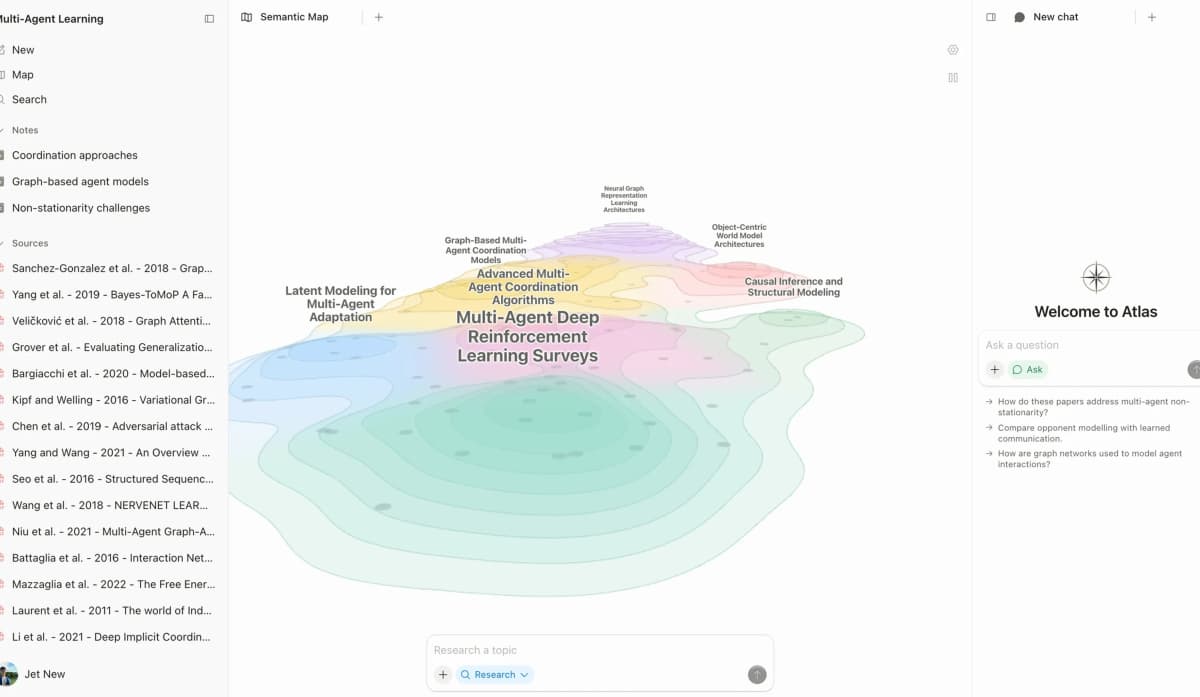
Atlas's Semantic Map presents a research corpus as clustered source topics instead of a flat folder of pages.
"It's like an ultimate GPT. I can finally see what I've read." Kyle Lao, CEO & Co-founder of MenSC Labs
Saga does not have a per-paper claim map or a project-wide topic map. A Knowledge Map helps you recover a paper you read three weeks ago. Visual maps make a body of papers legible at a glance, and the multi-level zoom of the Knowledge Map is the surface Atlas is built around.
Source traces for every claim
The hallucination problem in AI research tools isn't "the model made something up." It's "the model put a citation next to a claim that the cited passage doesn't justify."
Atlas renders every answer as a claim-source-justification triple: the claim, the passage, and a one-sentence explanation of why the passage supports the claim. You can click into the source paragraph and read the highlighted sentences in context.
Atlas checks this with the H/V ratio. It measures how often a cited sentence fails a passage-level check. Atlas targets H/V < 0.1 on this benchmark.
We explain the method in Verifiable AI Research (2026): What It Actually Means, and our citation analysis guide covers the reader's audit step.
Saga AI can answer questions using pages mentioned in a prompt. Saga's official AI page does not describe Atlas-style claim, passage, and justification triples.
Casual writing may not need that trail. A thesis sentence, legal brief, or treatment summary does. Every Atlas claim traces to its source, and Atlas explains why the source justifies it.
Project-scoped research context
Saga connects pages, tasks, collections, and references inside each workspace. Links and references stay within that workspace.
Atlas keeps citations, notes, Knowledge Maps, Semantic Maps, sources, and chats together inside one research project. A separate project creates a separate context boundary.
That boundary lets a sustained project use the material already added to it without mixing in unrelated work. Reuse a source elsewhere by adding it to the other project explicitly. Saga draws a similar boundary at the workspace level.
Comparing Atlas and Saga: features
Both tools touch daily research, but they live in different categories. Atlas is built for papers, maps, cited answers, and reuse across a research corpus. Saga is built for pages, tasks, and AI in one workspace.
Saga is broader for daily operations. Atlas goes deeper when the answer needs sources. Each table below includes a row where Saga wins or ties.
Paper deconstruction with Knowledge Maps
The Knowledge Map is Atlas's per-paper view. It breaks one paper into claims, evidence, and links between ideas. The node text comes directly from the paper. You can start with the main thesis and click down to a specific paragraph, then keep the library organized with a research paper organizer.
| Atlas | Saga |
|---|---|
| Multi-level argument structure ✓ | Pages with PDF embeds and AI summaries |
| Labeled relations (motivates, causes, enables) ✓ | ✗ |
| Faithful-to-source node text ✓ | ✗ |
| Hierarchical breadcrumbs ✓ | ✗ |
| ✗ | Unified pages + tasks + AI workspace ✓. Saga leads on task integration |
Table 2: Atlas maps a paper's argument, while Saga keeps notes, tasks, and AI assistance together on workspace pages.
Good to know: The bottom row belongs to Saga. Atlas does not ship that surface. The Knowledge Map's payoff is recovering a paper's argument three weeks after you first read it, when topic chips alone are no longer enough.
Project and corpus view with Semantic Maps
The Semantic Map is Atlas's project view. It places sources, notes, chats, and citations on 1 map. Related items sit near each other. You can change the topic angle without uploading the same files again, which is useful when synthesizing research papers.
| Atlas | Saga |
|---|---|
| Spatial embedding of sources + notes + chats ✓ | Page hierarchy + references |
| Auto-labeled topic clusters ✓ | ✗ |
| Topic-angle re-projection ✓ | ✗ |
| Mixed-item project canvas ✓ | ✗ |
| ✗ | Task management integrated with notes ✓. Saga leads on daily operations |
Table 3: Atlas organizes research sources spatially, while Saga organizes connected pages, collections, references, and tasks inside a workspace.
Good to know: Saga's strength on that row is genuine. If your work depends on it, that's the boundary. The Semantic Map's payoff is when 200 papers stop being a folder and start being a corpus you can re-project under different topic angles without re-reading.
Citation-grounded answers
Atlas shows the claim, the passage, and a one-sentence reason why the passage supports the claim. You can jump to the source paragraph, read the highlighted sentences, and check whether the reasoning holds. The citation tracking guide explains why a link alone is a weaker audit surface.
| Atlas | Saga |
|---|---|
| Claim-source-justification triples ✓ | AI assistant over pages (no per-claim grounding) |
| Reasoning traces (why this passage supports this claim) ✓ | ✗ |
| Jump-to-source with passage highlight ✓ | ✗ |
| H/V ratio < 0.1 benchmark published ✓ | ✗ |
| ✗ | Fast, clean page editor ✓. Saga leads on page authoring |
Table 4: Atlas exposes a passage-level evidence trail, while Saga provides AI assistance within its page-and-task editor.
Good to know: Both tools connect AI output to workspace content. Atlas also explains why a passage justifies a claim. Everyday Q&A rarely needs that explanation. A thesis sentence or brief paragraph does.
Literature-grounded annotations
Atlas annotates each paper when you upload it. Citations inside the paper become objects you can inspect. When the cited source is open access, Atlas can pull in the useful passage. You can see how the paper builds its case without leaving the document.
| Atlas | Saga |
|---|---|
| Auto-annotate on ingest ✓ | ✗ |
| Multi-citation synthesis (how citations build the argument) ✓ | ✗ |
| Resolve cited sources (open-access) ✓ | ✗ |
| Exact passage / page / paragraph anchors ✓ | ✗ |
| ✗ | Mac and Windows desktop apps ✓. Saga leads on platform access |
Table 5: Atlas resolves citation chains inside papers, while Saga supports general file attachments and desktop access.
Good to know: This feature resolves citations inside the paper you're reading. When the cited source is open access, Atlas pulls in the cited passage. You can see the citation chain as part of the paper's structure.
Project-scoped context
Atlas keeps citations, mentions, Knowledge Maps, Semantic Maps, chats, and annotations inside one project. Separate projects isolate unrelated evidence.
| Atlas | Saga |
|---|---|
| Project-scoped research context ✓ | Per-workspace references |
| Sources + notes + maps + chats share one project ✓ | Pages + references share one workspace |
| Separate projects isolate unrelated context ✓ | Separate workspaces isolate context |
| Sources must be added to each relevant project | Pages must be added to each relevant workspace |
| ✗ | Reasonable no-cost plan and pricing ✓. Saga leads on entry cost |
Table 6: Atlas groups source-derived maps and evidence traces inside a project, while Saga links pages and references within each workspace.
Good to know: Both tools isolate context at a workspace boundary. In Atlas, add a source to every project where it should support answers.
Price comparison
Atlas is a paid product with a short evaluation sample of 10 sources and 5 lifetime AI chats. After that, Atlas Pro costs $20/mo or $204/yr with unlimited sources and unlimited AI chats.
The paid tier includes Knowledge Map, Semantic Map, claim-source-justification, and project-scoped context. Those research surfaces define the Atlas subscription.
| Atlas | Saga |
|---|---|
| Free: ✗ (evaluation sample only: 10 sources · 5 lifetime AI chats) | Free: No-cost plan: full features for personal use ✓ |
| Pro: $20/mo or $204/yr · unlimited sources · unlimited AI chats · all features | Paid: Standard $6/member/mo on annual billing · Business $12/member/mo is listed with a waitlist |
| Pro unlocks Knowledge Map, Semantic Map, claim-source-justification, and project-scoped context ✓ | ✗ |
Table 7: Atlas charges for research-specific maps and evidence traces. Saga's official pricing page lists a free tier with unlimited pages and tasks, up to 3 workspace members, and 5,000 Saga AI words per month.
To evaluate the evidence surface, generate a Knowledge Map from one paper before moving a larger corpus into Atlas.
When to choose Atlas vs Saga
Choose by the output you need to maintain. Saga fits a shared operational workspace. Atlas fits a research corpus whose claims must remain traceable to passages.
Use the questions below to test that boundary against your own project.
- Want paper structure mapped clearly? Go with Atlas. (Knowledge Map)
- Want answers that explain why a source supports a claim? Go with Atlas. (claim-source-justification)
- Want sources, notes, maps, and chats to stay together for a sustained research question? Go with Atlas. (project-scoped context)
- Want a unified workspace with notes, tasks, and AI in one tool? Go with Saga.
- Tied: keeping a workspace of notes and tasks with light AI assistance. Both work fine for different jobs. The wedge only opens up once you're building a corpus you'll return to.
If the Atlas rows match your work, test one paper you know well. Run a Knowledge Map, then ask one question that needs a specific source.
Recommendations by user type
- PhD researchers: Atlas. Years 1–2 often mean heavy literature review work. The Knowledge Map helps you recover a paper without rereading it. Years 3–4 often mean thesis writing. Claim-source-justification helps anchor each thesis claim to a passage.
- Students doing literature reviews and thesis research: Atlas. This means dissertation, thesis, and literature review work. The Knowledge Map saves the most time early. Sources, maps, notes, and chats remain available when you return to the same project.
- Knowledge workers (consultants, analysts, PMs, journalists): Atlas when reading and citing papers is the core work, Saga when a unified notes-plus-tasks workspace is the daily need.
- Personal researchers with stakes: Atlas for medical, legal, major-purchase, or deep self-study work. Source checks matter when you need to defend the answer. Saga remains useful for the supporting notes and tasks.
Saga is better for shared pages, lightweight project docs, tasks, and auto-linked wiki references. Its official task guide documents assignees, due dates, priorities, templates, and an aggregated task view.
Atlas is better when a group is focused on the same research corpus: PDFs, claims, citations, maps, and source-backed answers.
If people are editing an operating doc together, Saga is the natural surface. If they are reasoning from the same body of evidence, Atlas fits the research job. For adjacent choices, compare the best note-taking apps.
Using Atlas and Saga together
Saga can remain the operating workspace for shared notes, tasks, and project pages while Atlas holds papers that need visual maps and passage-level checks. This division preserves Saga's collaboration strengths and gives the research corpus a dedicated evidence surface.
Migrating research sources to Atlas
If you keep research notes in Saga, the move to Atlas is workable. Saga's official export guide says each page exports as a ZIP containing a Markdown file and its images. Atlas ingests PDFs and pages as research sources.
Start by picking the Saga pages you truly need. Export those pages, then upload them to Atlas with the PDFs behind the notes. The PDFs matter most. Each paper gets a Knowledge Map, and its citations become links you can inspect.
Page text, lists, headings, note structure, and source PDFs migrate cleanly. Saga page links, Saga AI chat history, workspace permissions, sharing settings, and tasks do not migrate.
Atlas organizes each research project through its sources, citations, Knowledge Maps, and Semantic Map. Atlas also has no task manager. Keep Saga running if you need its task workflow.
A good migration path is gradual. Keep Saga for daily notes and tasks for a few weeks. Upload the research corpus to one Atlas project, starting with the PDFs and long notes. Generate the per-paper Knowledge Maps and the project's Semantic Map.
Once Atlas has the corpus, test whether its cited answers replace your prior source-checking steps. There is no direct integration, so upload sources to each tool separately. The workflows can still run side by side. Keep each Atlas project limited to the sources that belong to its research question.
Worked example with 8 papers
Say you have 8 papers for a thesis chapter. You need an 800-word synthesis with citations you can defend. Here is how the two workflows differ.
In Saga, you create 1 page per paper. You add the PDF or a manual summary and link related pages with Saga's references. Then you ask the AI assistant to draft a synthesis on a new page.
The page links give you structure. The AI can use the pages it can see. You still read, condense, and check the papers yourself. For a low-stakes section, that can be enough.
In Atlas, you upload all 8 PDFs into one project. Each paper gets a Knowledge Map. You can see the spine of each paper without reading it again. The Semantic Map then shows how the 8 papers relate. You can change the map angle, such as "methods" or "common limits."
Then you ask the project chat for the synthesis. Each answer shows the claim, the source passage, and why that passage supports the claim. You can click into the cited paragraph and check it. The research-paper analysis guide covers this source-first workflow.
In Saga, you do the per-paper breakdown and ground the draft in pages. In Atlas, the breakdown starts from the PDFs and the answer traces to an exact passage.
For a thesis chapter, that trace matters. Atlas gives you the highlighted passage and a short reason. Saga gives you the page link. Both are useful, but they answer different risks.
Limits and edge cases
When Saga is the right call
There are workflows where Saga is the better call. Shared wikis with AI help are one of them. Saga gives you pages, tasks, AI, a clean editor, and auto-linked references in one place. Atlas is a research workspace without a general wiki surface.
Auto-linked references across pages are another Saga strength. Atlas instead organizes sources through citations, Knowledge Maps, and the Semantic Map inside one project. If your project depends on user-written backlinks, Saga is the right form.
Lightweight project docs also fit Saga better. Briefs, meeting notes, plans, and decision logs feel natural there. Live editing for non-research docs is also Saga territory. Atlas supports shared research projects and lacks multi-cursor editing for arbitrary pages. Use Saga for a launch brief that colleagues edit together. Use Atlas when they need to reason over the same 60 papers for 4 months.
Common objections
"I already use Notion, Obsidian, or Roam. Do I need Saga or Atlas?" If the notes tool is doing what you need, keep it. Atlas is a research workspace for papers, citations, and the reasoning over them. Compare Atlas and Notion, Atlas and Obsidian, and Roam Research alternatives before adding another general notes tool.
The deciding question is whether you have a research corpus that justifies a dedicated tool. If you read and cite papers regularly, Atlas earns its keep alongside your notes tool. If your work is mostly text-first knowledge work without a paper corpus, Saga or your existing notes tool is the closer match.
"Can I evaluate Atlas before paying?" The evaluation sample gives you 10 sources and 5 lifetime AI chats. That is enough to run a Knowledge Map on 1 paper and chat with a small corpus.
The per-paper map and source trace are useful on day 1, while the project view becomes more useful as sources accumulate inside that project. Upload a paper you know well and ask a question that needs a specific passage. The resulting trace shows whether Atlas fits your research.
"What if my corpus is mostly non-PDF (web pages, transcripts, internal docs)?" Atlas is opinionated toward PDFs and the citation surface inside them. Web pages and transcripts can be uploaded, but the Knowledge Map and Literature-Grounded Annotations are most valuable on properly structured papers with reference lists. If your corpus is entirely web content with no underlying paper structure, Saga's general-page model is a closer match. The threshold is whether your sources have arguments-with-citations you'd want to deconstruct, if yes, Atlas, if no, Saga.
Atlas
Synthesize research sources in Atlas
Upload research documents, compare findings, and inspect each cited passage.
Frequently Asked Questions
Atlas explains how each citation justifies a claim. Every answer is rendered as a claim-source-justification triple: the claim, the passage it draws from, and a one-sentence explanation of why the passage supports the claim. You can click into the source paragraph and read the highlighted sentences in context. Saga AI can answer from pages mentioned in a prompt, but its official product material does not describe a reasoning trace that connects each claim to a passage. That trace matters when you need to defend a thesis sentence, a brief paragraph, or a treatment-plan summary. Read more about how Atlas grounds claims in Verifiable AI Research (2026): What It Actually Means.