
Atlas vs Logseq in 2026 | In-Depth Research Comparison
Atlas is a visual research workspace. Logseq is an open-source local-first outliner with a daily-notes workflow. Compare deconstruction and citations.
- Byline

Summary
Use Atlas for source-grounded research synthesis. Use Logseq for local-first outlining, daily notes, and block references.
The updated comparison covers cited answers, Knowledge Maps, markdown migration, block graphs, privacy, and context reuse.
Atlas traces claims to passages, while Logseq keeps notes in a plain-text outliner workflow.
Logseq can remain the daily notes system while Atlas handles source libraries that need auditable answers.
Note: We make Atlas. This comparison is written by the team that built it. Where Logseq has the better answer, the article says so plainly. The goal is to help you choose the right tool. Atlas does not fit every research job.

Atlas

Move from Logseq notes to cited source answers
Upload a research PDF and trace each claim to its supporting passage.
Quick verdict
Atlas is a visual research workspace for source-heavy work. That includes thesis research, paper reviews, treatment decisions, and major purchases. Logseq is a free, open-source outliner for local markdown notes, daily journals, backlinks, and block references.
Use Logseq when your graph is mostly your own notes. Use Atlas when source documents need visual maps and cited answers. Atlas turns each paper into a Knowledge Map. It maps the whole project in a Semantic Map. It also answers questions with a claim, a source, and a reason, so every claim traces back to a passage.
How we compared Atlas and Logseq
This comparison uses 6 checks. Can the tool cite sources well? Can it link blocks? Can it keep files local? Does it support daily notes, plugins, and fair pricing?
It also checks Obsidian. Many Logseq searchers are comparing several local markdown graphs alongside Atlas.
Feature comparison
This table is the fast read. Atlas wins when the research output needs cited answers and visual source maps. Logseq wins when the job is local-first outlining and block-level note control.
| Atlas | Logseq |
|---|---|
| AI citation grounding: shows the claim, source passage, and why the passage supports it. Atlas wins for defended synthesis. | Source links and citations can be written manually. The source reasoning trace is not built in. |
| Knowledge Maps: builds a visual map for each uploaded paper. Atlas wins for deep reading. | Uses pages, bullets, backlinks, and graph view rather than paper deconstruction. |
| ✗ Block-reference outliner. Atlas is organised around projects and sources. | ✓ Block references: strong block references and transclusion across pages. Logseq wins here. |
| ✗ Local file ownership. Atlas is a cloud product with private uploaded sources. | ✓ Local-first storage: plain markdown or org-mode files in a local folder. Logseq wins here. |
| ✗ Daily journal as the main surface. Atlas is a project/source workspace. | ✓ Daily notes: daily journal is a core workflow. Logseq wins here. |
| ✗ Open-source plugin system. Atlas ships built-in research workflows. | ✓ Open-source plugins: free, open-source app with community plugins. Logseq wins here. |
| Pricing: evaluation sample, then Atlas Pro at $20/mo or $204/yr. | Pricing: free app. Hosted sync is optional and paid. This is a Logseq win for budget-first users. |
Table 1: Atlas and Logseq compared on citations, maps, local storage, outlining, plugins, and price.
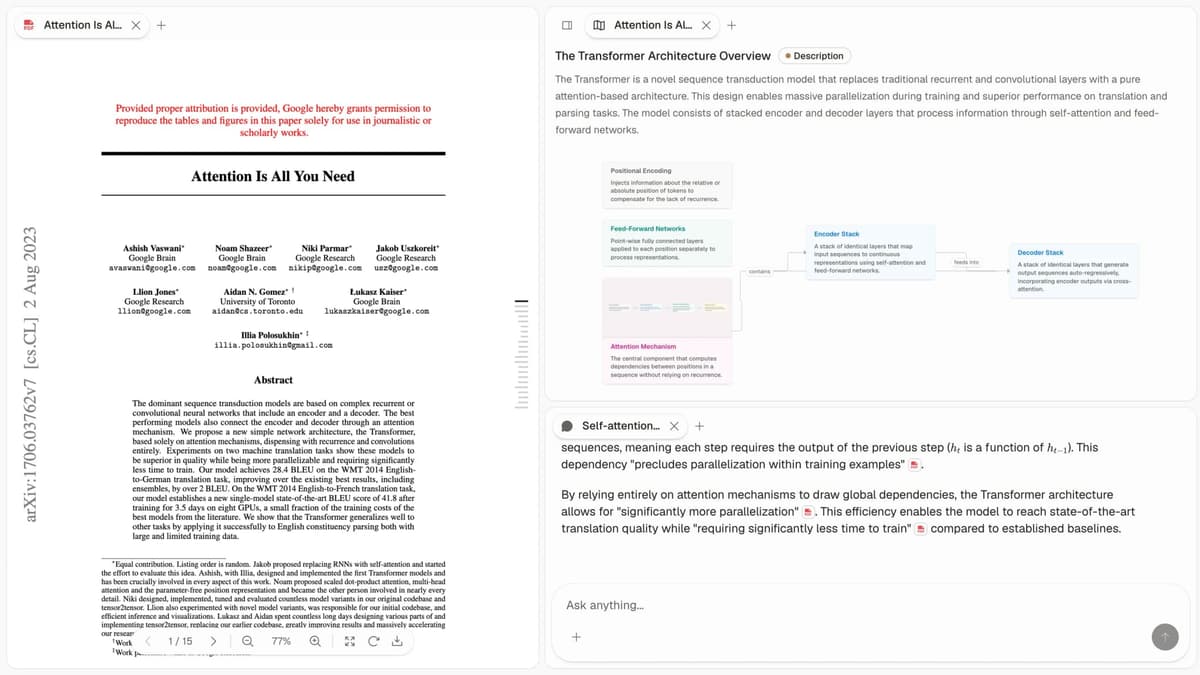
Atlas product screenshot showing the cited-answer and map views used in source-heavy research.
The official demo below supports the feature comparison by showing Logseq's outliner, backlinks, and linked references.
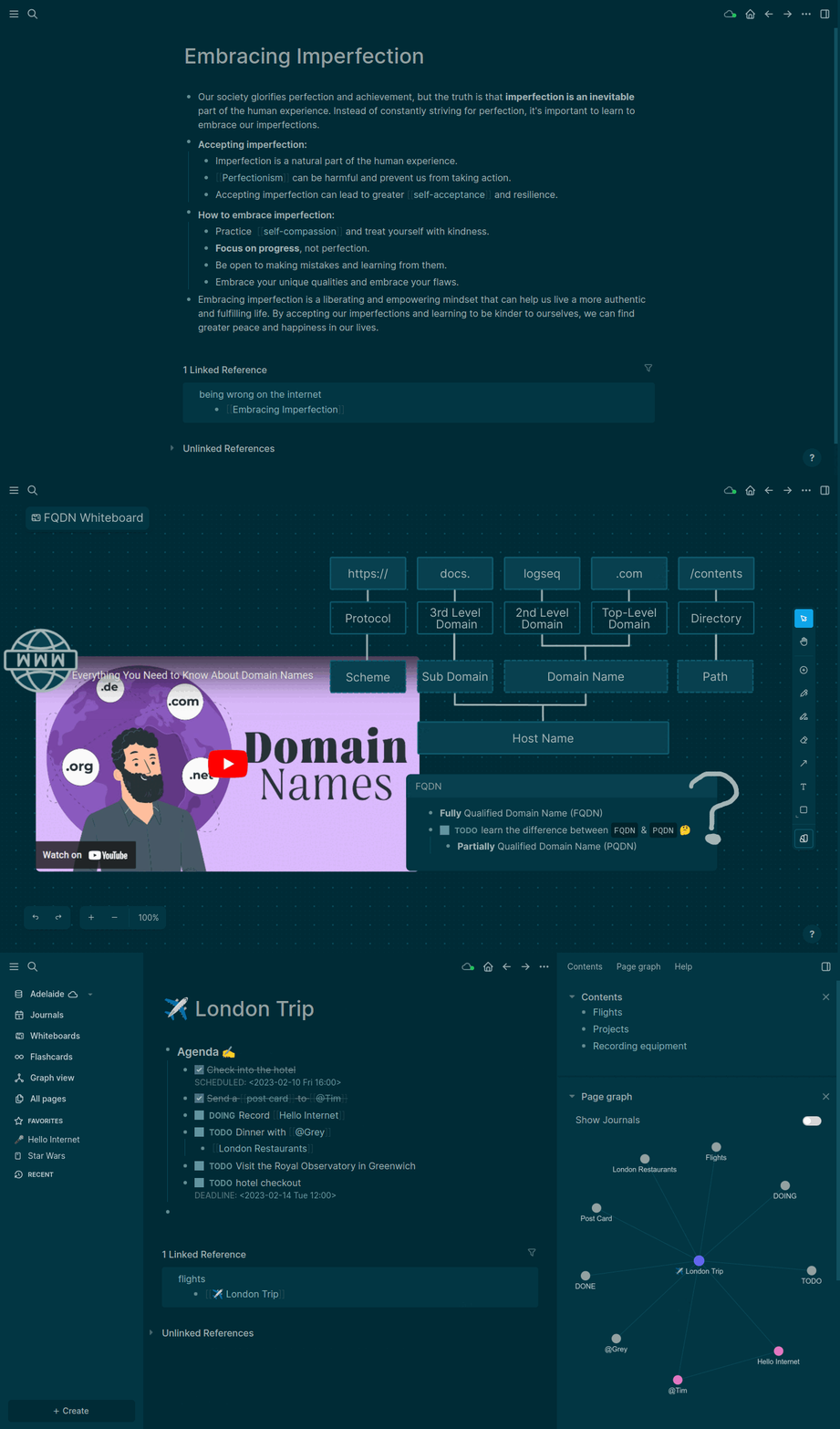
Official Logseq product demo from the logseq/logseq GitHub README. It shows the outliner and linked-reference workflow where Logseq is strongest.
How is Atlas different?
Logseq and Atlas both help with reading and thinking. They diverge when the output has to become shareable, source-backed work. Three differences matter most. Our guide to organizing research notes explains why source structure becomes important once a project outgrows a personal notebook.
Visual maps for papers and projects
Atlas builds two visual maps as you read. A Knowledge Map shows one paper's claims, evidence, terms, and links between ideas.
You see the paper's spine first, then click down into the passages behind it. This is a source-derived argument map rather than a manually drawn topic outline. The knowledge graph guide covers the broader category.
A Semantic Map shows the whole project on a shared canvas. Sources, notes, chats, and citations cluster by topic.
You can re-map the same project under a new angle without uploading the sources again. That is how 200 papers stop feeling like a folder. Our knowledge graph tools comparison covers the broader category.
"It's like an ultimate GPT. I can finally see what I've read." Kyle Lao, CEO & Co-founder of MenSC Labs
Logseq does not break a paper into claim and evidence nodes. It also does not re-map a whole source set by topic angle.
The Knowledge Map helps when you return to a paper weeks after reading it. Visual maps make a body of papers legible at a glance.
Inspectable claim support
The key citation failure occurs when a model attaches a source that does not justify its claim. Atlas renders every answer as a claim-source-justification triple: the claim, the passage, and a one-sentence explanation of the support.
You can click into the source paragraph and read the highlighted sentences in context. Our ChatGPT alternatives guide explains how to distinguish linked sources from supported claims.
Atlas tracks this with the H/V ratio. It checks how often a generated sentence fails a passage-level citation review. Atlas targets H/V < 0.1 on that benchmark, and we publish the method in our verifiable AI research guide.
Logseq answers may include citations or source links. Its answer view does not provide a claim-by-claim reason trace. Casual Q&A may not require that trace. A thesis sentence, legal brief, or treatment note often does. Every Atlas claim traces to its source, and Atlas explains why the source justifies it.
Project-scoped research context
Logseq's repository describes a privacy-first, open-source tool with Markdown and Org-mode support. Logseq treats your vault as a local graph of blocks and pages.
Atlas keeps sources, notes, maps, citations, and chats together inside the project where they were created. The shared project evidence base supports cited synthesis without mixing in unrelated research.
The products use different boundaries. Logseq's graph connects blocks across its local vault. Atlas connects research surfaces inside one project. A separate Atlas project starts with its own sources and context rather than inheriting another project's chats or notes.
Evaluation note: Atlas offers a sample of 10 sources and 5 lifetime AI chats. That is enough to map one paper and test the cited-answer flow.
Comparing Atlas and Logseq
Atlas and Logseq live in different categories. Atlas helps you read papers, map a project, and cite sources. Logseq helps you write local notes, link blocks, keep a daily journal, and build a personal graph. The connected-notes app guide covers that second category in more depth.
That difference matters. Logseq is broader as a personal knowledge base. Atlas is deeper when the output must cite source documents. The next sections cover paper maps, project maps, cited answers, citation notes, and project context. Each table includes at least one row where Logseq wins or ties.
Paper deconstruction with Knowledge Maps
The Knowledge Map is Atlas's per-paper view. It breaks one paper into claims, evidence, terms, and links between ideas. Node text stays faithful to the paper.
You can move from the main claim down to a specific paragraph. See the research-paper synthesis guide for a practical use.
| Atlas | Logseq |
|---|---|
| Multi-level argument structure ✓ | Outliner blocks per paper with manual notes |
| Labeled relations (motivates, causes, enables) ✓ | ✗ |
| Faithful-to-source node text ✓ | ✗ |
| Hierarchical breadcrumbs ✓ | ✗ |
| ✗ | Local-first markdown blocks ✓. A storage advantage for Logseq |
Table 2: Knowledge Map coverage compared with Logseq's local block outliner.
Good to know: The bottom row belongs to Logseq. Atlas does not ship that surface. The Knowledge Map's payoff is recovering a paper's argument three weeks after you first read it, when topic chips alone are no longer enough.
Project view with Semantic Maps
The Semantic Map is Atlas's project view. It puts sources, notes, chats, and citations on a shared canvas. Related items cluster by topic.
You can re-map the same project under a different question without uploading the sources again. It is one of the mind-map-from-documents workflows used to navigate a large corpus.
| Atlas | Logseq |
|---|---|
| Spatial embedding of sources + notes + chats ✓ | Block-reference graph |
| Auto-labeled topic clusters ✓ | ✗ |
| Topic-angle re-projection ✓ | ✗ |
| Project-scoped corpus view ✓ | ✗ |
| ✗ | Free, open-source community ✓. A licensing advantage for Logseq |
Table 3: Semantic Map coverage compared with Logseq's local graph view.
Good to know: Logseq's strength on that row is genuine. If your work depends on it, that's the boundary. The Semantic Map's payoff is when 200 papers stop being a folder and start being a corpus you can re-project under different topic angles without re-reading.
Citation-grounded answers
Atlas shows the claim, the passage, and a short reason why the passage supports the claim. You can jump to the source paragraph, read the highlighted sentences, and check whether the reasoning holds. The AI citation-analysis guide provides a fuller checklist for evaluating that evidence surface.
| Atlas | Logseq |
|---|---|
| Claim-source-justification triples ✓ | ✗ |
| Reasoning traces (why this passage supports this claim) ✓ | ✗ |
| Jump-to-source with passage highlight ✓ | ✗ |
| H/V ratio < 0.1 benchmark published ✓ | ✗ |
| ✗ | Block-reference transclusion across pages ✓. A linking advantage for Logseq |
Table 4: Citation-grounding surfaces compared with Logseq's block references.
Good to know: Both tools can show citations. Atlas also explains why a passage justifies a claim. That reasoning trace matters when a thesis sentence or brief paragraph must withstand review.
Literature-grounded annotations
Atlas annotates each paper when you upload it. Citations inside the paper become objects you can inspect. When the cited source is open access, Atlas pulls in the relevant passage. That lets you see how a paper builds its argument across sources without leaving the document, a useful step before writing a literature review.
| Atlas | Logseq |
|---|---|
| Auto-annotate on ingest ✓ | Manual block notes per source |
| Multi-citation synthesis (how citations build the argument) ✓ | ✗ |
| Resolve cited sources (open-access) ✓ | ✗ |
| Exact passage / page / paragraph anchors ✓ | ✗ |
| ✗ | Daily-notes workflow integrated with the graph ✓. A daily capture advantage for Logseq |
Table 5: Literature annotation surfaces compared with Logseq's daily-note graph.
Good to know: These annotations resolve citations inside the paper you're reading. They are not web search. They show how one paper builds its argument from the sources it cites.
Project-scoped context
Atlas keeps citations, notes, Knowledge Maps, Semantic Maps, and chats together inside one project. A separate project starts with its own sources and context. The research paper organizer guide explains how project boundaries affect retrieval and synthesis.
| Atlas | Logseq |
|---|---|
| Project-scoped research context ✓ | Persistent local graph ✓ |
| Sources + notes + maps + chats share one project ✓ | Blocks + pages share one vault ✓ |
| Separate projects isolate unrelated context ✓ | Vault links can span local pages ✓ |
| Sources must be added to each relevant project | Local notes remain available in the vault |
| ✗ | Plugin ecosystem and customisation ✓. An extensibility advantage for Logseq |
Table 6: Project context compared with Logseq's persistent local vault.
Good to know: Both products use boundaries deliberately. Atlas scopes maps and cited synthesis to a research project. Logseq links blocks across a local vault.
Price comparison
Atlas is a paid product. There is no permanent free plan. The short sample includes 10 sources and 5 lifetime AI chats. After that, Atlas Pro is $20/mo or $204/yr. At the paid tier, Atlas includes Knowledge Map, Semantic Map, cited answer traces, and project context. You are paying for research surfaces Logseq does not ship at any tier.
| Atlas | Logseq |
|---|---|
| Free: ✗ (evaluation sample only: 10 sources · 5 lifetime AI chats) | Free: Free, open-source app ✓ |
| Pro: $20/mo or $204/yr with unlimited AI chats and unlimited sources | Hosted sync: optional. The current official Sync access guide ties beta access to recurring Open Collective contributions |
| Pro unlocks Knowledge Map, Semantic Map, and claim-source-justification ✓ | ✗ |
Table 7: The evaluation sample is enough to test whether source-grounded answers are worth adding beside Logseq. Use one representative paper and inspect its cited passages before moving a larger corpus.
When to choose Atlas or Logseq
- Choose Atlas when you need a paper broken into claims, evidence, and source passages.
- Choose Atlas when you need answers that explain how each citation supports the claim.
- Choose Atlas when the same research corpus will matter for months.
- Want an open-source, local-first outliner with block references? Go with Logseq.
- Want daily notes at the center of your knowledge system? Go with Logseq.
- Tied: both work fine for holding notes. Logseq is better for bullet-first daily notes. Atlas is better once those notes need cited source answers.
Recommendations by user type
- PhD researchers: Choose Atlas for paper-review years and thesis-writing years. Knowledge Maps help recover papers without re-reading. Cited answer traces help when thesis sentences need a passage behind them.
- Students doing paper reviews: Choose Atlas for dissertations, theses, and source-heavy reviews. Choose Logseq for class notes, daily journals, and lightweight reading notes. The second-brain apps guide compares more note-centered options.
- Knowledge workers: Choose Atlas when PDFs and citations are the core work. Choose Logseq when the main need is a daily-note outliner.
- Personal researchers with high stakes: Choose Atlas for medical, legal, major-purchase, or deep self-study projects where you must defend the answer. Choose Logseq when the project is mainly private notes.
Logseq is the stronger home for local-first outlining, daily notes, block references, and private personal knowledge work. Atlas is the stronger home for papers and documents that need claim-source reasoning inside a project. If your graph is mostly your own blocks, keep it in Logseq. If source arguments should become Knowledge Maps, a project Semantic Map, and cited answers, Atlas is the better research layer.
Where Obsidian fits
Obsidian is the other tool many Logseq searchers should consider. It is also local-first, markdown-based, and plugin-friendly. Its model is page-first, while Logseq is block-first.
Choose Obsidian if you want a long-form note vault with many plugins and a familiar file model. Choose Logseq if daily journals and block references are the main way you capture ideas. Choose Atlas when the hard part is turning source documents into maps and cited answers.
That boundary keeps the comparison useful. Obsidian and Logseq are better homes for a private vault you want to own forever.
Atlas is a better layer when a set of papers must become a defended answer, review section, or decision memo. Some researchers use both layers without forcing one tool to do every job.
Where Notion, Joplin, and Standard Notes fit
Notion is the better fit for shared docs, databases, and collaborative work. Joplin is an open-source, offline-first Markdown notes app with several sync targets. Standard Notes centers on end-to-end encrypted notes across devices.
All 3 differ from Atlas's source-grounded research focus. They also give Logseq searchers more options when collaboration, sync choice, or encrypted general notes matter more than block references.
Migrating from Logseq
Logseq's data model is unusual, so migration needs care. The graph is a tree of bullet blocks. Each block has its own address and can be referenced from another page. Pages are collections of blocks. The daily journal is one page per day. The app supports Markdown and Org-mode files, as documented in its official README. That makes migration possible because the note content can be exported or retained in standard text formats.
What moves cleanly into Atlas is the prose. Import page bodies and block text as Atlas notes, then upload the underlying PDFs as sources. PDFs are deconstructed into Knowledge Maps. If you kept paper notes beside the original PDFs, upload the PDFs into the matching Atlas project and keep the imported Markdown as companion notes. Our personal knowledge-management guide helps separate the durable note archive from the evidence corpus.
What does not migrate is the block-reference graph itself. Logseq's ((block-id)) links, queries, plugin behavior, PDF overlays, flashcard workflows, and Whiteboards have no native equivalent in Atlas.
Atlas is organised around projects, sources, Knowledge Maps, Semantic Maps, and citation-grounded answers. Prose and PDFs migrate. Block mechanics do not. The Logseq alternatives guide covers tools that preserve more of the personal-knowledge-management model.
Worked example with 8 papers
Imagine you have 8 papers for one review section. You need a paragraph that argues a position and cites each paper where it supports the claim. Here is how each route gets you there.
In Logseq, you would create a page per paper. You read the PDF in another viewer or use Logseq's PDF-annotation tools, then outline the paper's main claims as bullets. Block references help you pull important bullets into a synthesis page. From there, you reorganise the argument and write the prose by hand. Logseq's official README lists PDF annotation among its supported knowledge-work features.
That graph is useful. The same claim can sit in two synthesis pages at once. The constraint is that the structure lives in your head. You extract the claims, decide which evidence supports which point, and keep the citation map straight as you write. A bullet does not know which sentence in the PDF anchors the claim unless you typed that anchor yourself.
In Atlas, the same 8 papers go into one project. Each paper becomes a Knowledge Map on upload, so the main claims and evidence are visible before you draft.
Ask the project chat for a draft. Each answer sentence returns with the claim, source passage, and a short reason for the support. You can click into the paragraph and check the highlight.
The Semantic Map adds the cross-paper view. Re-map the project around the section topic and the 8 papers cluster by what they argue. You can see agreement, dissent, and evidence gaps before you write.
Both workflows can produce a section you could submit. The difference is where the structure lives. In Logseq, it lives in your bullet hierarchy and your head. In Atlas, it is rendered into maps and citation traces you can audit. For a one-off section, Logseq's lower cost is reasonable. For a chapter you will revise across a semester, Atlas keeps the structure reusable.
When Logseq is the right call
There are workflows where Logseq is the right pick. The clearest one is local file ownership. If your notes must live as markdown files in a folder you control, Logseq is built around that requirement. You can sync the folder with your own tooling, version it with git, and read it with any text editor. Atlas runs on cloud infrastructure. That is a real trade-off.
The second is the block outliner workflow. In Logseq, every bullet can be referenced from another page. You reorganise the graph by linking blocks rather than copying text. If your thinking style is bullet-first, Atlas uses the wrong model for that job.
The third is daily journaling. Logseq's daily-notes page rolls into the rest of the graph. If your core habit is "open the app, append to today, and let backlinks emerge," Logseq fits naturally.
The fourth is open source. Logseq is free and its codebase and releases are public. If you need to audit or fork the tool, Logseq allows it and Atlas does not. These are not gaps Atlas should pretend away. They are the rows where Logseq wins outright.
Common objections and edge cases
"My research lives in a private vault that can never go to the cloud. How does Atlas help?" If cloud-AI use is disallowed by your organisation or your funder, that is a hard constraint Atlas does not work around. Atlas runs on cloud infrastructure and your uploaded papers sit there while they are indexed. The pragmatic split is to keep sensitive material in the local Logseq vault and use Atlas only for the public-literature work where cloud handling is acceptable. The trade is real and we would rather flag it than paper over it.
"I already have years of Logseq blocks. Do I lose all that work?" The markdown files are yours and Logseq does not lock them up. Keep the Logseq vault for daily notes and outliner work. Bring the relevant papers, highlights, and prose into Atlas.
Atlas does not recreate the block-reference topology. Prose content transfers as notes, and the PDFs become Knowledge Maps. Many users run both products side by side.
"What if my research is a few one-off projects rather than a multi-year corpus?" The evaluation sample of 10 sources and 5 lifetime AI chats lets you try the Knowledge Map on one paper and run a cited chat over a small set. If that per-paper surface helps, Atlas can still fit a bounded project. If you would rather stay in a free local outliner, Logseq is the better fit.
Atlas
Move from Logseq notes to cited source answers
Upload a research PDF and trace each claim to its supporting passage.
Frequently Asked Questions
Atlas explains how each citation supports its claim. Every answer is rendered as a claim-source-justification triple: the claim, the passage it draws from, and a one-sentence explanation of why the passage supports the claim. You can click into the source paragraph and read the highlighted sentences in context. Logseq may cite at the sentence level or link to sources, but it does not render the reasoning trace that connects the claim to the passage. That trace is the move when you need to defend a thesis sentence, a brief paragraph, or a treatment-plan summary. Read more about how Atlas grounds claims in our verifiable AI research methodology.