

Free AI research tools are useful, but "free" is not the same research job in every product. One tool may help you find papers. Another may show citation context. Another may summarize uploaded sources or help turn notes into a draft.
Ask a smaller question first. Can this free AI research tool show the source behind the answer you plan to use?
For early exploration, a free search or summary tool can save time. For a literature review, policy memo, thesis chapter, or client deliverable, use a stricter cutoff. Every important claim needs a source you can open, inspect, and defend.

Compare your sources with cited answers
Add your chosen sources, compare evidence, and inspect every cited passage.
Quick verdict
Choose by the next step in your research. My recommendation:
- Best after you have sources: Atlas, when you need cited answers you can inspect.
- Best for scholarly search: Consensus, when you want answers tied to papers.
- Best for paper screening: Elicit, when you need to find papers and pull review fields. For the search-tool split, see Elicit vs Consensus.
- Best for citation context: Scite, when you need to see how later papers cite a work.
- Best free source notebook: NotebookLM, when you want to work inside a bounded set of uploaded or imported materials. For a wider market scan, compare NotebookLM competitors.
- Best for drafts: Jenni or Paperpal, when the main task is writing or editing.
- Best paper workspace: ScholarAI, when you want paper search, citation help, and PDF features.
That last distinction matters. Search tools help you find or triage papers. Writing tools help you produce prose. A source-based workspace helps after the source set exists. Use it to compare papers, ask narrow questions, open citations, and save only findings that survive source inspection.
Still choosing the category? The AI research assistant guide covers search tools, writing tools, and source workspaces.
What to look for
Start with source links before you compare credits or feature lists. A free tier can be generous and still be risky. The risk is highest when the answer cannot be traced back to a paper, passage, record, or uploaded file. The broader AI tools for academic research roundup covers more discovery tools. This page stays focused on free-entry choices.
Source-traceability rubric
Check 6 things before you rely on the tool:
- Source basis: Does the answer come from paper records, uploaded files, the open web, a citation index, or model text?
- Source check: Can you open the cited source and see the passage that supports the claim?
- Best stage: Is the tool built for paper search, citation checks, source chat, writing, or synthesis across your material?
- Free-entry limits: Does the free path limit searches, uploads, source count, export, advanced models, plagiarism checks, or writing credits?
- Export path: Can notes, sources, tables, citations, or drafts leave the tool in a format you can use?
- Review burden: How much checking remains before the output is safe for a paper, report, or decision?
Research-stage fit
After the source check, match the tool to the next action. Search tools should help you find and screen papers. Citation-context tools should help you see how a paper is used by later work. Writing tools should help with drafting and revision. Tools like Atlas should help you compare selected sources. They should also help you check the passages behind important claims.
Free AI research tools compared
This table uses official product pages for the listed tools. Atlas claims come from public Atlas docs. I avoid exact free-plan quotas because limits, credits, and plan names change often.
| Tool | Best use | Source trail | Main caveat |
|---|---|---|---|
| Atlas | Ask cited questions across sources you add | Project sources, papers, files, notes, and citation badges that open source passages | Use Atlas after source collection. Use search or writing tools when those are the main jobs |
| Consensus | Search papers for answers to focused questions | Paper records and source-backed answers | Strongest when the question fits paper search. Still open the paper behind the answer |
| Elicit | Find papers and extract review fields | Papers, extraction tables, reports, and citations | Free limits and extraction depth can affect a full review |
| Scite | Check how papers cite a work | Citation statements around scholarly papers | Citation context is not full synthesis across your notes and PDFs |
| NotebookLM | Work inside a source notebook | Sources added to the notebook | Check source support, import behavior, and limits before building a large project |
| Jenni | Draft academic prose with citation help | Sources and citations surfaced while writing | Writing help still needs source review |
| Paperpal | Edit and prepare manuscripts | Writing, reference, plagiarism, and PDF support | Feature access and monthly limits can vary by plan |
| ScholarAI | Search papers, manage citations, and work with PDFs | Paper search, citations, and source-based generation | Check field coverage before you rely on the source set |
Table 1: Use the table as a decision matrix. If you are collecting papers, choose a search-first tool. If you are checking how a famous paper is cited, use a citation-context tool. If you are turning sources into notes, use a workspace that keeps answers tied to material you can inspect.
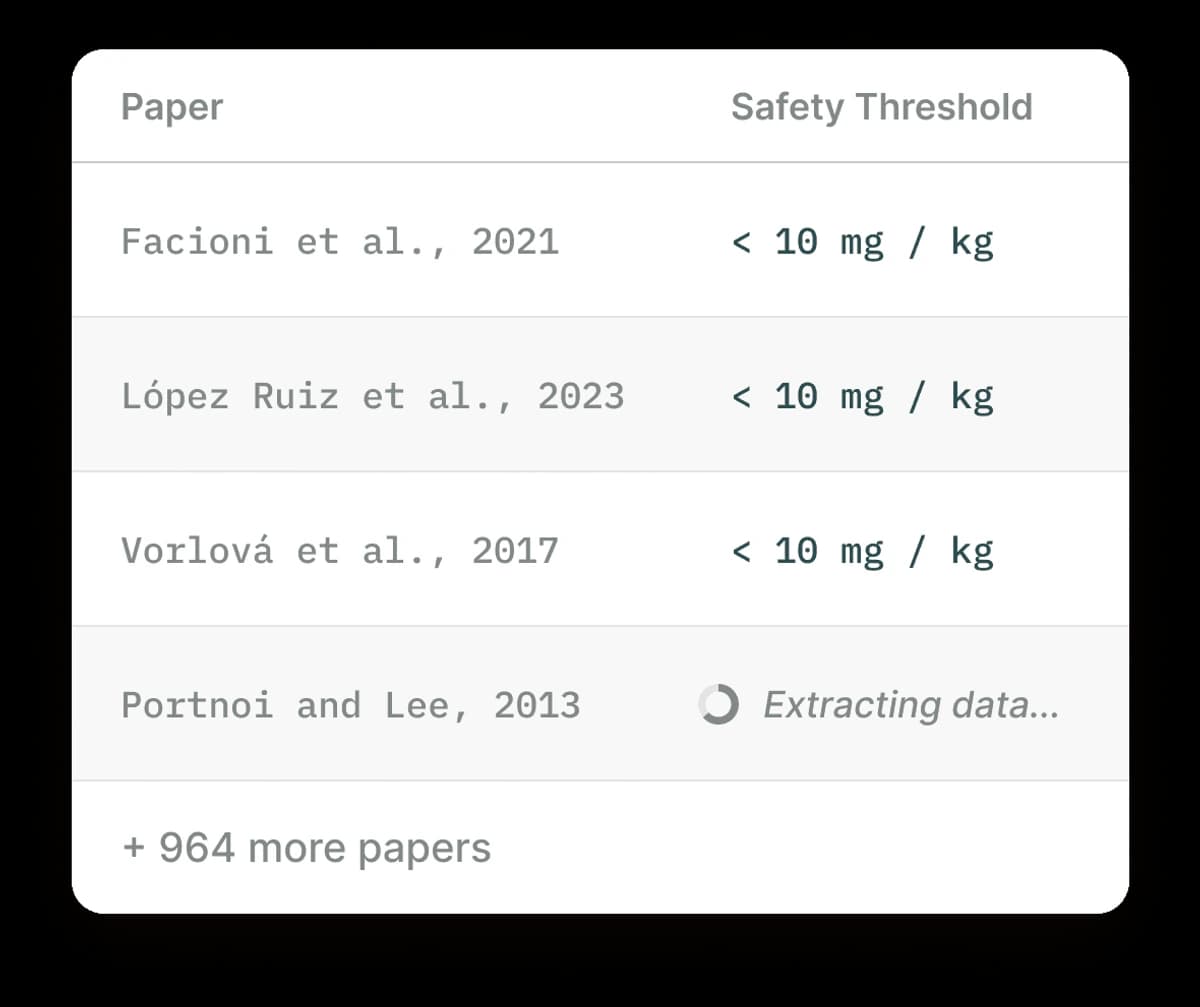
The Elicit screenshot shows why extraction tables are useful for free-tool screening. Rows map to papers, and columns map to fields such as findings, methods, or study details. Keep that structure as crawlable notes or a Markdown table when you move from screening into your own review.
Best free AI research tools
Atlas
Atlas is the best fit here when the research problem begins after source collection. You have PDFs, papers, websites, notes, or transcripts, and you need to ask questions across them without losing the evidence trail.
Atlas supports PDFs, websites, YouTube transcripts, paper search, text notes, and chat files. You can search by DOI, arXiv ID, title, author, or topic. Review the paper before adding it to a project. For adjacent source-based workflows, compare AI tools that cite sources and AI tools that summarize research papers.
Do not judge Atlas by whether it replaces every search tool. Use search tools to find candidate papers. Then use Atlas when you need grounded answers across the materials you decide to keep. For a direct product boundary, see Atlas vs Elicit.
Pair Atlas with search or citation tools when:
- you found papers in Consensus, Elicit, Semantic Scholar, Google Scholar, or a library
- you need to compare methods, limits, or findings across sources
- you want cited answers that open back to source passages
- you need to save verified findings before a fluent summary moves into notes or a draft.
Consensus
Consensus is strongest when paper search can answer the question. Use it for focused questions. Ask whether a treatment has support, what a field tends to find, or which papers back a claim. The Consensus alternative page covers when a broader workspace may fit better.
Use it to find your first set of papers. Then open the papers before citing any result. A synthesized answer can help you decide what to read. It should not become the final authority for a literature review.
Pair Consensus with Atlas when you want to move from "which papers should I inspect?" to a paper-by-paper check inside your own project.
Elicit
Elicit is useful when the research task depends on finding papers and extracting structured details. It fits review tables with fields such as sample size, group studied, method, country, dataset, result, or caveat.
That structured view is the reason to use it. A normal chatbot answer may summarize a topic, but extraction columns can help you see which papers belong in a review matrix.
The caveat is that extracted fields still need spot checks. If a paper's method or result will appear in your own work, open the paper. Confirm the row before relying on it.
Pair Elicit with Atlas after you choose the papers. Elicit can help fill the review table. Atlas can help ask cited questions across the source set. For the tradeoff, read Consensus vs Elicit or Scite vs Elicit.
Scite
Scite is the best fit when citation context is the job. It shows how later papers cite a work. It can also show whether the citing text supports, contrasts with, or mentions it.
That is different from asking for a general summary. Citation context helps when a paper is well known or disputed. It also helps when newer work may have changed how an older paper should be read.
Use Scite before you build a claim around a single paper. Then read the cited papers and the original paper before deciding how much weight the claim deserves.
Pair Scite with Atlas when you have a source set and want to compare the papers' claims, disagreements, and caveats. For a closer citation-context view, use Atlas vs Scite.
NotebookLM
NotebookLM is a strong free-entry option when you want a source notebook. Google Help covers uploads, imports, source summaries, web and Drive search, Deep Research import behavior, and free-user source limits.
Use it when you have a bounded set of sources and want to ask questions inside that notebook. It can help with coursework, reading groups, or a small project where the source set is known.
Check source limits, imports, and school or employer rules before moving sensitive work into any hosted notebook.
Pair NotebookLM with Atlas when the project needs citation checks, source order, and saved verified findings. For a direct comparison, see Atlas vs NotebookLM.
Jenni
Jenni is best judged as a writing workspace. It focuses on reading, writing, and citing, so it fits the stage where notes become prose.
Use it when the hard part is drafting, rewriting, adding citations, or keeping writing momentum. Do not treat writing fluency as evidence quality. A paragraph can sound finished while the cited support is thin, mismatched, or missing. For a writing-specific view, read the AI academic writing guide.
Pair Jenni with Atlas when you want to verify source claims before they move into prose. Atlas is stronger for asking cited questions across the source set. Jenni is stronger when the next task is drafting and revision.
Paperpal
Paperpal is writing-centered. It helps edit, rewrite, check copied text, manage references, and work with PDFs. It fits when the document already exists and the next job is revision.
The same caution applies to research review. Editing tools can improve the text without improving the proof. Check any source-based sentence against the original paper before treating it as ready.
Pair Paperpal with Atlas when you want source-grounded notes and cited answers before the editing stage.
ScholarAI
ScholarAI helps with paper search, citations, PDFs, and sourced answers. It belongs in the search-and-workspace group rather than the pure writing group.
Use it when you want to keep papers, PDFs, and citations close together. Check whether the source set covers your field, journal type, date range, and access needs. If the main job is filing and returning to papers later, compare research paper organizer workflows too.
Pair ScholarAI with Atlas when you want to bring selected sources into a project and ask grounded comparison questions across them.
Source-checked research workflow in Atlas
Here is the sequence I would use after free discovery tools have helped identify a candidate source set.
- Collect the source set. Add the papers, PDFs, web sources, notes, or transcripts that matter for the question. For academic papers, start with precise identifiers such as DOI, arXiv ID, or exact title when you have them.
- Ask a narrow grounded question. A useful prompt names the claim, method, source, or comparison. "Compare the limits reported in these 3 papers" works better than "Summarize my research."
- Check citation badges. Important claims should have citations. Open each citation and read the passage Atlas used.
- Read the surrounding context. The cited sentence may be relevant but incomplete. Check whether nearby text adds a caveat, changes the claim strength, or names a conflicting result.
- Save only verified findings. If the passage supports the claim, save the finding with its source context. If it does not, ask a narrower follow-up or mark the answer as unverified.
That process is slower than accepting the first AI answer, but it is safer for source-based research. It also gives you a repeatable handoff. Search tools help find candidates. Atlas helps turn selected sources into checked notes.
Free tier caveats
Before you choose a free AI research tool for serious work, check the details that change most often. Check these before signup:
- Search or message quotas: Some tools limit searches, chats, or premium model calls.
- Source count and upload size: Source notebooks and PDF workflows often cap files, notebooks, or storage.
- Export: A free plan may let you view a table or answer. It may still restrict export, citation formats, or team use.
- Citation depth: A tool may show paper links, citation records, source snippets, or exact passages. Those are not interchangeable.
- Data rules: Check whether your school or employer allows private data, study participant material, or paywalled PDFs.
- Subject fit: A tool for medical papers may be weaker for humanities, law, local policy, or niche tech fields.
- Review time: The cheaper tool can cost more if it creates hours of source cleanup, citation repair, or export fixes.
For coursework or early exploration, a free tier may be enough. For a thesis, manuscript, grant memo, or professional report, choose the tool that leaves the strongest evidence trail.
Choose your tool
Choose the tool that matches the next research action:
- If you need to find papers, start with Consensus, Elicit, ScholarAI, a library, or another paper search tool.
- If you need to understand citation context, use Scite and then inspect the papers behind the citation statements.
- If you need to work inside a source notebook, consider NotebookLM. Check current limits before building the whole project there.
- If you need to write or revise academic prose, compare Jenni and Paperpal. Check source-based sentences yourself.
- If you need to ask cited questions across selected sources, use Atlas. Inspect the source passages before reusing the answer.
The most reliable research stack is usually not one free tool. First, find candidate sources. Screen them. Move the useful ones into Atlas or another source workspace. Ask narrow questions. Check citations. Then move findings into a draft.
Compare your sources with cited answers
Add your chosen sources, compare evidence, and inspect every cited passage.