

QuillBot is useful when the job is sentence-level writing help. It can paraphrase a draft, clean grammar, summarize a passage, translate text, or format a quick citation. It is less complete when an assignment depends on source proof from a paper, lecture note, PDF, or web page.
Students need more than a coupon. They need writing help that follows school rules and keeps claims tied to the right sources.

Check sources in Atlas
Compare course readings and inspect citations before using a polished claim.
Quick Verdict on QuillBot for Students
Use QuillBot to improve wording. It can rewrite rough sentences, fix grammar, shorten text, translate passages, and format citations. QuillBot's student resources cover those jobs.
QuillBot does not replace the reading, source check, or teacher's AI rules. A rewrite can still lack a citation, change the meaning, or break the assignment rules.
Pay only if QuillBot solves the part that slows you down. If you need help with a full draft, paper reading, or source checks, compare tools built for those jobs first.
If you already know QuillBot is not the right fit, use the QuillBot alternatives comparison to separate paraphrasing, grammar, academic editing, humanizing, and source-checking tools.
What Students Really Need From QuillBot
The phrase "QuillBot for students" hides several different jobs:
- Paraphrasing: rewriting a sentence without changing its meaning.
- Grammar cleanup: catching grammar, wording, and clarity issues.
- Summaries: turning a passage into a shorter review note.
- Citations: formatting source details in the required style.
- Drafting: building an outline, argument, paragraph, or review section.
- Source checks: seeing whether the source passage supports a draft claim.
QuillBot is strongest in the first four. It is not a full study system. The risky handoff happens when a student rewrites text before checking the source. Polished wording can make a weak claim look finished. The citation may still be wrong. The passage may be out of context. The student may not understand the evidence.
Responsible use is narrower. Use QuillBot to improve your own draft language. Keep the original source, citation rule, and assignment policy in view. If the sentence came from someone else's idea, a paraphrase still needs a citation.
QuillBot Premium and Student Discount Checks
QuillBot has official Premium and student-discount pages. Student Beans also appears in the discount results. Use those pages to check current terms before you pay.
Before paying, use the live checkout to check:
- which tools the plan includes;
- whether your country, school, or email can use the offer;
- whether the offer covers a month, a year, or a shorter period;
- any limits on checks, translations, summaries, or citations;
- the price after the offer ends.
Prices and offers can change, so check them on the day you buy. The free plan may be enough for an occasional rewrite. Premium matters more if you revise long drafts each week. It will not solve a source-check problem.
If budget is the main constraint, compare QuillBot with other free AI tools for students before paying for a writing-only upgrade.
What to Look For in Student Tools
Choose based on the task that slows down your assignment.
Use a paraphraser or grammar checker for a draft that needs better wording. Use a citation-aware tool to build a paper. Use a paper reader to understand studies; Perplexity for students can help find answers and source leads. Use a source-based workspace when you need to check a claim against a passage.
When students need more than QuillBot
Atlas for source checks
Atlas fits after the draft has been polished. Students can add PDFs, websites, academic papers, notes, and other supported sources to a project. Then they can ask a grounded question and inspect citation badges that point back to source passages.
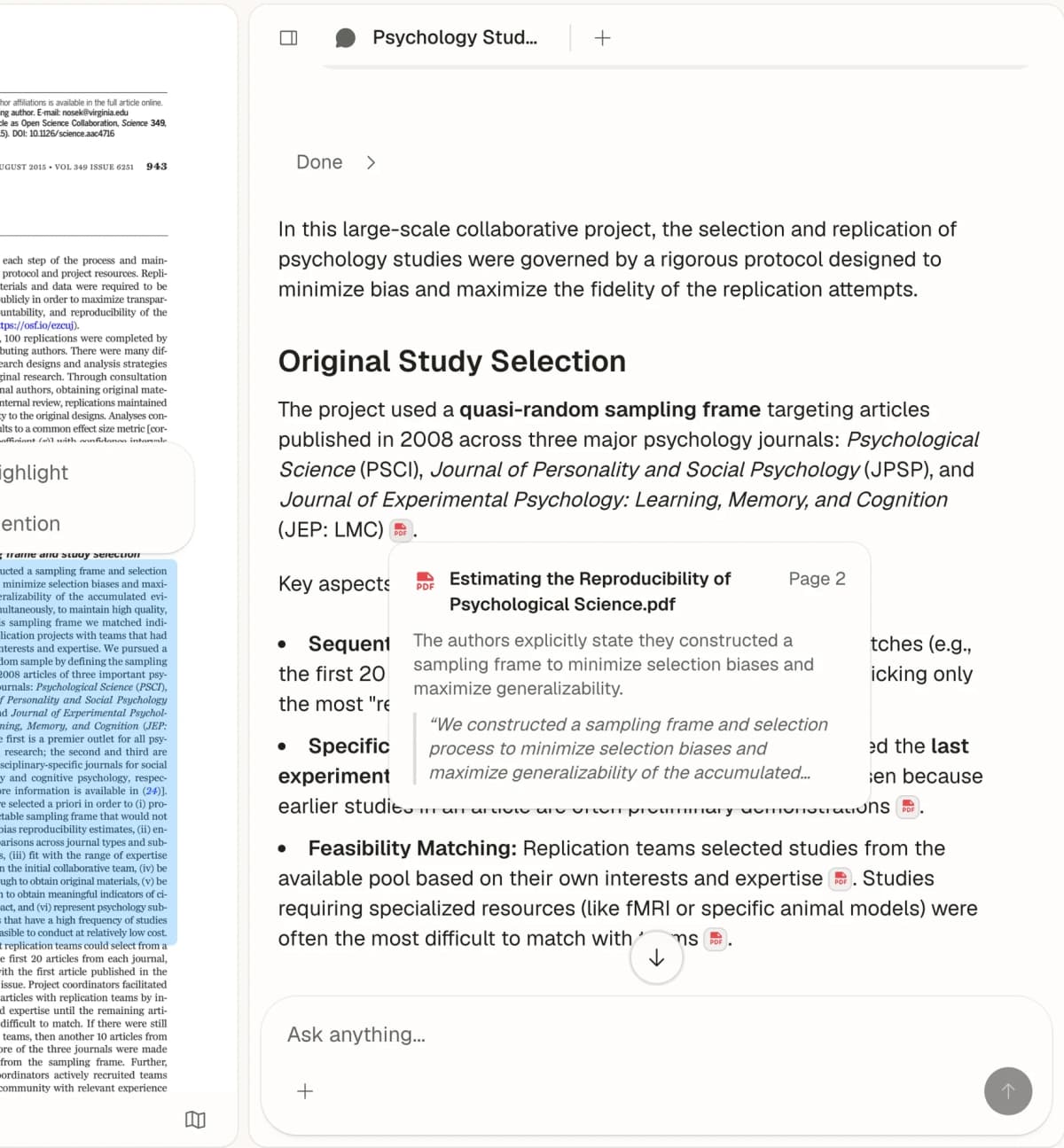
Atlas displays an answer beside the source passage it cites. Open that passage to check what the source supports. Source: Atlas Chat with Paper.
That makes Atlas useful when the sentence sounds right but the evidence still needs checking. After cleaning up a paragraph in QuillBot, a student can ask Atlas which uploaded source supports the comparison. Then they can open the cited passage and revise from evidence they can inspect.
QuillBot
QuillBot fits rewrites, grammar fixes, summaries, translation, and quick citation formats. Scribbr's test found that it produced fluent rewrites and fixed grammar. It had more trouble with long or broken source text.
Use it on wording you already understand. A rewrite of unfamiliar text may look clear even when the meaning has changed.
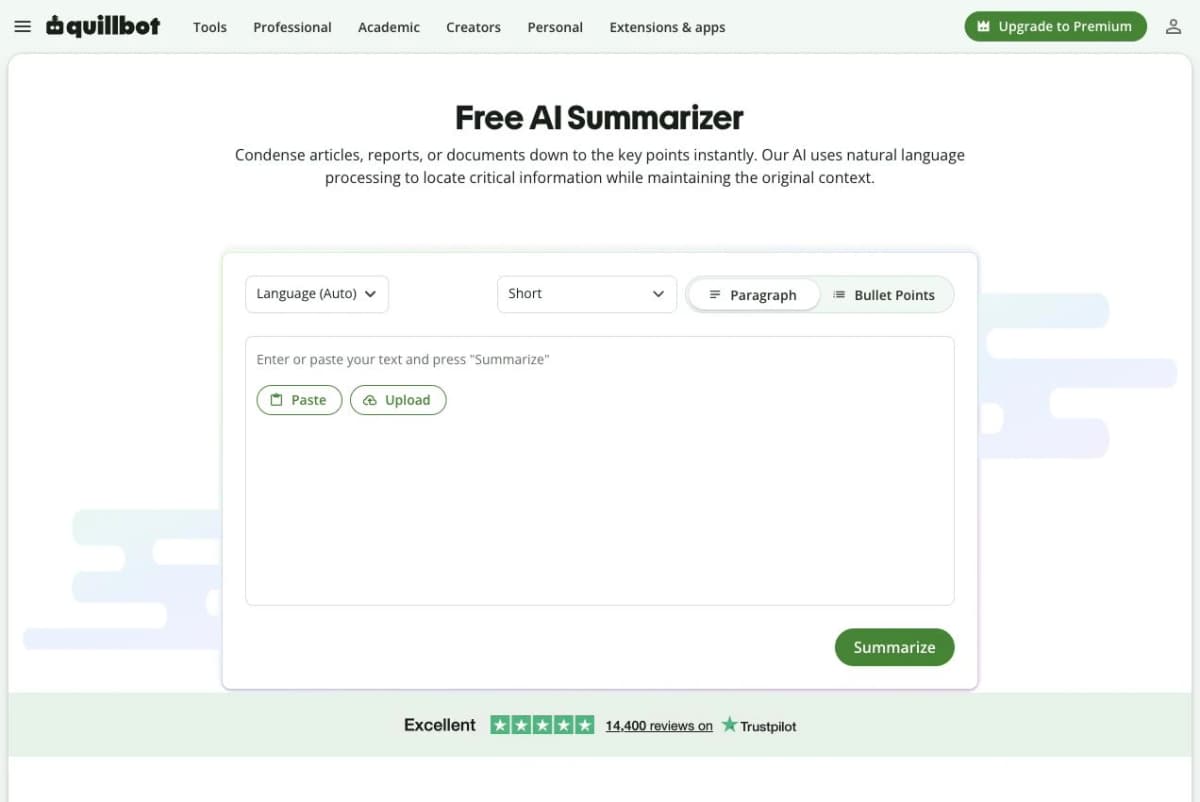
QuillBot’s blank Summarizer shows language, length, and paragraph or bullet controls. It does not show a generated result. Source: QuillBot Summarizer.
Grammarly
Grammarly fits students who want feedback where they already write. Its student page lists proofreading, rewrites, citations, plagiarism checks, and ways to note AI use.
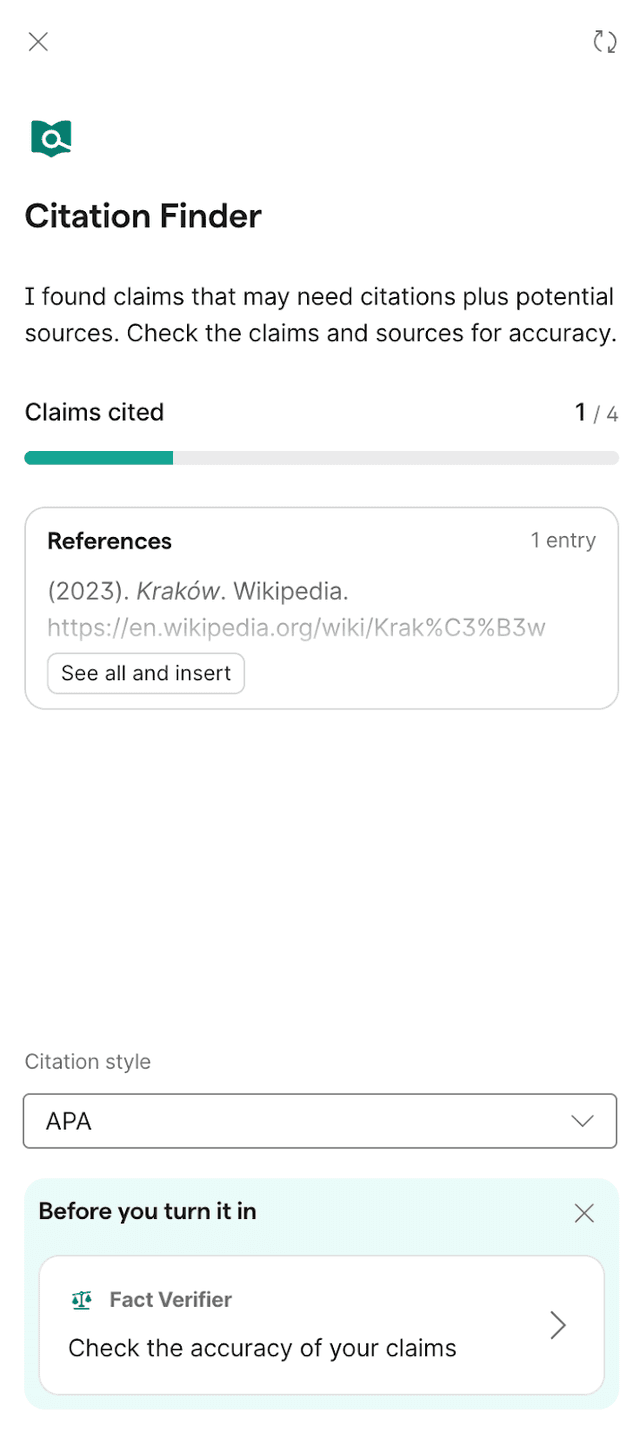
Grammarly’s official help guide shows Citation Finder beside a draft. Its sample Wikipedia reference illustrates the panel, not the accuracy or suitability of that source for an assignment.
Use it for clear, correct writing across documents and apps. It is not a paper reader, so source-based work still needs a separate check.
Paperpal
Paperpal focuses on academic drafts and papers. Its site lists edits, rewrites, references, PDF comparison, citation styles, and checks before submission.
Choose it for academic wording or a paper that needs a final edit. A clean draft still needs source checks, teacher review, and school AI rules.
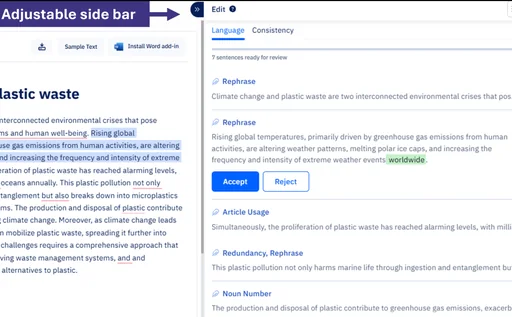
This crop emphasizes Paperpal’s editor and review pane. Its sample text does not establish editing quality, and the image shows no reference search or citation results. Source: Paperpal’s online editor update.
Jenni AI
Jenni AI is a better fit when the student needs a writing space rather than a sentence-level paraphraser. Its product pages cover drafting, outlines, inline citations, source-linked claims, claim review, and exports.
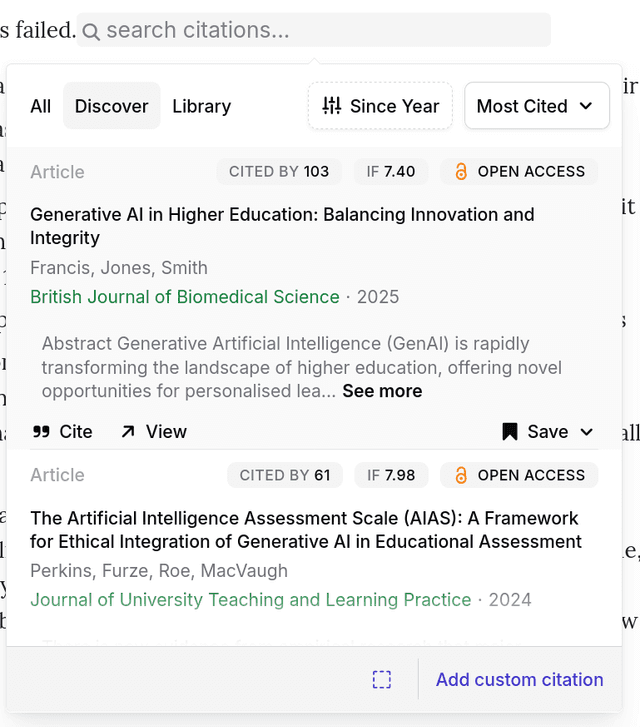
Jenni’s official documentation shows its citation search panel. The sample records and visible citation metrics illustrate the interface; verify sources and metadata before relying on them.
Choose Jenni when the assignment starts at the outline or draft stage and you want citation-aware writing support. Still inspect source links before using a generated claim. Citation features reduce friction, but they do not prove that every sentence is correct.
SciSpace
SciSpace is strongest when the student job centers on research papers. Its AI Writer covers autocomplete, edits, and citations from a large paper corpus. The broader product also supports paper reading and research writing.
Choose SciSpace when you need help reading papers or drafting with scholarly citations. It may miss closed, paywalled, niche, or instructor-provided sources. Check whether your required readings are available.
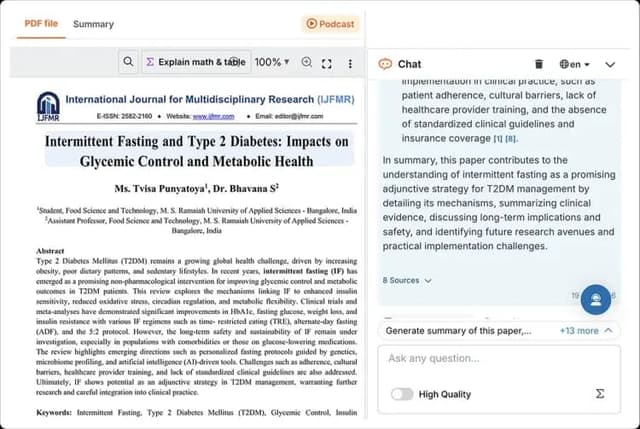
A source-reviewed 2026 SciSpace capture shows a paper beside chat and an 8 Sources control. It illustrates the reading interface, not writing quality or the accuracy of demo-paper content. Source: SciSpace PDF Chat comparison.
QuillBot Alternatives Compared
Use this table as a study-job map. The right choice depends on where the assignment is stuck. The bottleneck may be language, drafting, paper reading, citation formatting, source discovery, or evidence checks.
| Tool | Best student job | Strongest proof source | Verification risk | Choose it when |
|---|---|---|---|---|
| Atlas | Source-grounded comparison across uploaded readings, PDFs, web sources, papers, and notes | Source types, grounded questions, citations, and multi-source synthesis docs | Citations still need passage inspection before you reuse a claim | You have polished a draft and need to check what the sources actually support |
| QuillBot | Paraphrasing, grammar cleanup, summarizing, translation, and quick citations | Student resources, Premium pages, academic-integrity page, and paraphrasing tests | A fluent paraphrase can still misstate, under-cite, or over-polish source material | You understand the source and need cleaner wording or a formatted citation |
| Grammarly | Broad writing feedback, proofreading, AI-use disclosure, and everyday student writing support | Grammarly's student page | Writing feedback does not prove the source evidence is correct | You want feedback while writing across documents, emails, and assignments |
| Paperpal | Academic editing, rewriting, reference support, PDF comparison, and submission-readiness checks | Paperpal's product pages | Academic polish can still miss discipline rules or source weaknesses | You need research-writing edits before a formal submission or instructor review |
| Jenni AI | Academic drafting, outlines, inline citations, source-linked writing, and exports | Jenni's product pages | Citation-aware drafting still requires source checking | You need help moving from outline to cited academic prose |
| SciSpace | Paper reading, scholarly writing, autocomplete, edits, and citations from a paper corpus | SciSpace AI Writer pages | Corpus coverage may not match every assigned or paywalled source | You need help reading and writing around research papers |
Table 1: The table separates sentence polish, paper work, and evidence checks so the tool choice follows the assignment bottleneck.
What to Look For in Atlas
Move from QuillBot to Atlas when the words sound better but the claims still need proof. This often happens after a rewrite or summary.
Use this source-check workflow:
- Rewrite the draft only after you understand the source.
- Mark comparisons, causes, numbers, definitions, and claims about an author.
- Add the related readings, PDFs, pages, notes, or papers to Atlas.
- Ask, "Which source supports this claim, and what is the strongest passage?"
- Open the citation and read the text around it.
- Revise from that passage and keep the citation beside the claim.
Atlas keeps the source, question, answer, and citations in one place. The same workflow can compare several readings while keeping each key claim tied to a passage.
Atlas does not rewrite grammar or check plagiarism. It compares sources and shows the cited text behind a claim.
How Students Should Choose
Choose QuillBot for rewrites, grammar fixes, summaries, translation, or citation formats. Check Premium only when a free-plan limit blocks work you do often.
Choose Grammarly for daily writing feedback. Choose Paperpal for an academic edit. Choose Jenni AI for a drafting space with citations. Choose SciSpace when the work starts with research papers.
Choose Atlas when the sentence is clear but the claim still needs proof. Compare the readings and inspect the cited passages before you submit.
Check sources in Atlas
Compare course readings and inspect citations before using a polished claim.