
Atlas vs MindMeister (2026): An In-Depth Research Comparison
Atlas is a visual research workspace, MindMeister is a long-running online mind-mapping tool. Compare paper deconstruction, citation grounding, and fit.
- Byline

Summary
Use Atlas for source-grounded research maps. Use MindMeister for online maps, live collaboration, and brainstorming.
The comparison covers cited answers, paper maps, exports, migration, and visual workflow fit.
Atlas maps papers from sources. MindMeister helps users draw and present maps by hand.
MindMeister can stay useful for presentation maps. Atlas handles research libraries that need citations.
Note: We make Atlas, so this comparison comes from the team that built it. The tables mark the jobs where MindMeister wins, and the decision guidance explains those advantages. The goal is to help you choose the right tool for your current research task. Atlas does not suit every research job.
Atlas is a visual research workspace for people working through papers, reports, and source-heavy projects.
MindMeister is an online map tool for manual branches, live teamwork, presentations, and MeisterTask handoff. The mind-mapping software guide explains the wider category.
Atlas gives you Knowledge Maps and Semantic Maps. Answers are citation-grounded through claim-source-justification, and each project keeps its own source context.
The mind map and knowledge graph comparison explains why those structures support different jobs. MindMeister gives you a fast shared canvas for drawing and presenting ideas.
If you need a clean mind map for a meeting, class, or brainstorm, choose MindMeister. If you need a map that comes from source documents and lets you check the cited passage behind a claim, choose Atlas.

Atlas

Generate a cited research map from your papers
Upload a paper and compare its cited argument map with your manual map.
Quick verdict: Atlas or MindMeister?
Choose Atlas when the map must be tied to sources. Atlas reads papers and builds a Knowledge Map for each one. It can also show a project in a Semantic Map. Answers include a claim, source passage, and reason.
That makes Atlas a better fit for theses and literature reviews. It also fits policy briefs, treatment research, and other work where you must defend the answer.
Choose MindMeister when the deliverable is a mind map. It is stronger for live group mapping, branch styling, presentation mode, templates, and task handoff through MeisterTask. It is also cheaper if you only need a few simple maps.
Criteria and comparison table
I compared the tools on six research jobs. The rubric covers map creation, claim grounding, source upload, teamwork, presentation, and price. I also checked MindMeister's public pricing and the source workflow behind Atlas's research paper analyzer.
MindMeister should win where the job is manual diagramming. Atlas earns the recommendation when the job is source-grounded research.
| Atlas | MindMeister |
|---|---|
| AI-generated vs. manual maps: Generates Knowledge Maps from uploaded papers. Atlas wins when the map should come from source text. | AI-generated vs. manual maps: User draws manual branch maps. MindMeister wins when the finished diagram is the deliverable. |
| Citation grounding: Keeps claim, source passage, and reason together. Atlas wins for defended research writing. | Citation grounding: Links and notes are manual. |
| Source upload: Built around PDFs and source-heavy projects. Atlas wins for research files. | Source upload: Attaches files and links to nodes. MindMeister wins for node attachments. |
| Collaboration: ✗ No live branch-editing canvas. | Collaboration: ✓ Stronger for live co-editing and meetings. |
| Presentation export: ✗ Better for inspection than slide export. | Presentation export: ✓ Stronger for presentation mode and themes. |
| Pricing: ✗ Paid after a small evaluation sample. | Pricing: ✓ Lower entry price with a Basic no-cost plan. |
Table 1: The rubric points to Atlas for generated research maps, citation grounding, PDF upload, and source review. It points to MindMeister for manual maps, live collaboration, presentation export, and lower entry price.
How is Atlas different?
MindMeister and Atlas overlap at the surface. Both can sit near reading, planning, and reasoning work. They diverge once the output has to be defended. Three differences matter most.
Product screenshots and workflow test
Evaluation note: Atlas offers an evaluation sample of 10 sources and 5 lifetime AI chats. That is enough to run a Knowledge Map on one paper before you decide.
The practical test is one paper. In MindMeister, you draw the branches yourself and decide which claims deserve branches. In Atlas, you upload the paper and check the generated Knowledge Map against cited passages. The document-to-mind-map guide explains this source-first workflow.
Visual maps of every paper and project
Atlas builds two maps as you read. A Knowledge Map breaks each paper into claims, evidence, terms, and links between ideas. You see the paper's spine first, then click into the passages that support it.
A Semantic Map shows a whole project on a single canvas. Sources, notes, chats, and citations cluster by topic, so 200 papers stop feeling like a folder.
"It's like an ultimate GPT. I can finally see what I've read." Kyle Lao, CEO & Co-founder of MenSC Labs
MindMeister does not break a paper into claim and evidence nodes. It also does not re-map a whole project by topic angle.
If you have ever spent an afternoon trying to recover a paper you read three weeks ago, the Knowledge Map is the first Atlas surface that pays off. Visual maps make a body of papers legible at a glance.
Every claim traces to a source
AI research tools can produce weak citations. A claim may cite a passage that does not support it. Atlas renders each answer as a claim-source-justification triple.
You see the claim, the passage, and a short reason why the passage supports the claim. You can click into the source paragraph and read the highlighted text.
Atlas tracks this with the H/V ratio. It checks how often a generated sentence fails a passage-level citation review. Atlas targets H/V < 0.1 on that benchmark, and the Verifiable AI Research benchmark publishes the method.
MindMeister can hold links and notes. Atlas adds a claim-by-claim reason trace. That extra trace may be unnecessary for casual Q&A, but it matters for a thesis sentence, legal brief, or treatment note. The citation tool guide covers this verification job in more detail.
Project-scoped research context
Atlas keeps sources, notes, chats, Knowledge Maps, and the Semantic Map inside the project where they were created. Those surfaces share one evidence base for the research question.
A separate Atlas project has separate sources and context. That isolation prevents unrelated evidence from entering a cited answer. MindMeister takes a different approach through separate manually arranged maps.
Comparing Atlas and MindMeister: feature comparison
Both tools can help a researcher think visually, but they sit in different categories. Atlas helps you read papers, map the current project, cite sources, and keep its research context together. MindMeister helps you draw mind maps, collaborate live, present branches, and turn branches into tasks.
The sections below compare paper maps, project maps, cited answers, citation notes, and project context. Each table includes at least one row where MindMeister wins or ties, because a useful comparison has to name the boundary.
This evaluation treats collaboration, migration, presentation, citation quality, and long-term research continuity as separate decision criteria.
Nearby mind-mapping alternatives
The surrounding market includes Coggle, Miro, MindMup, MindMap AI, and XMind. These products are closer to MindMeister's canvas category. They help people draw, brainstorm, or present ideas.
Lucidchart and Whimsical cover polished team diagrams. Mapify and GitMind add prompt- or file-assisted map generation.
The AI mind-map generator guide compares that adjacent category. Atlas remains distinct because its maps come from research sources and stay tied to cited passages.
Paper deconstruction (Knowledge Map)
The Knowledge Map is Atlas's per-paper surface. It breaks one paper into claims, evidence, and links between ideas. Node text stays faithful to the paper. You can move from the main claim down to a specific paragraph.
| Atlas | MindMeister |
|---|---|
| Multi-level argument structure ✓ | Manual tree-based mind map per paper |
| Labeled relations (motivates, causes, enables) ✓ | ✗ |
| Faithful-to-source node text ✓ | ✗ |
| Hierarchical breadcrumbs ✓ | ✗ |
| ✗ | Long-running mind-mapping brand ✓. MindMeister has greater category familiarity. |
Table 2: Atlas paper deconstruction compared with MindMeister's manually authored tree maps.
Good to know: The bottom row belongs to MindMeister. Atlas does not ship that surface. The Knowledge Map's payoff is recovering a paper's argument three weeks after you first read it, when topic chips alone are no longer enough.
Project view (Semantic Map)
The Semantic Map is Atlas's project view. It places sources, notes, chats, and citations on a single canvas. Related items cluster by topic. You can re-map the same project from a new angle without uploading the files again.
| Atlas | MindMeister |
|---|---|
| Spatial embedding of sources + notes + chats ✓ | Separate mind maps per topic |
| Auto-labeled topic clusters ✓ | ✗ |
| Topic-angle re-projection ✓ | ✗ |
| One project-scoped evidence view ✓ | ✗ |
| ✗ | Presentation mode from mind maps ✓. MindMeister has the stronger presentation surface. |
Table 3: Atlas project mapping compared with MindMeister's separate presentation-ready maps.
Good to know: MindMeister's strength on that row is genuine. If your work depends on it, that's the boundary. The Semantic Map's payoff is when 200 papers stop being a folder and start being a corpus you can re-project under different topic angles without re-reading.
Citation-grounded answers
Atlas shows the claim, supporting passage, and reason the passage supports the claim. You can jump to the source paragraph, read the highlighted sentences, and check whether the reasoning holds.
| Atlas | MindMeister |
|---|---|
| Claim-source-justification triples ✓ | ✗ |
| Reasoning traces (why this passage supports this claim) ✓ | ✗ |
| Jump-to-source with passage highlight ✓ | ✗ |
| H/V ratio < 0.1 benchmark published ✓ | ✗ |
| ✗ | Integration with MeisterTask for task management ✓. MindMeister has the native task handoff. |
Table 4: Atlas answer-verification features compared with MindMeister's links, notes, and task handoff.
Good to know: Both tools can hold source links. Atlas also explains why a passage supports a claim. Everyday Q&A may not require that reason trace. A thesis sentence or evidence-heavy paragraph often does.
Literature-grounded annotations
Atlas annotates each paper on ingest. Citations inside the paper become objects you can inspect. When a cited source is open-access, Atlas can pull in the relevant passage. You can see how the paper builds its argument through other sources without leaving the document.
| Atlas | MindMeister |
|---|---|
| Auto-annotate on ingest ✓ | ✗ |
| Multi-citation synthesis (how citations build the argument) ✓ | ✗ |
| Resolve cited sources (open-access) ✓ | ✗ |
| Exact passage / page / paragraph anchors ✓ | ✗ |
| ✗ | Rich formatting, themes, and templates ✓. MindMeister provides more visual styling. |
Table 5: Atlas citation-resolution features compared with MindMeister's formatting and template controls.
Good to know: These notes make the source chain visible. They show how a paper uses the sources it cites.
Project-scoped context
Atlas keeps sources, notes, maps, and chats inside one project. A separate project has a separate evidence base.
| Atlas | MindMeister |
|---|---|
| Project-scoped research context ✓ | Separate manual maps ✓ |
| Sources, notes, maps, and chats share one evidence base ✓ | Links and attachments can be added to map nodes ✓ |
| Separate projects isolate unrelated context ✓ | Separate maps isolate topics ✓ |
| Sources must be added to each relevant Atlas project | Maps can be duplicated as templates ✓ |
| ✗ | No-cost plan for solo users ✓. MindMeister has the lower entry cost. |
Table 6: Atlas project-scoped context compared with MindMeister's lower-cost standalone map workflow.
Good to know: Atlas's project boundary is deliberate. Put sources that answer the same question together, and start a separate project when the evidence should remain isolated.
Price comparison
Atlas is a paid product. There is no perpetual no-cost plan. The evaluation sample includes 10 sources and 5 lifetime AI chats. After that, Atlas Pro is $20/mo or $204/yr.
The Atlas tier includes unlimited sources, unlimited AI chats, Knowledge Maps, Semantic Maps, and claim-source-justification. MindMeister charges for a general mind-map canvas, collaboration, and presentation features. Confirm its current tiers on the official pricing page before buying seats.
| Atlas | MindMeister |
|---|---|
| Free: ✗ (evaluation sample only: 10 sources · 5 lifetime AI chats) | Free: Basic no-cost plan: 3 mind maps ✓ |
| Pro: $20/mo or $204/yr (unlimited sources · unlimited AI chats · all features) | Paid: Personal $4.99/mo · Pro $8.25/mo · Business $12.49/user/mo |
| Pro unlocks Knowledge Map, Semantic Map, and claim-source-justification ✓ | ✗ |
Table 7: Atlas and MindMeister pricing compared for source-grounded research and collaborative mind mapping.
Once you have checked the table and price boundary, run a single-paper trial. Uploading that paper lets you judge whether its generated argument map is more useful than the manual diagram you would create.
When to choose Atlas vs MindMeister
- Want paper structure deconstructed multi-level? Go with Atlas. (Knowledge Map)
- Want answers that explain how each citation justifies the claim? Go with Atlas. (claim-source-justification)
- Want one project-scoped evidence base for maps, notes, and cited chat? Go with Atlas.
- Want a mature map tool with slides and tasks? Go with MindMeister.
- Tied: building a presentation from a mind map you sketched. Both can help, but MindMeister is designed for that exact pattern. The wedge opens once you build a corpus you will return to.
Use MindMeister when the map is the deliverable: a meeting artifact, teaching visual, or presentation. Its branch editor and collaboration workflow match that job directly.
Use Atlas when the map is a step toward cited writing. The source passage, argument structure, and ability to reuse research later then matter more than manual layout control.
Recommendations by user type
- PhD researchers: Atlas. Early literature-review work benefits from Knowledge Maps. Thesis writing benefits from claim-source-justification because each key sentence can point back to a passage.
- Students doing literature reviews and thesis research: Atlas. The Knowledge Map saves time during reading, while sources, maps, and cited chats remain usable inside the same project across semesters.
- Knowledge workers: Choose Atlas when reading and citing sources is the core job. Choose MindMeister when a clear mind map is the daily need.
- Personal researchers with high stakes: Atlas. Medical, legal, and major-purchase research often needs a source trail. MindMeister is a fine starting canvas, but Atlas is better when you must defend the answer.
MindMeister is for authored mind maps: plans, brainstorms, teaching, and diagrams. Atlas is for maps that come from sources. If you need a clean diagram for an audience, MindMeister is the right surface. If you need a map tied to source text, Atlas is the better research tool.
What changes after the first week
The first week with MindMeister is usually fast. You open a blank map, add a central topic, and start arranging branches. The map reflects your own reading and structure.
That is a strength when the task is planning a meeting, outlining a class, or shaping a talk. The tool stays out of the way. You decide what matters.
The first week with Atlas starts with source files. Atlas reads them, builds maps, and gives you cited answers. The map points back to the paper.
You can click from a claim to the passage that supports it. That changes how you review your own notes because the source trail is always close.
By the end of the first week, the trade-off is clear. MindMeister is faster for a map you already know how to draw. Atlas is stronger when the source material is still teaching you what the map should contain.
If you are summarizing a paper you already understand, MindMeister may be enough. If you are still finding the paper's structure, Atlas saves time by making that structure visible.
The second week exposes the project-boundary difference. In MindMeister, you may create another map for the next paper or meeting. That keeps each map clean, while the links between maps live mostly in your head.
In Atlas, sources, notes, chats, and maps stay inside the project where they were created. Add the relevant sources to a separate project when the research question changes.
That difference matters when a project spans months. A thesis, grant brief, market scan, or clinical research question rarely ends with a single map. Keep its sources in the same Atlas project as you add papers, revise claims, and check old assumptions.
MindMeister is useful when you need a visual artifact for that moment. Atlas is useful when the research itself needs to keep growing.
This is also why the tools can coexist. Keep MindMeister for shared diagrams and use Atlas for the cited research layer underneath.
Migration and worked example
Bringing MindMeister work into Atlas
Most MindMeister users arrive with branch-based maps. A map may represent a paper, a chapter, or a brainstorm. MindMeister exports several document, image, and outline formats. On migration day, separate content from layout.
The text content migrates best. Export a map as Word, RTF, or an outline, then paste the useful text into an Atlas note. Upload the source PDFs that sat behind the map. Atlas can then build Knowledge Maps and a Semantic Map from the papers themselves.
The visual layer does not migrate as a native Atlas object. Branch colors, icons, themes, images, comments, slides, and MeisterTask links stay with MindMeister. Atlas generates a fresh map from the source argument. Keep MindMeister archived for meeting visuals and rebuild the research corpus in Atlas from the PDFs.
8-paper literature-review example
Imagine a student writing a review section from 8 papers on spaced study. In MindMeister, the student opens a map, creates the chapter title, and adds 1 branch per paper.
Under each paper, they add the claim, method, sample size, key finding, and limit. With practice, that can take 15 to 20 minutes per paper. For 8 papers, the map can take 2 to 3 hours before writing starts.
In Atlas, the student uploads the same eight PDFs. Each paper becomes a Knowledge Map on ingest. The student scans the top-level claim, opens the supporting paragraphs only where needed, and marks the claims that matter for the chapter.
The Semantic Map then shows how the 8 papers cluster. The student can switch the angle from "retention findings" to "effect-size methods" without rebuilding the map. When writing starts, claim-source-justification ties the draft back to passages in the corpus.
If the chapter grows 3 months later inside the same project, the papers, maps, notes, and chats are still available. MindMeister gives a useful snapshot. Atlas gives project-scoped research context.
Decision rubric recap
- Choose Atlas for generated paper maps, cited answers, PDF upload, source review, and one project-scoped evidence base.
- Choose MindMeister for manual maps, live co-editing, map styling, presentation exports, MeisterTask handoff, and lower entry cost.
- Treat it as a tie only when the map is a temporary planning artifact and the source trail does not matter.
MindMeister fit and objections
When MindMeister is the right call
MindMeister owns several jobs where Atlas is the wrong recommendation. The first is live mind mapping in a meeting. If two or more people need to edit the same map at once, MindMeister is the better surface. Atlas does not ship that kind of co-editing canvas.
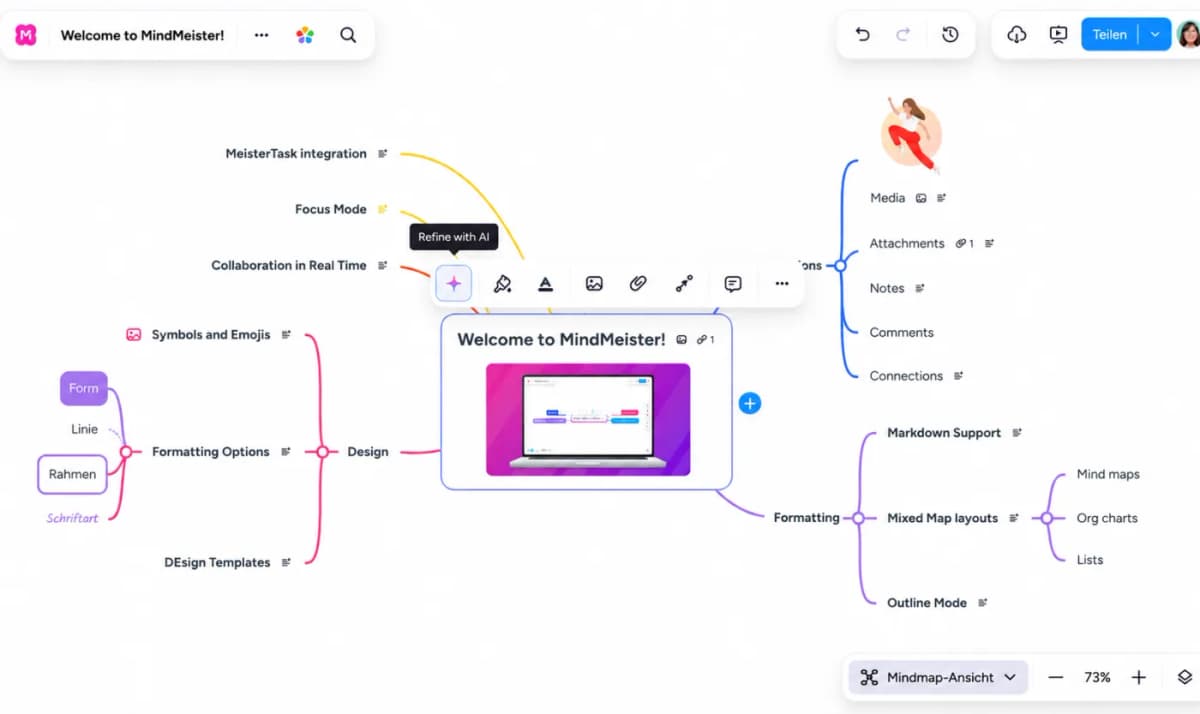
MindMeister's official editor screenshot shows the branch canvas, selected-topic toolbar, share controls, presentation control, and zoom tools used during collaborative map editing.
The second is open-ended team brainstorming. In that setting, the value is the act of creating and arranging nodes together. Atlas Knowledge Maps are faithful to sources by design, so they are the wrong surface for divergent idea generation.
The third is teaching and training. MindMeister presentation mode, themes, and templates are built for showing a map to a group. Atlas maps prioritize research inspection and are less suitable for running a workshop.
The fourth is MeisterTask handoff. If branches need to become tasks, MindMeister has the native product-family link. Atlas does not compete there.
Common objections and edge cases
Can I use Atlas as a real-time collaboration tool the way MindMeister works in meetings? Atlas does not provide MindMeister's synchronous branch-editing canvas. If your team works around a shared live map, keep MindMeister for that ritual. Use Atlas for the research corpus the meeting refers back to.
What if I only need to mind-map a handful of papers? Use the project horizon as the threshold. If you have fifteen PDFs that you will read once and never revisit, MindMeister or another simple mapper may be enough. Atlas pays off when the source trail and future reuse matter.
Does Atlas have a presentation mode I can use for a thesis defence or a conference talk? Not in the MindMeister sense. Atlas maps are interactive research surfaces. You can zoom into a paper or re-map a corpus live, but they are not slide decks. For a polished handoff, use Atlas for research and a slide tool for the talk.
Atlas
Generate a cited research map from your papers
Upload a paper and compare its cited argument map with your manual map.
Frequently Asked Questions
Atlas explains the link between a claim and its evidence. Each answer includes the claim, supporting passage, and a short explanation of why the passage supports the claim. You can open the source paragraph and inspect the highlighted sentences in context. MindMeister can store links and notes, while Atlas provides the reasoning trace needed to defend a thesis sentence or evidence-heavy paragraph. The Verifiable AI Research benchmark describes the method.