
Mural Alternative for Research | Atlas vs Mural (2026)
Atlas is a visual research workspace, Mural is a collaborative whiteboard tool for enterprise teams. Compare on paper deconstruction, citation grounding.
- Byline

Summary
Use Atlas for source-grounded research synthesis. Use Mural for enterprise whiteboarding, workshops, and facilitation templates.
This comparison covers cited answers, Knowledge Maps, Mural exports, source migration, and enterprise fit.
Atlas traces claims to source passages, while Mural helps teams run structured workshops and shared canvases.
Mural can remain the facilitation surface while Atlas handles research libraries that need evidence trails.
Note: We make Atlas. This comparison is written by the team that built it. Where Mural has the better answer for a given research job, this article says so. See the table rows where Mural wins and the "When to choose Mural" section below.

Atlas

Map research with cited evidence
Trace visual claims to uploaded sources while Mural runs the workshop.
Quick verdict
Atlas is a visual research workspace for people who need to understand a body of papers. That work might be a thesis, a treatment decision, or a literature review. Mural is a collaborative whiteboard with an infinite canvas, sticky notes, templates, and live editing for large teams.
Both tools can sit near a research workflow. Atlas maps each paper as a Knowledge Map, shows one project's corpus in a Semantic Map, and grounds answers in cited passages. Sources, notes, maps, citations, and chats share the same project evidence base. Mural's templates, voting, and timers are designed for live workshops. If you need to check the evidence behind a thesis, treatment plan, or brief, Atlas is the better fit.
How we compared Atlas and Mural
We compared the tools by the job the user is trying to finish. Atlas was scored on source upload, paper maps, cited answers, project maps, and reuse within a research project.
Mural was scored against its current pricing and feature matrix. We checked workshop setup, shared canvases, facilitation controls, live collaboration, and enterprise fit. The deciding factor is whether the research starts from citable sources or a group session that needs a shared canvas.
Feature comparison
| Atlas | Mural |
|---|---|
| Citation grounding: claim, source passage, and reason shown together. Atlas wins for defensible research synthesis. | Mural can hold source links and stickies, but it does not make claim-level proof the core surface. |
| Knowledge Maps: turns papers into claims, evidence, definitions, and relations. Atlas wins for paper recall. | Sticky notes and templates are flexible, but the user builds the structure by hand. |
| Workshop facilitation: Atlas has no voting, timers, private mode, or summon-to-me controls. | Mural wins for live workshops, design sprints, and enterprise facilitation. |
| Enterprise canvas work: Atlas focuses on research projects and sources. | Mural wins for shared boards, templates, and Microsoft Teams workflows. |
| Project-scoped research context: sources, maps, citations, notes, and chats share one Atlas project. | Mural boards keep workshop material on a collaborative canvas. |
| ✗ | Mural wins on live facilitation ✓. Atlas does not offer voting, timers, or facilitator controls. |
Table 1: Atlas and Mural compared on cited research, project context, whiteboarding, and live facilitation.
Interface snapshots
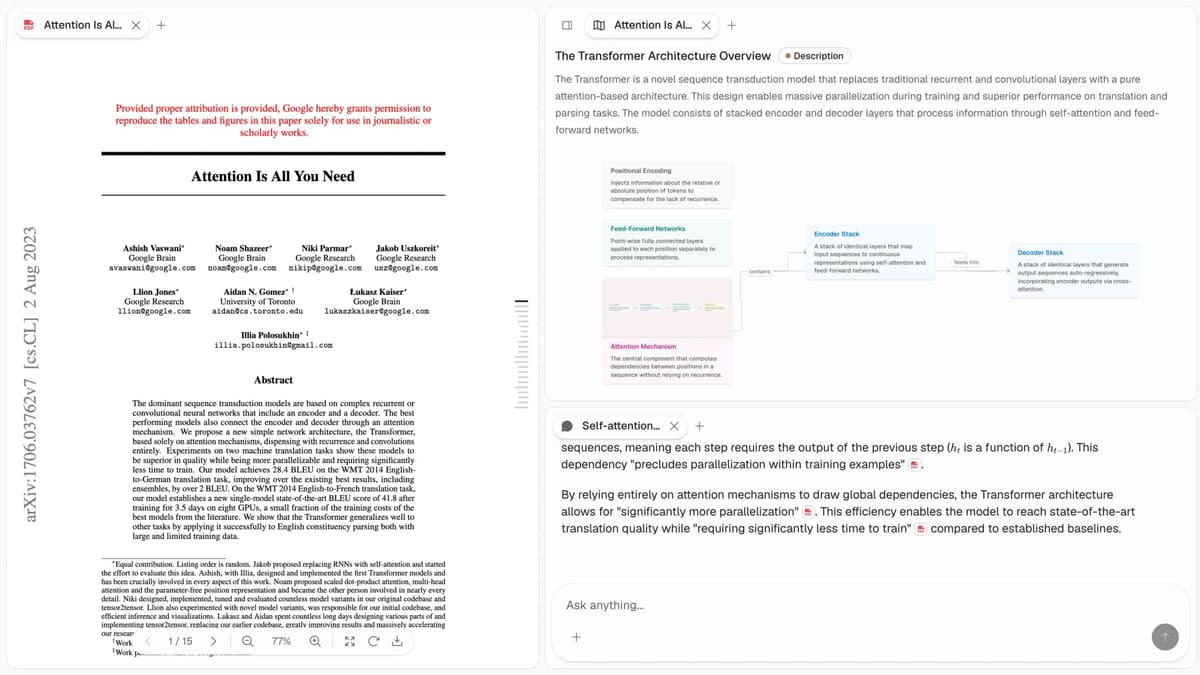
First-party Atlas screenshot showing the source-review surface Mural does not provide: a paper, its Knowledge Map, and citation markers beside the answer.
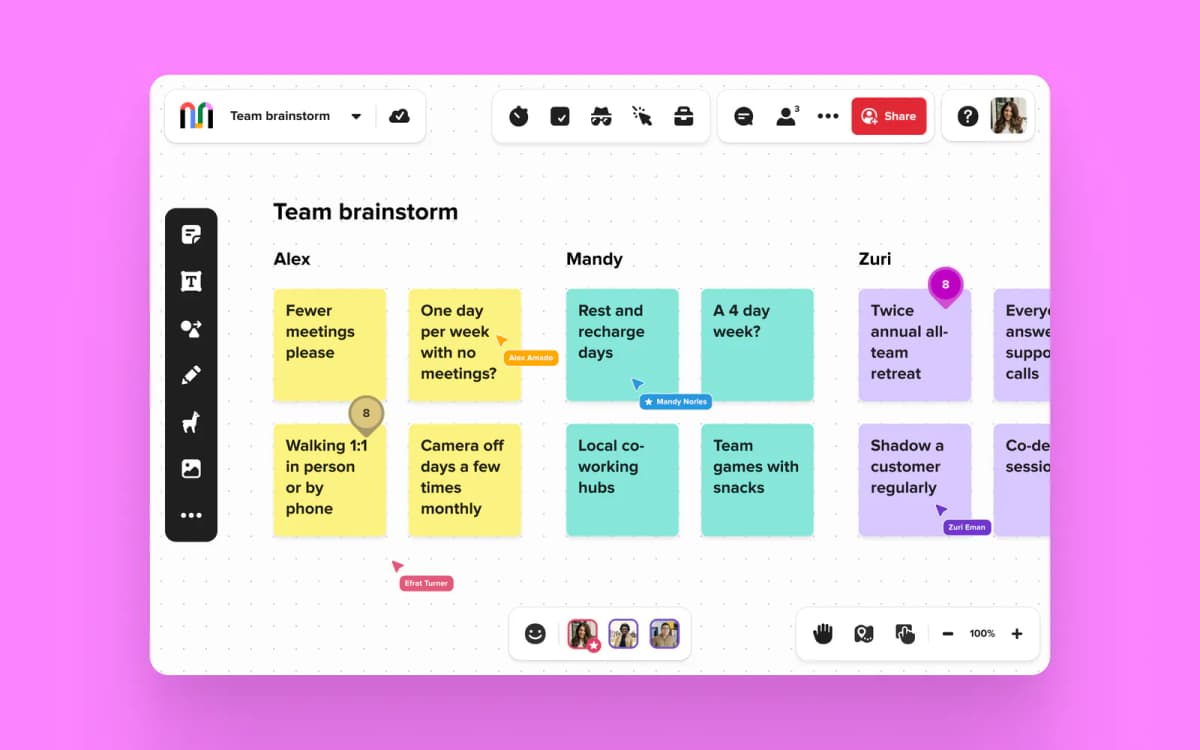
Official Mural brand-assets image showing the collaborative board surface.
How is Atlas different?
Mural and Atlas both support visual work. They split on three jobs that decide whether a research output can be checked later.
Visual maps for papers and projects
Atlas builds two visual maps as you read. A Knowledge Map breaks each paper into claims, evidence, and links between them. You see the paper's spine first, then open the supporting passage. This is a source-derived knowledge graph, rather than a manually arranged whiteboard.
A Semantic Map works at the project level. It places sources, notes, chats, and citations on a canvas. Related items cluster by topic. You can view the same project from a new angle without re-reading the folder. Our knowledge graph tools guide covers the wider category.
"It's like an ultimate GPT. I can finally see what I've read." Kyle Lao, CEO & Co-founder of MenSC Labs
Mural does not break each paper into a claim-and-evidence map. It also does not re-map a whole project by topic angle. If you have tried to recover a paper's structure weeks later, the Knowledge Map helps first. Visual maps make a body of papers legible at a glance.
Inspectable claim support
The harder citation failure is a source that does not support its attached claim. Atlas answers with a cited triple: the claim, the passage, and a short reason the passage supports it.
You can open the source paragraph and read the highlighted text. The AI citation-analysis guide gives a broader checklist for checking that support.
Atlas tracks this internally with the H/V ratio. It measures the share of generated sentences whose citation fails a passage-level check. Atlas targets H/V < 0.1. We publish the benchmark in our verifiable AI research guide.
Mural answers may link to sources. Its answer view does not provide Atlas's claim-justification trace. Casual Q&A may not require that trace. A thesis sentence or legal brief often does.
Project-scoped research context
Mural treats each board as a collaborative canvas. Work goes in, the board remains, and the next session can start fresh. Atlas keeps sources, notes, citations, Knowledge Maps, Semantic Maps, and chats together inside the project where they were created.
The products use different boundaries. A Mural board can support a workshop that spans many contributors. An Atlas project gives maps and cited chat one shared evidence base. A separate Atlas project starts with its own sources and context, which prevents unrelated research from leaking into the answer.
Comparing Atlas and Mural features
Both products can support a research project. Atlas focuses on reading papers, citing sources, and keeping one evidence base. Mural focuses on live group sessions, shared canvases, and workshop templates.
Mural provides more facilitation features than Atlas. Atlas goes deeper on source-backed research. The 5 comparisons below each include a row where Mural wins or ties.
Paper deconstruction with Knowledge Maps
The Knowledge Map is Atlas's per-paper view. It maps one paper as a structured tree. Nodes use relation labels such as motivates, causes, enables, and contradicts. Node text stays faithful to the paper.
You can zoom from the main thesis down to a specific paragraph. See the research-paper synthesis guide for a practical use.
| Atlas | Mural |
|---|---|
| Multi-level argument structure ✓ | Sticky-note summaries on a mural |
| Labeled relations (motivates, causes, enables) ✓ | ✗ |
| Faithful-to-source node text ✓ | ✗ |
| Hierarchical breadcrumbs ✓ | ✗ |
| ✗ | Enterprise collaborative whiteboard ✓. A canvas advantage for Mural |
Table 2: Knowledge Map coverage compared with Mural's collaborative canvas.
Good to know: The bottom row belongs to Mural. Atlas does not ship that surface. The Knowledge Map's payoff is recovering a paper's argument three weeks after you first read it, when topic chips alone are no longer enough.
Project view with Semantic Maps
The Semantic Map is Atlas's project view. It places sources, notes, chats, and citations on a canvas. Related items cluster by topic. You can view the same project from a new angle without uploading the sources again. It is one of several mind-map-from-documents workflows for large source sets.
| Atlas | Mural |
|---|---|
| Spatial embedding of sources + notes + chats ✓ | Murals with frameworks and stickies |
| Auto-labeled topic clusters ✓ | ✗ |
| Topic-angle re-projection ✓ | ✗ |
| Project-scoped corpus view ✓ | ✗ |
| ✗ | Design-thinking framework templates ✓. A template advantage for Mural |
Table 3: Semantic Map coverage compared with Mural's framework-based boards.
Good to know: Mural's strength on that row is real. Choose it when templates drive the session. The Semantic Map helps when 200 papers need to form a searchable corpus.
Citation-grounded answers
Atlas produces cited answers with the claim, the passage, and a one-sentence reason why that passage supports the claim. You can jump to the source paragraph and read the highlighted sentences to check the reasoning. The ChatGPT alternatives guide explains why linked sources alone are insufficient for high-stakes synthesis.
| Atlas | Mural |
|---|---|
| Claim-source-justification triples ✓ | ✗ |
| Reasoning traces (why this passage supports this claim) ✓ | ✗ |
| Jump-to-source with passage highlight ✓ | ✗ |
| H/V ratio < 0.1 benchmark published ✓ | ✗ |
| ✗ | Facilitation features (voting, timers, summon) ✓. A live-session advantage for Mural |
Table 4: Citation-grounding surfaces compared with Mural's facilitation controls.
Good to know: Both products can show citations. Atlas also explains why a passage justifies a claim. That reasoning trace matters when a thesis sentence or brief paragraph must withstand review.
Literature-grounded annotations
Atlas marks up each paper when you upload it. It finds the citations inside the paper and makes them clickable. When a cited source is open-access, Atlas pulls in the passage and shows you how that citation builds the paper's case.
You can see the chain of sources without leaving the document. That is an important step before writing a literature review.
| Atlas | Mural |
|---|---|
| Auto-annotate on ingest ✓ | Manual stickies per source |
| Multi-citation synthesis (how citations build the argument) ✓ | ✗ |
| Resolve cited sources (open-access) ✓ | ✗ |
| Exact passage / page / paragraph anchors ✓ | ✗ |
| ✗ | Enterprise SSO and security ✓. An IT-control advantage for Mural |
Table 5: Literature annotations compared with Mural's enterprise controls.
Good to know: Atlas resolves citations inside the paper you're reading. When a cited source is open-access, it pulls the passage in. You can see how the paper's case is built, source by source, without uploading each one yourself.
Project-scoped context
Atlas keeps citations, notes, Knowledge Maps, Semantic Maps, and chats together inside a single project. A separate project starts with its own sources and context.
The research paper organizer guide explains why that boundary matters for retrieval.
| Atlas | Mural |
|---|---|
| Project-scoped research context ✓ | Per-mural canvas ✓ |
| Sources + notes + maps + chats share a single project ✓ | Files + links + stickies share one mural ✓ |
| Separate projects isolate unrelated context ✓ | Murals can separate workshop contexts ✓ |
| Sources must be added to each relevant project | Board content remains in its mural |
| ✗ | Integration with Microsoft Teams ✓. An integration advantage for Mural |
Table 6: Atlas project context compared with Mural's persistent board content.
Good to know: Both products use boundaries deliberately. Atlas scopes maps and cited synthesis to a research project. Mural scopes facilitation material to a collaborative board.
Price comparison
Atlas is a paid product. There is no permanent free plan. You get a short evaluation sample with 10 sources and 5 lifetime AI chats. After that, Atlas Pro is $20/mo or $204/yr. At that tier, Atlas includes unlimited sources, unlimited AI chats, Knowledge Maps, Semantic Maps, claim-source-justification, and project-scoped research context. Mural's current official pricing lists Free, Team+, Business, and Enterprise tiers.
| Atlas | Mural |
|---|---|
| Free: ✗ (evaluation sample only: 10 sources · 5 lifetime AI chats) | Mural wins on free access: no-cost plan with 3 editable murals ✓ |
| Pro: $20/mo or $204/yr (unlimited sources · unlimited AI chats · all features) | Paid: Team+ $9.99/user/mo · Business $17.99/user/mo · Enterprise custom |
| Pro unlocks Knowledge Map, Semantic Map, claim-source-justification, and project context ✓ | ✗ |
Table 7: Atlas and Mural pricing compared for individual research and collaborative whiteboarding.
The evaluation sample is enough to test whether source-grounded maps belong beside your Mural workshops.
When to choose Atlas vs Mural
- Want paper structure deconstructed multi-level? Go with Atlas. (Knowledge Map)
- Want answers that explain how each citation justifies the claim? Go with Atlas. (claim-source-justification)
- Want a single project to keep sources, maps, notes, citations, and chats together? Go with Atlas.
- Want enterprise-grade collaborative whiteboarding with workshop templates? Go with Mural.
- Tied: mapping research findings onto a workshop canvas. Both work, but they do different jobs. The split opens when you build a corpus you will return to.
Recommendations by user type
Choose by the final deliverable and who must review it.
- PhD researchers: Atlas. Years 1–2 benefit most from the Knowledge Map, because each paper is deconstructed without re-reading. Years 3–4 benefit from cited answers where every thesis sentence is anchored to a passage. Mural works for standalone tasks. Keeping sources, maps, and cited chats together inside the thesis project makes Atlas the better fit for that sustained research workflow.
- Students doing literature reviews and thesis research: Atlas, for dissertation and thesis workflows. The Knowledge Map saves the most time in the lit-review phase. A focused project keeps the papers and cited answers together.
- Knowledge workers (consultants, analysts, PMs, journalists): Atlas when reading and citing papers is the core work. Mural when live workshop hosting is the daily need.
- Personal researchers with high-stakes questions (medical, legal, major purchases): Atlas. When the stakes are high, citation-grounded answers earn their keep. Mural is a fine starting point. Atlas is the tool you move to once you need to defend the answer.
Mural is built for live collaboration. It gives you workshops, voting, templates, and shared canvas exercises. Atlas is built for source-grounded research.
Choose Mural when the workshop output is the deliverable. Choose Atlas when the source corpus must support a reviewed answer. The research-notes guide helps define that handoff.
Migrating from Mural to Atlas
If you've been running your literature work inside Mural, the practical migration is narrower than it looks. Mural is an infinite canvas with sticky notes, templates, live co-editing, voting, and timers. Mural's official guides document PDF and PNG exports plus CSV downloads for selected objects. That CSV is the bridge.
The text on your sticky notes migrates cleanly. The CSV export gives you one row per sticky. You can re-import those rows as notes against the source PDFs in Atlas. The migrated notes remain linked to each paper.
Some objects do not migrate cleanly. The spatial layout, vote state, template state, live editor state, and session history stay in Mural. Atlas is not a whiteboard. A cluster of four stickies does not carry over as geometry. It carries over as a label plus the sticky text. If the labels were only implied by layout, add them to the CSV before import.
The migration has 5 steps. Export each mural as CSV. Export the source PDFs you used. Upload the PDFs to Atlas so each one gets a Knowledge Map.
Attach the relevant sticky rows as notes against the matching paper. Then re-run the synthesis as a chat over the new project. The literature-review AI guide covers the evidence checks to run before drafting.
Worked example with 8 papers
Here is the same job done 2 ways. You need to write a 600-word review section on 8 related papers, with citations.
In Mural: open a new mural and drop in the eight PDFs as link tiles. Create a sticky for each paper. Read each paper and add stickies for claims, evidence, and method. Color-code by paper. Cluster the stickies by theme. Add connector lines between clusters. Vote on the top themes with collaborators. Then open a separate document and write the review. You still need to remember which sticky maps to which passage.
In Atlas: create a project and upload the 8 PDFs. Atlas builds a Knowledge Map for each paper. Open the Semantic Map and view the 8 papers by topic.
Ask Atlas to draft the section. Atlas returns each claim with a cited passage and a short reason the passage supports it. You check the cited paragraphs and edit. This route makes citation checks explicit.
The structural difference is clear. In Mural, synthesis is your job, and the canvas supports memory. In Atlas, the tool drafts the synthesis, and the maps help you check it. Both can produce the same section. The review burden is different.
When Mural is the right call
Mural is the better tool for jobs Atlas does not try to do. Choose Mural for:
- Live workshops where a workshop lead needs voting, timers, summoning, and private mode to run a distributed session in real time. Atlas has none of those, by design.
- Design-thinking exercises where the template (empathy maps, journey grids, How-Might-We boards, 2x2 grids) is itself the deliverable. Mural's template library is broad and well-executed.
- Sprint planning and retrospectives for product teams that already live inside a Microsoft Teams or Atlassian stack. The integration depth is real.
- Shared canvas work with frameworks, where the group must return to the board after the session.
- Customer-journey mapping and service blueprinting, where spatial layout is the final artifact.
If your week is built around live group sessions, Mural is the answer. Atlas is the research workspace for source-grounded synthesis. Both products cover different jobs, and many groups keep both.
Using Atlas with Mural
The cleanest setup is not always a full migration. Mural is best at the live room. Atlas is best at the source library behind the room. The second-brain apps guide covers other ways to keep durable notes beside that source library.
Keep these jobs in Mural:
- Workshop agendas that need frames, timers, votes, and facilitator controls.
- Sticky-note brainstorms while the group is making and sorting ideas live.
- Board links that support a live session but do not need later citation checks.
Move these jobs into Atlas:
- PDFs, reports, papers, and transcripts that need to be mapped and cited.
- Evidence checks where a claim needs a source passage.
- Sustained research context where papers, notes, and chats should remain available inside the same Atlas project. Start a separate project when its evidence needs to stay isolated.
For example, a product team might run a customer journey workshop in Mural. The board contains interview quotes, pain points, and opportunity areas. After the session, the research lead exports the final sticky notes and uploads the interview transcripts to Atlas. Atlas then answers questions such as "which quotes support this opportunity area?" or "which customer segment raised this concern most often?" The Mural board stays useful as the shared workshop artifact. Atlas becomes the place where the evidence is checked.
A graduate student has a different split. They may not need Mural at all unless a supervisor or lab group wants a shared canvas. The hard part is usually not moving sticky notes around. It is remembering which paper made which claim, whether two authors disagree, and which passage can support a paragraph in the draft. That is Atlas work.
An enterprise design group may land in the middle. Keep Mural for discovery workshops, roadmap sessions, and design critiques.
Use Atlas for source-heavy inputs before and after those sessions: market research, interview transcripts, policy documents, competitive analysis, or literature reviews. Start in Mural when people must think together live. Put the source in Atlas when a claim must survive later review.
This split also avoids a common bad migration. Do not try to turn Atlas into a replacement whiteboard. You will miss Mural's facilitation controls. Do not try to turn Mural into a research database either. You will end up with attractive boards that still require manual citation checks. Let each tool do the job it is built for.
Miro, Trello, CaudalFlow, and Lucidspark
If you are comparing Mural alternatives, Atlas is only one branch of the market. The rest of the field is worth separating before you choose.
Atlas vs Miro and Lucidspark are the closest direct substitutes for Mural. They are broad whiteboard products. Pick them when the core job is a shared board, planning session, or diagram that many people edit together.
Trello is a task-board product rather than a free-form whiteboard. CaudalFlow appears in the search landscape for Mural alternatives, but we could not verify a current first-party product page. Treat it as a discovery lead until an official feature surface is available.
ClickUp, FigJam, and Conceptboard
ClickUp is a work-management suite with docs, tasks, and whiteboards. It fits groups that want the board next to project tracking. FigJam and Conceptboard fit the whiteboard family. FigJam is natural for Figma-heavy design work. Conceptboard is closer to structured online collaboration and review.
Cloudairy, Confluence, Scrintal, and OneNote
Cloudairy combines whiteboards with diagrams, docs, and task boards. Confluence puts a whiteboard inside Atlassian's document workspace. Scrintal focuses on visual notes and research on an infinite canvas. Microsoft OneNote is a notebook app with free-form pages rather than a workshop-first canvas.
Boardmix and Notion
Boardmix is another collaborative online whiteboard, while Notion centers docs, projects, and team knowledge rather than live workshop facilitation.
If your shortlist has narrowed to a collaborative canvas and a document workspace, the Miro vs Notion comparison explains that separate choice.
Obsidian Parallax, Mattral ReSearch, Papergraph, and Panvas
Search results for this comparison also surface Obsidian Parallax, Mattral ReSearch, Papergraph, and Panvas. We could not verify current first-party product pages for those names, so treat them as discovery leads rather than documented Mural substitutes.
iObeya, Bluescape, and Collaboard
iObeya, Bluescape, and Collaboard sit closer to enterprise visual collaboration. They matter when procurement, security review, and large meeting rooms matter as much as the board itself.
Padlet
Padlet is lighter. It works for simple classroom boards, mood boards, and fast collection of links or notes.
VisualNote AI
VisualNote AI points at the newer category of AI-assisted visual notes. That category can help summarize or arrange ideas, but the important question is still what the visual note is grounded in. If the output has to cite a paper, transcript, or report at the passage level, Atlas is the research-side option. If the output only needs to help people arrange ideas on a board, one of the whiteboard tools is usually the cleaner fit.
The shortlist depends on the job. Choose Mural, Miro, Lucidspark, iObeya, Bluescape, Collaboard, Padlet, or ClickUp for collaborative board work. Choose Atlas when every claim must carry source evidence.
Common objections and edge cases
"My team already runs everything in Mural. Won't a second tool fragment the research process?" Most groups keep Mural for live sessions and Atlas for the research corpus that feeds them. Source PDFs and sticky text move by export and import.
There is no live integration. The tools run at different cadences: Mural supports live sessions, while Atlas supports reading and synthesis.
"Can Atlas do real-time multi-user editing on a shared canvas like Mural?" No. Atlas is a single-user-at-a-time research workspace. There is no live cursor presence, no co-editing, no summon-to-here. Atlas supports project-level sharing for sources and chats that collaborators can review outside a live session. If your job requires live canvas work, Mural is the right tool.
"Does Atlas have framework templates like How-Might-We or empathy maps?" No. Atlas has the Knowledge Map for one paper and the Semantic Map for one project. It is not a template library. If your work depends on templates, Mural wins. For paper-heavy research, the argument map matters more. Pick by the job in front of you.
Atlas
Map research with cited evidence
Trace visual claims to uploaded sources while Mural runs the workshop.
Frequently Asked Questions
Atlas explains how each citation supports its claim. Every answer is rendered as a claim-source-justification triple: the claim, the passage it draws from, and a one-sentence explanation of why the passage supports the claim. You can click into the source paragraph and read the highlighted sentences in context. Mural may cite at the sentence level or link to sources, but it does not render the reasoning trace that connects the claim to the passage. That trace is the move when you need to defend a thesis sentence, a brief paragraph, or a treatment-plan summary. Read more about how Atlas grounds claims in our verifiable AI research methodology.