
Atlas vs Semantic Scholar: An In-Depth Research Comparison
Atlas is a visual research workspace, Semantic Scholar is an AI-assisted academic search engine. Compare paper deconstruction, citation grounding, and fit.
- Byline

Summary
As of 2026, use Semantic Scholar to find papers. Use Atlas for citation-grounded answers after selection.
Atlas adds Knowledge Maps, Semantic Maps, and project-scoped context for chosen paper sets.
Semantic Scholar helps widen the search with paper discovery, TLDRs, citation trails, and alerts.
Many research teams use both tools in sequence.
Note: We make Atlas. This is a comparison from the team that built it. It is not a neutral review. When Semantic Scholar is the better tool, we say so. Use the table and the fit sections to choose the right tool for the job in front of you.
By Jet New, Atlas.
Atlas is a visual research workspace for research-paper analysis. It helps you understand a chosen set of papers, ask cited questions, and keep that research useful over time. Semantic Scholar is Ai2's free, AI-powered research tool. It helps you find papers, scan TLDR summaries, follow citation trails, and use Semantic Reader for inline context.
As of 2026, use Semantic Scholar when you need to find papers. Use Atlas after you have picked the papers and need cited answers, Knowledge Maps, and a Semantic Map inside one project. Our handoff rule is to switch tools when the paper set stops changing. We tested that rule with 8 papers. First came search, then source-traced writing.

Atlas

Synthesize saved papers with cited answers
Upload selected papers after discovery and trace every synthesis claim.
Quick answer
Choose Semantic Scholar for search, citation graph work, alerts, and free access to a large academic index. It is the stronger first tab when the job is finding papers you do not yet have.
Choose Atlas for deep reading after discovery. Atlas turns uploaded papers into Knowledge Maps, lets you ask source-cited questions, and keeps notes, maps, chats, and sources connected inside one literature-review project. Separate projects isolate unrelated evidence.
Most serious research workflows use both. Semantic Scholar widens the search. Atlas deepens the reading.
How is Atlas different from Semantic Scholar?
Atlas and Semantic Scholar sit on different sides of the research handoff. Semantic Scholar is strongest while the question is still "what should I read?" Atlas is strongest after the answer becomes "what do these selected papers support?"
This table covers the main proof points. It compares cited answers, maps, paper search, TLDRs, citation graphs, uploaded-paper synthesis, and price.
| Comparison dimension | Result |
|---|---|
| Citation grounding | Atlas: claim, source passage, and reasoning trace for uploaded papers. Semantic Scholar: paper links and citation context, but lighter fixed-corpus reasoning traces. |
| Knowledge Maps and Semantic Maps | Atlas: yes, generated from uploaded sources. Semantic Scholar: no equivalent uploaded-corpus map surface. |
| Academic paper discovery | Atlas: no broad academic search index. Search stays inside your library and cited-source layer. Semantic Scholar: yes, broad academic search, author pages, references, cited-by pages, related papers, feeds, and alerts. |
| TLDR summaries | Atlas: not the core scan surface. Atlas uses maps after upload. Semantic Scholar: yes, useful for deciding whether a paper belongs in the reading pile. |
| Citation navigation | Atlas: exposes uploaded and resolved cited-source context. Semantic Scholar: stronger for cited-by, references, related papers, authors, feeds, and alerts. |
| Uploaded-corpus synthesis | Atlas: yes, this is Atlas's strongest job. Semantic Scholar: weaker because the workflow stays closer to paper pages and search results. |
| Pricing | Atlas: paid after a short evaluation sample. Semantic Scholar: free for academic and research use. |
Table 1: Atlas specializes in fixed-corpus synthesis, while Semantic Scholar specializes in academic discovery and citation navigation.
Citation-grounded answers
Atlas is designed around citation-grounded answers over a fixed source set. When you ask a question inside an Atlas project, the useful output includes the claim, source passage, and reason the passage supports the claim. Our citation-analysis guide explains this audit surface.
Semantic Scholar is better at finding the next paper, following citations, and scanning paper pages. It can help you reach the source quickly. Atlas is better when a supervisor, reviewer, client, or collaborator asks where a sentence came from and you need to open the exact supporting passage.
Knowledge Maps and Semantic Maps
Atlas creates visual maps after upload. A Knowledge Map shows the structure of a paper: claims, evidence, and relationships between ideas. A Semantic Map shows patterns across a project. The mind map and knowledge graph comparison explains why these relationships matter.
Semantic Scholar's TLDRs are useful earlier. They help decide whether a paper deserves attention. The difference is depth. A TLDR answers "should I read this?" A map answers "what did this paper argue, and where does it fit in the source set?"
Project-scoped research context
Atlas keeps sources, notes, maps, chats, citations, and mentions connected inside one project. Separate projects isolate unrelated evidence. The knowledge graph AI guide covers how connected context differs from a saved search list.
Semantic Scholar's library, feeds, alerts, and citation graph are stronger for monitoring a field. Semantic Scholar's search and Semantic Scholar's free plan are real advantages. The trade-off is that its saved-paper workflow is not the same as a project workspace for cited synthesis.
Criteria and methodology
We compared the tools by research phase and the jobs described in our academic research software guide. The key question was where each tool does the heavier work.
The criteria were paper discovery, paper reading, cited answers, project context, migration, price, and fit by user type. We also checked for the trade-offs that matter in real work. A free search engine can beat a paid workspace for discovery. A workspace with source traces can beat a search engine once the paper set is fixed.
This article uses current public product positioning and first-party product surfaces. Semantic Scholar describes itself as a free AI-powered research tool for scientific literature. Its official Library and Research Feeds documentation covers folders, bulk citation export, and recommended papers. Atlas is evaluated as the product we build, with the limits stated plainly.
Google Scholar, OpenAlex, Consensus, and CORE
Search results also surface Google Scholar, OpenAlex, Consensus, and CORE. They are separate scholarly discovery, aggregation, or evidence-search services. This article compares Atlas Workspace with Semantic Scholar.
Comparing Atlas and Semantic Scholar: features
The comparison table above is the compact version. The first workflow step uses a TLDR to screen a candidate paper before full-text reading. Atlas starts after source selection and maps the chosen PDF's claims, evidence, and relationships in greater depth.
Step-by-step handoff workflow
Use this workflow guide when the choice is unclear. We use it as the handoff point between search and synthesis work. For this comparison, we chose 8 papers in search, then wrote a review section from source traces.
| Workflow step | Tool choice |
|---|---|
| Step 1: Search broadly and find unknown papers | Go with Semantic Scholar until the paper set stops changing |
| Step 2: Freeze the chosen reading set | Download the PDFs you are willing to cite and write a one-line inclusion reason |
| Step 3: Upload the stable PDFs | Move the chosen PDFs into Atlas for Knowledge Maps and source-traced answers |
| Step 4: Write from source traces | Use Atlas when you need to explain why a sentence is supported |
| Budget checkpoint | If free access is the main constraint, go with Semantic Scholar first |
Table 2: This handoff assigns discovery to Semantic Scholar and moves only a stable, citable PDF set into Atlas.
The handoff point is usually after the search set stops changing. The literature review process provides a broader sequence for discovery, screening, research synthesis, and writing.
Pros and cons
| Atlas | Semantic Scholar |
|---|---|
| Strong deep reading, Knowledge Maps, cited answers, and project-scoped context | Free, broad paper search, TLDRs, citation graph, alerts, author pages, and related-paper discovery |
| No broad academic discovery engine | Yes: broad academic discovery is the point of the product |
| Requires uploaded sources and is paid after the sample | Weaker for fixed-corpus synthesis and lighter on claim-level reasoning traces |
| Better when the output must be defended from source text | Better when the field is still open and you need breadth |
Table 3: Semantic Scholar wins breadth and discovery, while Atlas wins passage-traced work over selected sources.
This is why the tools pair well. Semantic Scholar gives you the field. Atlas gives you a workspace for the paper set you decide to trust.
Verdict by research phase
Semantic Scholar is the better search tool. Atlas is the better synthesis workspace. The rating only makes sense by job, so we score the tools against the handoff test.
| Atlas | Semantic Scholar |
|---|---|
| Broad academic search index: No | Broad academic search index: Yes |
| Unknown paper discovery: 2 / 5, because Atlas is not a broad academic search engine | Unknown paper discovery: 5 / 5, because search breadth decides the winner here |
| Fixed-corpus reading: 5 / 5, because uploaded PDFs need maps, notes, and source checks | Fixed-corpus reading: 3 / 5, because paper pages help but do not become a synthesis workspace |
| Citation trail work: 3 / 5, because Atlas resolves cited sources inside the uploaded set | Citation trail work: 5 / 5, because cited-by and related-paper trails belong to search |
| Defensible synthesis: 5 / 5, because final claims need source passages and reasoning | Defensible synthesis: 2 / 5, because the support trail usually has to be rebuilt outside the search page |
| Long project context: 5 / 5, because notes, maps, and chats stay together inside the project | Long project context: 3 / 5, because saved libraries and alerts are useful but not the same as a synthesis workspace |
Table 4: The phase-specific scores favor Semantic Scholar during discovery and Atlas during post-discovery synthesis.
The phase-specific rating is 20 / 25 for Atlas during post-discovery synthesis and 21 / 25 for Semantic Scholar during discovery. A global winner would ignore those different jobs.
Eight-paper workflow benchmark
We used a workflow test with 8 papers and a 500-word review paragraph, then checked where each major claim came from. The benchmark measures the moment when search turns into writing.
| Atlas | Semantic Scholar |
|---|---|
| No broad discovery index for finding the initial 8 papers | Yes: stronger for finding the initial set through search, related papers, authors, and citations |
| Faster once the eight PDFs are chosen because the project can answer across the uploaded set | Slower after selection because support checks usually move between paper pages, PDFs, and external notes |
| Stronger for the final verification pass: claim, source passage, and reasoning stay together | Stronger for the expansion pass: cited-by, references, alerts, and Semantic Scholar's graph view help find missing papers |
| Best output is a source-traced synthesis you can defend | Best output is a better reading list |
Table 5: The benchmark tests a workflow handoff rather than raw search speed. Use Semantic Scholar to build and improve the 8-paper set. Use Atlas when the set is stable enough to synthesize and every paragraph needs a source trail.
If your paper set is stable and you need to defend the synthesis, run a Knowledge Map on 1 paper. The evaluation sample includes 10 sources and 5 lifetime AI chats.
Filtering, alerts, and integrations
The highest-friction part of this workflow is not opening either product. It is deciding when discovery is finished enough to stop changing the source set. We use a three-pass rule:
- Search broadly in Semantic Scholar, field databases, and your citation manager until the same core papers keep recurring.
- Filter the list down to papers you are willing to cite. A promising TLDR alone is insufficient.
- Move only that stable PDF set into Atlas, then ask synthesis questions against the uploaded corpus.
For large result sets, keep filtering and sorting on the Semantic Scholar side. Search query strategy, citation trails, author pages, alerts, and feeds are discovery controls. The citation tracking guide explains how trails change as a field evolves.
For setup planning, split records from reading proof. Citation managers should keep bibliography data and export formats. Semantic Scholar should keep search, feeds, and follow-up discovery. Atlas should hold the PDFs and source traces used for synthesis.
Semantic Scholar's official Academic Graph API provides paper, author, citation, venue, recommendation, and dataset services. Check its current terms before building around it. If you need a defensible paragraph from 8 chosen papers, treat that as an Atlas job.
The handoff checklist has 4 items: a frozen title list, available PDFs, a written inclusion reason, and 1 drafted synthesis question. If any item is missing, stay in discovery. If all 4 are present, the project is ready for Atlas.
How to get started
Start in Semantic Scholar with a query that names the method, population, and outcome rather than the broad topic. A broad query finds the field. A narrow query finds the paper set you can read. Our AI literature-review guide and academic research AI overview cover the screening step.
Then run the second pass from citations instead of keywords. Open the papers that appear repeatedly in references, cited-by lists, and related-paper trails. Semantic Scholar performs best here because 1 useful paper can lead to a better search path.
Before moving to Atlas, make a small transfer note:
- Research question.
- Inclusion rule.
- Exclusion rule.
- Final paper list.
- First synthesis question.
Upload the PDFs only after that note exists. In Atlas, ask the first synthesis question before writing. If the answer cannot point to enough source passages, return to Semantic Scholar and widen the set. If the answer produces a sufficient source trail, keep the project in Atlas and write from the cited passages.
This sequence avoids a common failure mode. Use Semantic Scholar for discovery and move to Atlas after the search stabilizes. The checklist provides an explicit stopping rule.
Paper discovery and search
Semantic Scholar wins discovery. It is built around search, paper pages, author pages, related papers, and citation trails. If your question starts with "what should I read," open Semantic Scholar first.
Atlas is not a replacement for that job. Atlas works best after you have a chosen set of PDFs. You upload those papers, then use Atlas to map them, question them, and revisit the cited evidence inside that project.
That boundary matters. Search tools help you widen the field. Atlas helps you make sense of the field after you narrow it.
If you already found the papers and now need to defend the synthesis, upload one paper and run a Knowledge Map. That is enough to test the post-discovery workflow.
Paper reading and Knowledge Maps
Semantic Scholar's TLDR feature puts generated single-sentence summaries on search results for nearly 60 million papers in computer science, biology, and medicine. Those summaries help decide whether a paper belongs in the reading pile, much like the screening step in a research-paper summary workflow.
Atlas gives each uploaded paper a Knowledge Map. The map breaks the paper into claims, evidence, and links between ideas. You can start with the main claim and move down to the paragraph that supports it, then retain the source in a research paper organizer.
This is the first place Atlas becomes different. A TLDR helps you decide whether to read. A Knowledge Map helps you remember what the paper argued after you read it.
Kyle Lao, CEO and co-founder of MenSC Labs, described the map surface this way:
"It's like an ultimate GPT. I can finally see what I've read." Kyle Lao, CEO and co-founder of MenSC Labs
TLDRs may be enough for a one-off search. A map provides more depth for a thesis, review, brief, or long project.
Cited answers and source checks
Atlas is built for questions over a fixed source set. You can ask about the papers in a project and get answers tied back to source passages. The reasoning trace shows the claim, passage, and support reason. An AI citation checker helps assess the same evidence problem from the reader's side.
Semantic Scholar has a strong citation surface for discovery. It helps you move from one paper to another. Semantic Reader adds inline citation cards, library-aware citation cues, skimming highlights on supported papers, and optional Hypothesis annotations. That differs from asking one workspace to answer across your chosen files.
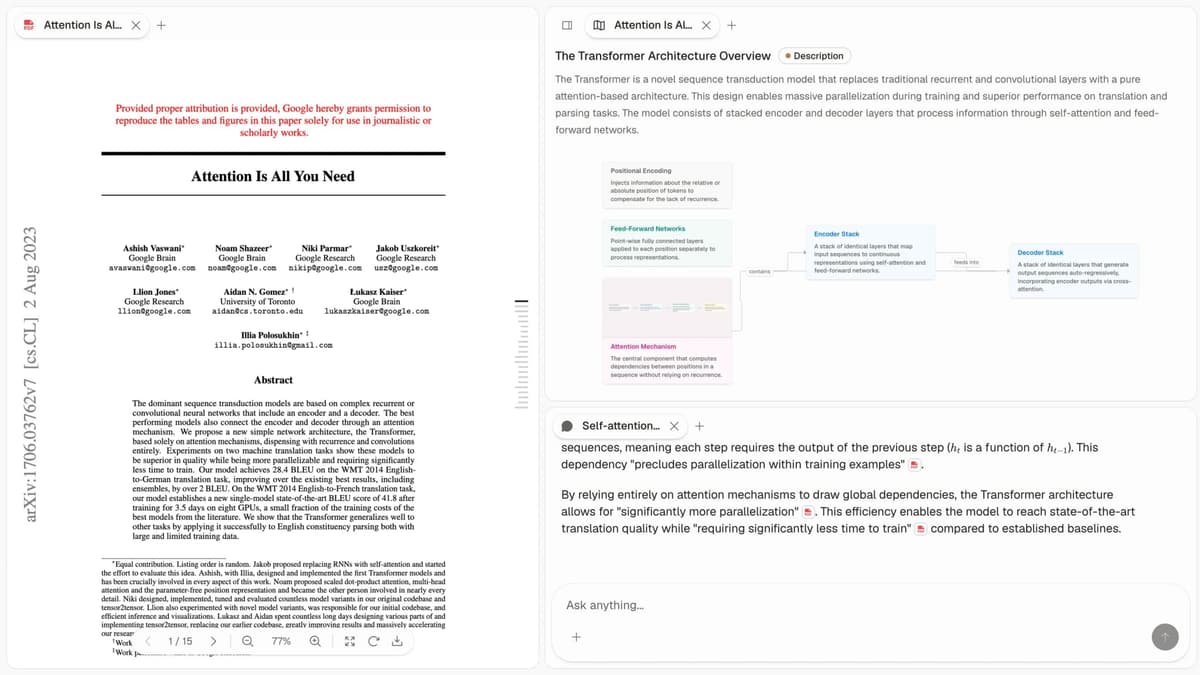
The screenshot places the source PDF, Knowledge Map, and cited-answer panel in the same Atlas workspace. A researcher can select a claim, inspect its highlighted source passage, and review the reason the passage supports it without rebuilding the trail elsewhere.
This difference shows up when someone challenges a sentence. In Atlas, you open the source trace and inspect the passage. In Semantic Scholar, you often move back to the paper, citation, or external notes and rebuild the support by hand.
Atlas publishes more detail about this standard in Verifiable AI Research.
Project-scoped research context
Semantic Scholar is good at saving papers, folders, feeds, and alerts. That is enough for many research jobs.
Atlas is stronger when the same work returns later inside a sustained project. It keeps papers, notes, maps, chats, citations, and source mentions connected within that project. Separate projects isolate unrelated research.
This benefit appears after a project contains reusable sources, notes, maps, and chats. Prior work in that project remains available for later questions. Add a source explicitly when it belongs in another project too.
Price comparison
Semantic Scholar wins on cost because it is free for academic and research use. Choose it when you need a no-cost tool for search, alerts, paper pages, and citation trails.
Atlas is paid after a short evaluation sample. The sample gives you 10 sources and 5 lifetime AI chats. Atlas Pro is $20 per month or $204 per year. Pro includes unlimited sources, unlimited AI chats, Knowledge Maps, Semantic Maps, cited answers, and project-scoped context.
Atlas Pro buys the deep-reading and synthesis layer after search. Semantic Scholar remains the broad paper discovery engine.
Generate a Knowledge Map from 1 paper before moving a larger corpus into Atlas.
Limits and edge cases
Platform limits
| Atlas | Semantic Scholar |
|---|---|
| No broad academic paper index | Yes: broad academic paper index |
| Search scope: your uploaded library plus cited-source resolution | Search scope: broad academic paper index |
| Source grounding: strong inside uploaded papers | Source grounding: strong for paper links and citation context |
| Offline or local-only work: no | Offline or local-only work: no. It is also a web-based research tool |
| Team memory: project workspace and shared source traces | Team memory: saved libraries, feeds, and alerts |
| Browser workflow: upload selected PDFs after search | Browser workflow: search and paper pages stay in the browser |
Table 6: Semantic Scholar leads on public academic search, while Atlas requires a selected source library.
The scope creates a practical limit. Atlas needs a discovery layer, while Semantic Scholar needs a separate synthesis surface when the final answer must cite a fixed source set. The citation tools guide covers adjacent bibliography needs.
Common search mistakes
The biggest mistake is treating Semantic Scholar as the whole research workflow. It is excellent for finding papers, but the synthesis still needs a place to happen. Our literature review mistakes guide covers related screening and synthesis failures.
The second mistake is uploading too early. If your topic is still broad, keep searching before you build an Atlas project. Upload when the paper set is stable enough to read closely.
The third mistake is using one broad search engine for specialist work. Biomedical reviews still benefit from PubMed and other field databases. Use Semantic Scholar for breadth, then bring the final PDFs into Atlas for close reading.
Language and specialist database fit
Neither tool should be treated as a full translation workflow. If a paper is in another language, check the source text, PDF extraction quality, and citation context before relying on any AI summary.
Semantic Scholar is broader than a specialist database. PubMed, IEEE Xplore, arXiv, SSRN, and field libraries can still be better first stops for narrow fields. Atlas fits after that search step, when the selected papers need to become a working source set.
Future development
Academic search and research workspaces are moving in different directions. Search tools will keep improving paper discovery, alerts, and citation graph navigation. Research workspaces will keep improving source-traced synthesis inside bounded projects.
That split is why the choice should stay workflow-based. If the task is "what exists," use the search graph. If the task is "what do these chosen sources support," use the workspace.
Who should skip each tool
Skip Atlas if you only need a free search tool, if you do not have PDFs to upload, or if you will never return to the project. A citation manager and Semantic Scholar may be enough.
Skip Semantic Scholar as the main workspace if the paper set is already chosen and your next task is synthesis. It can stay open for follow-up search, but the writing work belongs closer to the sources.
When to choose Atlas vs Semantic Scholar
Choose Atlas when you already have the papers and need to produce work you can defend. It fits thesis research, literature reviews, treatment summaries, analyst briefs, due diligence, and any project where the answer must point back to source text.
Choose Semantic Scholar when you need to find papers, scan a field, follow citation trails, track authors, or set alerts. It is also the better choice when you need a free tool.
Use both when the project matters. Search in Semantic Scholar, save the papers, download the PDFs you need, and upload the final set to Atlas for mapping and cited synthesis.
| Scenario | Recommendation |
|---|---|
| Want free paper discovery, author tracking, cited-by trails, or alerts? Go with Semantic Scholar. | Semantic Scholar wins the search phase. |
| Want citation-grounded synthesis over a chosen PDF set? Go with Atlas. | Atlas wins the reading and verification phase. |
| Tied: you have a small one-off reading list and no one will challenge the final wording. | Both work fine. Choose the lighter workflow. |
| Want both breadth and defensible synthesis? | Use Semantic Scholar first, then Atlas after the paper set is stable. |
Table 7: The decision table separates discovery from source-traced synthesis.
Recommendations by user type
PhD researchers should use both. Semantic Scholar is the discovery layer, and Atlas is the reading and synthesis layer once the paper set is chosen.
Students doing thesis or literature review work should start with Semantic Scholar if the reading list is still open. Use Atlas once the paper set is stable and you need to write from evidence.
Consultants, analysts, PMs, and journalists should use Atlas when the final output must survive review. If someone asks "where did that sentence come from," Atlas is the better fit.
Independent researchers on a tight budget should start with Semantic Scholar. Move to Atlas when the research becomes deep enough that source traces save time.
Migration and remaining edge cases
Migrating sources to Atlas
Migration transfers a selected reading set rather than the entire discovery product. Export or open your Semantic Scholar saved list, download the PDFs you want to read closely, and upload those PDFs into an Atlas project.
The saved paper list moves cleanly as a reading plan, the PDFs move as source files, and folders or saved searches map well to Atlas projects.
TLDR summaries do not move as native Atlas objects. That is fine in practice. Atlas creates a Knowledge Map for each uploaded paper, which serves a similar recall job at higher depth.
Semantic Reader highlights and notes do not import on their own. Keep important notes in your citation manager or paste them into Atlas as project notes.
The academic search graph does not move. Atlas does not try to copy Semantic Scholar's paper index, cited-by pages, author pages, or alerts. Keep Semantic Scholar open for those jobs.
Worked example from 8 papers
Imagine a literature-review section from 8 papers. You need 500 words that state the field, cite each paper, and survive a close read from a supervisor.
In Semantic Scholar, you find the papers, save them, scan TLDRs, and use the citation graph to catch missing work. Then you read the papers and write the section in your own notes. When your supervisor asks where a claim comes from, you return to the PDF and find the passage.
In Atlas, you upload the eight PDFs after discovery. Each paper gets a Knowledge Map. The project gets a Semantic Map. Then you ask where the papers agree, where they differ, and which passages support each point. The answer comes back with source traces you can check.
Both paths can produce a draft. Atlas is stronger when the draft needs to be defended in real time.
When Semantic Scholar is right
Semantic Scholar is the right call for discovery, so use it first when the job is finding papers you do not yet have.
It is also the right call for budget limits. Free access matters. Students and independent researchers should not pay for a workspace before they need one.
Semantic Scholar also wins broad field questions. If you need to know who cites a finding, which fields use it, or what related papers exist, the large paper graph is the right tool.
The split is rarely either-or. Semantic Scholar sits in the search tab, and Atlas sits in the reading tab.
Common objections
Does Atlas replace Zotero or Mendeley? Keep Zotero or another citation manager for your bibliography and export formats. Use Atlas for reading, mapping, and cited questions.
What happens with paywalled cited sources? Atlas can resolve cited sources when they are open-access. For closed sources, Atlas keeps the citation as metadata unless you upload the cited paper yourself.
Can collaborators inspect the same answer? Atlas stores the answer with its source trace. A collaborator can open the same project, map, passage, and reasoning.
Is Atlas useful for a one-time search? Usually no. Use Semantic Scholar for that. Atlas becomes useful when the paper set matters after the search is over.
Atlas
Synthesize saved papers with cited answers
Upload selected papers after discovery and trace every synthesis claim.
Frequently Asked Questions
Atlas explains how each citation justifies the claim. Every answer is rendered as a claim-source-justification triple: the claim, the passage it draws from, and a one-sentence explanation of why the passage supports the claim. You can click into the source paragraph and read the highlighted sentences in context. Semantic Scholar may cite at the sentence level or link to sources, but it does not render the reasoning trace that connects the claim to the passage. That trace is the move when you need to defend a thesis sentence, a brief paragraph, or a treatment-plan summary. Read more about how Atlas grounds claims in Verifiable AI Research.